
 By
A laptop that runs hot slows down, spins its fan loud, and feels warm on your lap. A cooling pad helps when the heat comes from blocked vents or a desk that traps warm air.
In short: The best laptop cooling pad is a mesh pad with a large fan, a tilt stand, and a USB pass-through port. The Havit HV-F2056 is the best all-round pick for a 15 inch laptop, and the KLIM Wind is the quietest pick for long work sessions.
Key takeaways
- Match the pad to the size of your laptop. A pad for a 15.6 inch laptop fits most mid-size machines, and a pad for a 17 inch laptop fits the largest models.
- A larger fan runs quieter than several small fans that spin fast.
- A USB pass-through port keeps a port free on the laptop, and a tilt stand lifts the screen to a better height.
- Clean the vents and check the fan before you buy a pad. A pad will not fix dust in the vents or a fan that has stopped.
- Measure the laptop, check the fan size in millimetres, and test the temperature before and after with the pad in place.

Three fans under a metal mesh top cool a 15 inch laptop without taking much desk space.

Four large fans move air at low speed, so the pad stays quiet during long work sessions.

A slim dual-fan pad with a USB pass-through port suits an office laptop that moves between desks.

Six fans and a steep tilt cover a hot 17 inch gaming laptop that runs long sessions.

Five fans and an adjustable stand give a first pad for a small budget.
How a cooling pad works
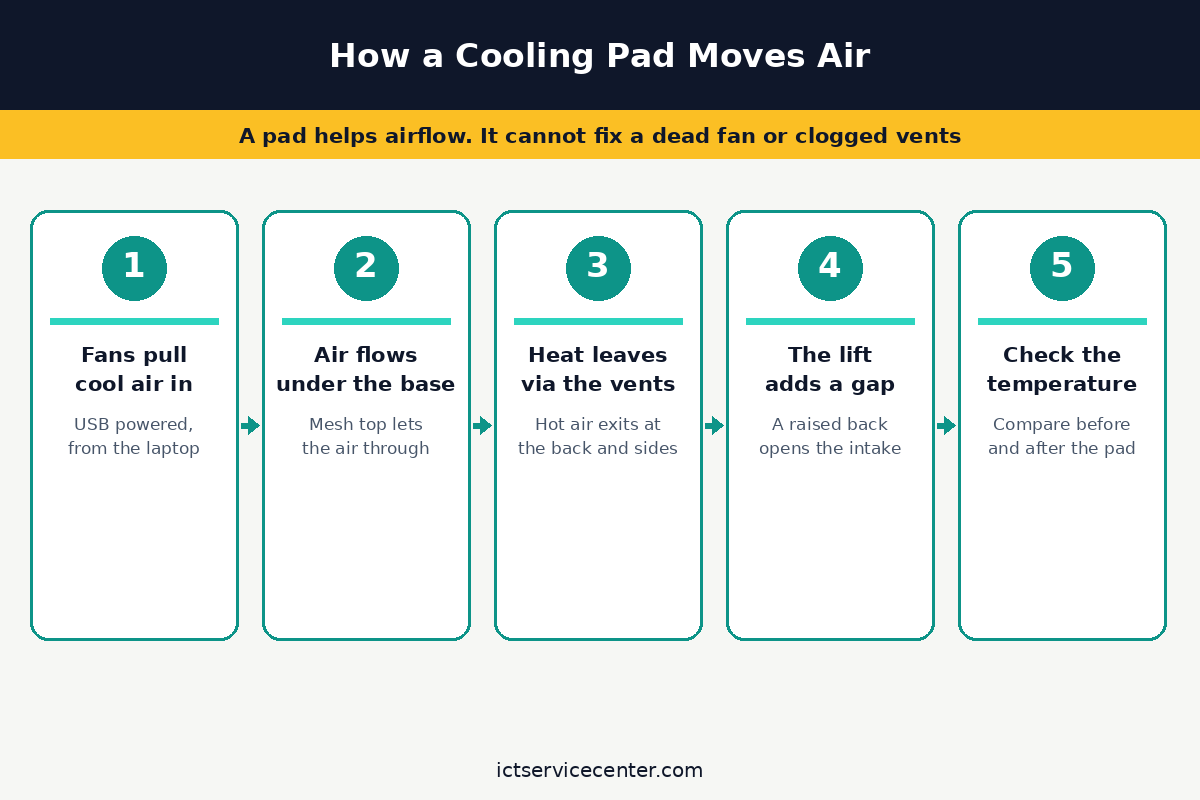
A cooling pad is a stand with built-in fans that lift the laptop off the desk and blow air across the base. The gap lets the laptop draw in cool air, and the fans push that air toward the vents.
A mesh top spreads the airflow, and a tilt stand raises the back of the laptop so the screen sits higher. It helps to understand charging laptops away from outlets before going further.
The fans sit under the hottest part of the laptop, which is usually the processor and the graphics chip. A pad with one large fan moves as much air as a pad with several small fans, and the large fan runs at a lower speed. A pad with a speed dial lets you turn the fans up when the laptop is working hard and down when it is idle.
Lenovo puts it plainly in its cooling guide: a cooling pad is a stand with built-in fans that improves airflow under the laptop. See whether a cooling pad is necessary for a laptop before you spend anything.
When a cooling pad helps, and when it does not
A pad helps when the laptop runs hot because the vents are blocked by a soft surface. A bed, a sofa, or a lap can press against the vents and trap warm air. A pad lifts the laptop off the surface, and the fans add airflow. A pad also helps when the room is warm and the laptop has no cool air to draw in.
A pad does nothing when the heat has a cause inside the machine. Dust packed into the vents blocks airflow, and a fan that has stopped will not start again. Our laptop overheating fix guide walks through the checks in order, and if the base itself is the hot spot, see our guide to a laptop bottom getting too hot.
Before you buy, run the cheap checks. Shut the laptop down, unplug it, and clear the vents with short bursts of compressed air. Our guide to how to check laptop temperature shows the steps. If the vents were full of dust, the clean alone may fix the heat. If the fan never spins, read our guide to repairing a laptop fan that is not working before you order anything.
How to choose a cooling pad
Start with size. Measure the width and depth of your laptop base, then check the pad listing for the size range. A pad for a 15.6 inch laptop fits most mid-size machines, and a pad for a 17 inch laptop fits the largest models. If the pad is too small, the laptop overhangs the edges and the fans miss the vents.
Fan count is the spec buyers overthink. One large fan moves as much air as several small ones, and it usually runs quieter. Small fans spin fast to move the same air, so they whine. Look at the fan size in millimetres on the listing, not just the count.
Noise depends on fan size and speed control, not on the brand name. A pad with a speed dial or a fan switch lets you turn the fans down when the laptop is idle and up when it is working hard.
A pad with no control runs at one speed, which is loud at night and weak under load. Loaders in this spot often ask about ergonomic laptop stands as well.
Power draw is simple but easy to miss. A pad draws its power from the laptop USB port, so it uses one port while it runs. A pad with a USB pass-through port gives that port back, so you do not lose a port to the pad.
Height adjustment is the feature you will use every day. A pad with two or three tilt steps lets you raise the back of the laptop, which helps the screen height and the airflow at the same time. A fixed flat pad cools the base but does nothing for your neck.
The 5 cooling pads at a glance
| Pad | Fans | Fits | Best for | Check before buying |
|---|---|---|---|---|
| Havit HV-F2056 | 3 fans | Up to 15.6 in | All-round use | Fan size in mm |
| KLIM Wind | 4 fans | Up to 17 in | Quiet rooms | Speed control |
| Targus Chill Mat | 2 fans | Up to 15.6 in | Work laptops | USB pass-through |
| TopMate C11 | 6 fans | Up to 17 in | Gaming laptops | Noise at full speed |
| Kootek 5-fan pad | 5 fans | Up to 17 in | Small budgets | Tilt range |
Havit HV-F2056: best all-round pad
The Havit HV-F2056 is the safe first choice for a 15 inch laptop. Three fans sit under a metal mesh top, and the pad lifts the laptop to a better angle. The mesh spreads the airflow, so the whole base gets cooler air, not just one spot.
It is light to move between desks, and the tilt stand has two steps. The pad runs from the laptop USB port, and the fans stay quiet at low speed. It is the pad to buy when you do not want to compare specs for a week.
Three fans under a metal mesh top cool a 15 inch laptop without taking much desk space.
- Ultra-Portable: Slim, portable, and light weight allowing you to protect your
- Ergonomic Comfort: Doubles as an ergonomic stand with two adjustable height settings
KLIM Wind: best quiet pad
The KLIM Wind is the pad to buy when the fan noise bothers you. Four large fans move air at low speed, so the pad stays quiet during long work sessions. The fans are large enough to cool a 17 inch laptop, and the pad has a speed dial to turn them down at night.
It is a wide pad, so check that it fits the desk before you order. The pad is light, and the tilt stand lifts the back of the laptop. It is the best pick for a quiet room, a library desk, or a shared office. For the detail, see our notes on preventing thermal damage.
Four large fans move air at low speed, so the pad stays quiet during long work sessions.
- ✅ AN INVESTMENT. This laptop cooler is an investment => no component overheating =>
- ✅ LARGE MODEL. Covers the following sizes: 11 11,3 12 13 14 15 15,6 16 inches
Targus Chill Mat: best pad for work laptops
The Targus Chill Mat is a slim dual-fan pad that suits an office laptop that moves between desks. It is light to carry in a bag, and it fits a 15.6 inch laptop without taking much space. The pad has a USB pass-through port, so you do not lose a port to the pad.
It is not the pad for a gaming laptop that runs hot for hours. The two fans move enough air for office work, browsing, and video calls, but a gaming laptop needs more airflow. For a work laptop, it is the tidy choice.
A slim dual-fan pad with a USB pass-through port suits an office laptop that moves between desks.
- Keep Cool While Working: Targus 17" Dual Fan Chill Mat gives you a comfortable and
- Double the Cooling Power: The dual fans are powered using a standard USB-A connection
TopMate C11: best pad for gaming laptops
The TopMate C11 has six fans and a steep tilt, and it is built for a hot 17 inch gaming laptop that runs long sessions. The fans cover the whole base, and the pad has a speed dial to turn them up when the game gets heavy.
It is a large pad, so it needs a desk with room to spare. The pad is louder than the quiet picks at full speed, and it draws more power from the laptop. For a gaming laptop, that trade is worth it.
Six fans and a steep tilt cover a hot 17 inch gaming laptop that runs long sessions.
- The laptop cooling pad is composed of four small fans and two large fans. Provide
- There are extended RGB light bars on both sides of the laptop fan. After the cooling
Kootek 5-fan pad: best budget pad
The Kootek 5-fan pad is the first pad to buy on a small budget. Five fans and an adjustable stand give a first pad that cools a 17 inch laptop without the price of the bigger names. The stand has several tilt steps, so the screen sits at a better height.
It is a plastic pad, so it is light but less solid than the metal mesh pads. The fans are louder at full speed, so turn them down when the laptop is idle. For the price, it is the best way to test whether a pad helps at all. If that sounds like your bench, read up on best laptop for fast performance next.
Five fans and an adjustable stand give a first pad for a small budget.
- Dual USB Hub: With a built-in dual USB hub, the laptop fan enables you to connect
- Whisper-Quiet Operation: Enjoy a noise-free and interference-free environment with
Mistakes to avoid
1. Buying a pad before cleaning the vents. Dust in the vents blocks air, and no outside fan fixes that. The pad gets the blame while the real fault stays inside. Fix it by cleaning the vents first, then testing the heat again before you order. Our guide to how to clean laptop vents and dust shows the safe steps.
2. Buying the wrong size pad. A pad for a 15.6 inch laptop will not cover a 17 inch laptop, and the fans will miss the vents. Measure the laptop base, then check the pad listing for the size range before you order.
3. Buying a pad for a fan that has stopped. A pad cannot fix a fan that never spins. If the fan is dead, the laptop needs a repair, not a pad. Check the fan first, then decide.
4. Ignoring noise. A pad with small fans that spin fast will whine all day. A pad with a speed dial lets you turn the fans down, and a pad with one large fan runs quieter than a pad with several small fans.
5. Ignoring the USB port. A pad uses a USB port while it runs, and a pad with no pass-through port leaves you one port short. A pad with a USB pass-through port gives that port back, so check the listing before you order.
Frequently asked questions
Do laptop cooling pads really work?
Yes, when the heat comes from blocked vents or a desk that traps warm air. A pad lifts the laptop and adds airflow, and the temperature drops by a few degrees. A pad will not fix dust in the vents, a fan that has stopped, or a battery that is swelling.
Are cooling pads bad for a laptop?
No, a pad does not harm a laptop. It draws power from a USB port and adds airflow under the base. A pad that is too small can block a vent, so match the pad to the laptop size.
Do cooling pads use a lot of power?
No, a pad draws a small amount of power from the laptop USB port. A pad with six fans draws more than a pad with one fan, and a pad with a speed dial lets you turn the fans down when the laptop is idle.
Can I use a cooling pad on a bed?
Yes, a pad lifts the laptop off a soft surface and keeps the vents clear. A bed or a sofa can press against the vents, so a pad helps there. A hard desk is still the best surface for airflow.
What size cooling pad do I need?
Measure the width and depth of your laptop base, then check the pad listing for the size range. A pad for a 15.6 inch laptop fits most mid-size machines, and a pad for a 17 inch laptop fits the largest models.
Bottom line: Clean the vents and check the fan first, then buy the pad that fits: Havit for a 15 inch desk laptop, KLIM Wind for a quiet room, Targus for a work laptop, TopMate for a gaming laptop, or Kootek on a small budget. For more buying guides, see the Buying Guides hub.
Sources: Lenovo Support, How to Physically Cool Down Your Laptop; Microsoft Support, What to try if your Surface feels too warm. Photos: Höhenverstellbar Tischgestell Maidesite, Polina Zimmerman, Hanna Pad, Andrea Piacquadio and RDNE Stock project. Diagram: ictservicecenter.com.