
 By
If your neck aches after a day on a laptop, the screen is probably too low. A stand lifts it to eye level, and that one change takes the bend out of your neck.
In short: The best laptop stand for neck pain is an adjustable aluminum stand that puts the top of your screen at or just below eye level, with a separate keyboard and mouse so your hands stay at elbow height. A stand helps when the cause is a low screen, and it does not treat pain that lasts, spreads, or comes with numbness, so see a clinician for that.
Key takeaways
- Set the top of the screen at or just below eye level, about an arm’s length away.
- A stand only works with an external keyboard and mouse, since the laptop keyboard rises with the screen.
- Adjustable stands suit shared desks and changing chairs, while fixed risers suit one fixed desk.
- Check screen size, laptop weight and vent layout before you buy any stand.
- A stand is not medical treatment, so persistent pain needs a clinician, not a new accessory.

Height and angle adjust in small steps, so you can set the screen top at eye level.

It folds flat and weighs little, so it fits in a laptop bag for work away from your desk.

A solid one-piece lift raises the screen and leaves storage space under the laptop.

Built-in fans push air under the laptop, which helps a machine that runs hot on a desk.
A simple folding design lifts the screen for less, with angle settings that suit most desks.
How to choose a laptop stand for neck pain
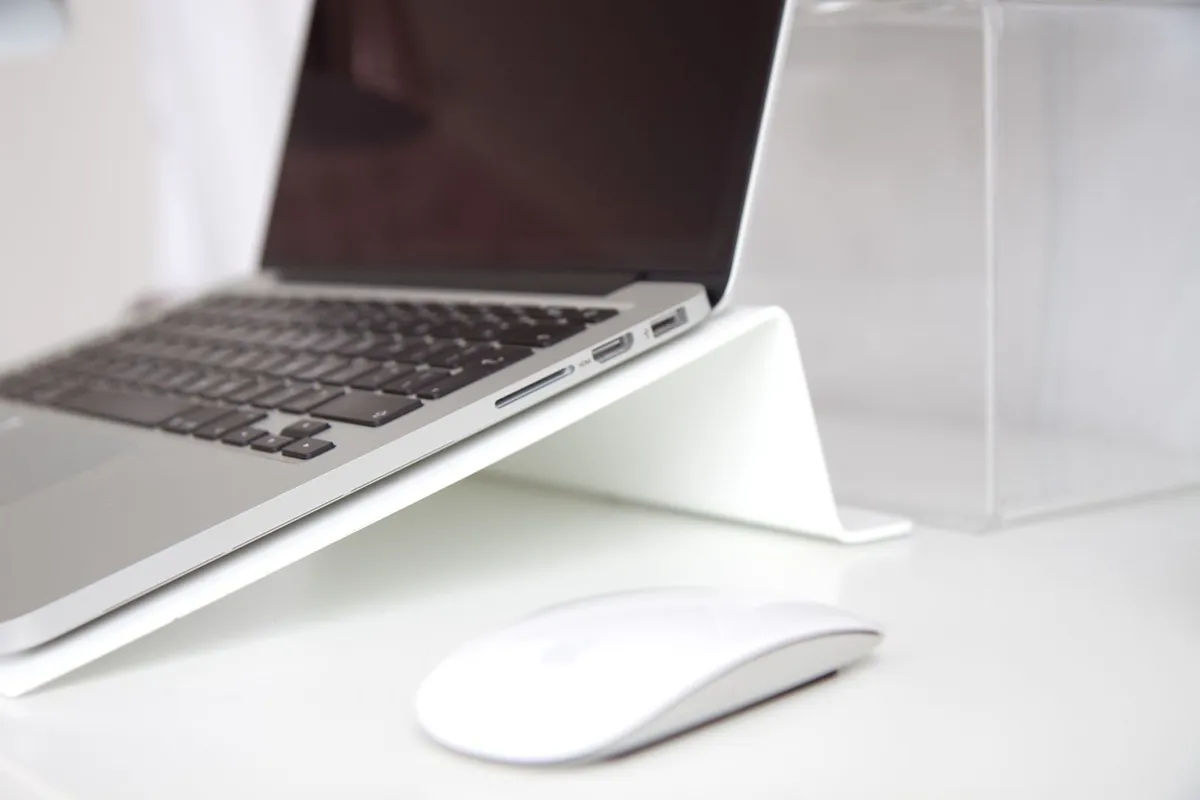
A laptop on a flat desk forces a bad trade. The screen sits low, so you bend your neck down to read it, and the keyboard sits at the right height for your hands. Raise the whole laptop and the screen improves, but the keyboard moves up with it. That is why a stand is only half of the fix. The other half is a separate keyboard and mouse.
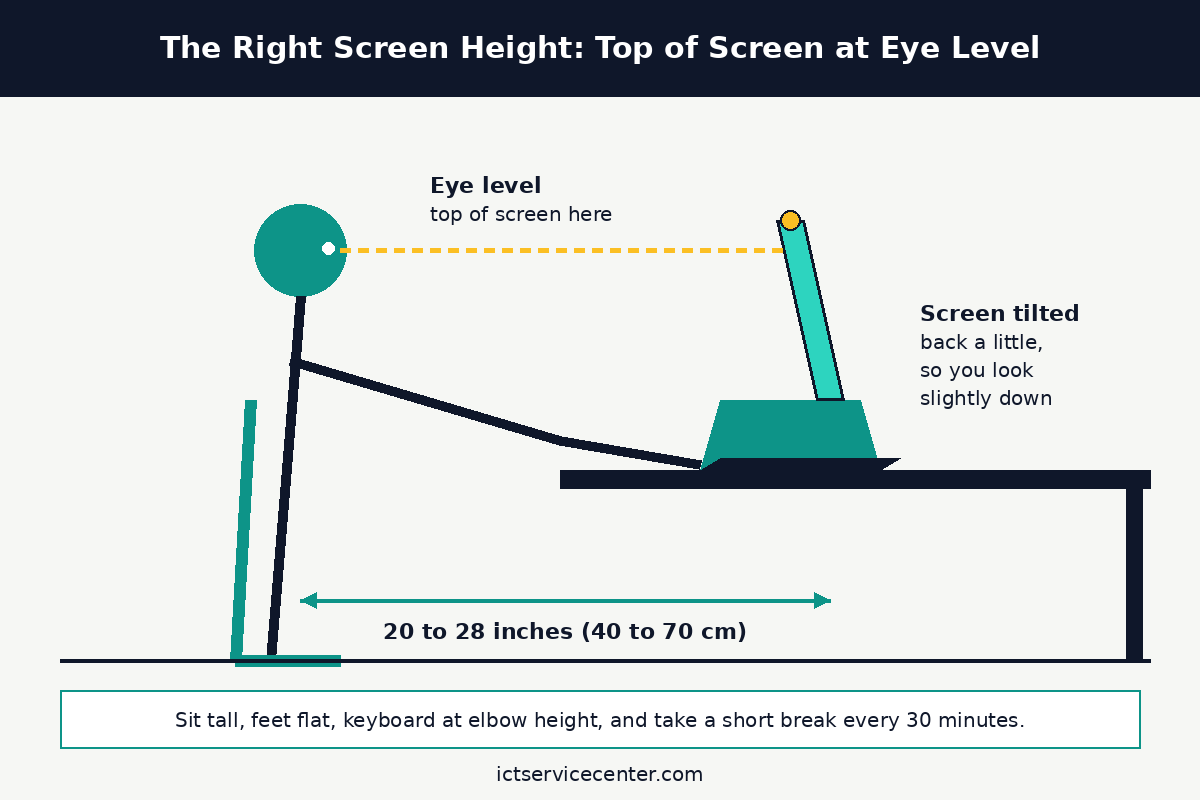
Start with height. Public ergonomic guidance agrees on the same target: the top of the screen should sit at or just below eye level, with the screen straight in front of you.
The Canadian Centre for Occupational Health and Safety puts the comfortable viewing distance at about 40 to 70 cm, roughly 16 to 28 inches, and places the best viewing angle about 15 degrees below the horizontal line of sight.
OSHA makes the same point in a different way in its computer workstations guide: there is no single correct posture that fits everyone, so the goal is a setup you can adjust until your neck stays neutral.
Next, decide between adjustable and fixed. An adjustable stand changes height and tilt, which helps when more than one person uses the desk, when you switch chairs, or when you are still finding the height that suits you.
A fixed riser holds one height, which is fine when one person uses one desk and one chair every day. Fixed stands tend to feel sturdier under a heavy laptop, since they have no joints or hinges to slip.
If you buy fixed, check the listed lift height on the product page first, and measure it against your own eye level while seated. A stand that lifts the screen only an inch or two will not fix a low screen.
Material matters for stability and heat. Aluminum stands are light, stiff and spread heat away from the laptop base. Plastic stands cost less and weigh less, but a thin plastic frame can flex under a heavy 15-inch or 17-inch machine.
Wood risers look good on a home desk and hold a laptop well, but they do not adjust and they trap more heat underneath.
Whatever the material, pick a design with an open frame or vent holes under the laptop, so air can move past the base instead of pooling under it.
Weight capacity and fit come before looks. Check the stand’s listed weight limit against your laptop’s weight, and check the stand’s width against the laptop base.
A stand made for a 13-inch ultrabook can tip or sag under a thick gaming laptop. Also check where the vents sit on your laptop. Many laptops pull air in through the bottom and push it out the side or back.
A stand that covers the bottom vents will make the fans work harder, not less.
Our guide to the best laptop accessories for work from home covers the keyboard, mouse and desk setup that goes with a stand, and the guide to choosing a laptop screen for work explains the screen size and resolution trade-offs that decide how far back you can sit.
The 5 stands at a glance
All five picks below lift the screen toward eye level, but they solve different problems. Use this table to narrow the list, then read the full pick for the fit checks.
| Stand | Type | Best for | Check before buying |
|---|---|---|---|
| Nulaxy aluminum laptop stand | Adjustable | One shared desk, changing chairs | Weight limit and max lift height |
| Nexstand K2 folding laptop stand | Portable folding | Travel and shared tables | Folded size and laptop weight |
| Soundance aluminum laptop stand | Fixed riser | One fixed home desk | Lift height against your eye level |
| Kootek laptop cooling pad with fans | Cooling stand | A laptop that runs hot | Fan noise and USB port use |
| Lamicall adjustable laptop stand | Budget folding | A first stand on a small budget | Angle settings and base width |
Nulaxy aluminum laptop stand: best adjustable stand
This stand suits a desk that more than one person uses, or a single user who is still finding the right height.
The height and angle adjust in small steps, so you can raise the screen until the top edge meets your eye level, then lock it there.
The aluminum frame stays stiff under most 13-inch to 15.6-inch laptops, and the open design leaves the bottom of the laptop exposed to air.
The one spec to check is the listed lift range on the product page. Measure your seated eye level first, then check that the stand can reach it. Also check the weight limit if your laptop is a thick model with a large battery.
Skip this stand if your desk never changes and your chair never moves, since a fixed riser costs less and has no joints to wear. Skip it too if you carry a stand every day, since this design is not as flat or light as a travel stand.
Height and angle adjust in small steps, so you can set the screen top at eye level.
- Broader Compatibility: Nulaxy C3 laptop stand is compatible with all laptops between in
- Ergonomic Riser: The laptop holder works as a riser to elevate the laptop screen to 7’’
Nexstand K2 folding laptop stand: best portable stand
This stand suits anyone who works away from a fixed desk: hot-desking, a library table, a client office, or a kitchen counter. It folds flat and slips into a laptop bag, so the ergonomic setup travels with you instead of staying at home. Open, it holds the laptop at a fixed tilt that brings the screen up, which takes the worst of the downward bend out of your neck.
The one spec to check is folded size against your bag, and the weight limit against your laptop. A folding stand trades some stability for portability, so a heavy laptop can make it feel less planted than a desk riser. It also needs a flat surface, so it is a poor pick for a bed or a sofa arm.
Pair it with a small travel keyboard and mouse, or the portability is wasted. Once the laptop is raised, its own keyboard sits too high to type on for long. For a laptop that travels a lot, read our guide to choosing a laptop for travel before you pick the stand, since weight and port layout decide what fits in the bag with it.
It folds flat and weighs little, so it fits in a laptop bag for work away from your desk.
- Its dimensions are 9.4*11*0.5in, so it can be easily stored in a bookshelf without
- The desk offers a natural height of 10in to raise your laptop, allowing you to work
Soundance aluminum laptop stand: best fixed riser
This stand suits one person at one desk who works there every day.
It is a single piece of bent aluminum with no hinges and no settings to slip, so the height you set on day one is the height you get on day one hundred.
The lift brings the screen closer to eye level, and the open space under the laptop holds a keyboard, a notebook, or a phone dock when the workday ends.
The one spec to check is the lift height. A fixed riser cannot adjust, so measure first. Sit in your chair, measure from the desk surface to your eye level, then compare that number with the stand’s listed lift and your laptop’s screen height. If the top of the screen still sits well below your eyes, an adjustable model is the better buy.
Skip this stand if you share the desk with someone much taller or shorter than you, since one fixed height cannot suit two very different eye levels. Skip it too if you carry your setup between rooms, since a one-piece aluminum riser is sturdy on a desk and awkward in a bag.
A solid one-piece lift raises the screen and leaves storage space under the laptop.
- Improve Viewing Comfort – Elevate your screen by 6 inches to an optimal eye level. This
- High-Strength Stability – Constructed from premium 5mm thickened aluminum alloy, this
Kootek laptop cooling pad with fans: best stand with cooling
This stand suits a laptop that runs hot on a desk: fans that spin up during video calls, a base that feels warm after an hour, or a machine that slows down under load.
The pad lifts the laptop off the desk and blows air across its base, which helps the laptop shed heat. The tilt also raises the screen, so it does the ergonomic job of a stand at the same time.
The one spec to check is fan noise and power. The fans run from a USB port on the laptop, so the pad takes one port and adds a low hum.
That is fine on a home desk and a poor match for a quiet library or a recording setup. Check that the fan layout lines up with your laptop’s vents. If your laptop pulls air in through the bottom, the fans help.
If it pulls air in through the sides, the pad is mostly a tilt stand, and the fans add little.
A cooling pad does not fix a laptop that overheats because its vents are clogged with dust. If the fans run loud all day, read our laptop overheating fix guide and the guide to cleaning laptop vents and dust first. If the laptop bottom gets too hot to touch, clean the vents before you buy anything, since a blocked vent will beat any cooling pad.
Built-in fans push air under the laptop, which helps a machine that runs hot on a desk.
- Dual USB Hub: With a built-in dual USB hub, the laptop fan enables you to connect
- Whisper-Quiet Operation: Enjoy a noise-free and interference-free environment with
Lamicall adjustable laptop stand: best budget stand
This stand suits a first-time buyer who wants the ergonomic gain without spending much. It folds flat, adjusts through a few angle settings, and lifts the screen enough to change the neck angle on most desks. The simple design has few parts, so there is little to break, and it packs away when the desk needs to clear for something else.
The one spec to check is the base width against your laptop. Budget folding stands are often made for 13-inch and 14-inch machines, and a wide 15.6-inch or 17-inch base can overhang the edges. Check the angle settings too. A stand with only two or three angles may not land exactly on your eye level, so be ready to fine-tune with the chair height instead.
Skip this stand if your laptop is heavy or thick, since a light folding frame can flex under a gaming laptop. Skip it too if you want a stand that stays put on a shared desk all day. For a small budget and a light laptop, though, this is the cheapest way to find out how much a raised screen helps your neck.
A simple folding design lifts the screen for less, with angle settings that suit most desks.
See options on AmazonMistakes to avoid
1. Raising the screen but typing on the laptop keyboard. Once the laptop sits on a stand, its keyboard is too high and too far back for comfortable typing. Your shoulders rise and your wrists bend, and the neck gain is lost to shoulder strain. Fix it with a separate keyboard and mouse at elbow height.
2. Setting the screen too high. A screen above eye level forces you to tilt your chin up all day, which strains the neck from the other direction. Fix it by lowering the stand until the top of the screen sits at or just below eye level, and check again after you change chairs.
3. Sitting too close after raising the screen. A raised screen feels bigger, so people slide closer to it, and the neck bends forward again to read small text. Fix it by sitting about an arm’s length away, roughly 40 to 70 cm, and making the text bigger instead of leaning in.
4. Buying a stand that does not fit the laptop. A stand made for a slim ultrabook can sag or tip under a heavy laptop, and a narrow stand can cover the bottom vents. Fix it by checking screen size, laptop weight and vent layout against the product page before you order.
5. Treating a stand as medical care. A stand fixes a low screen. It does not fix pain that lasts more than a few days, pain that spreads into the arm, numbness or tingling in the hands, or pain after a fall or accident. Fix it by seeing a clinician for those symptoms, and tell them about your desk setup.
Frequently asked questions
Can a laptop stand really help neck pain?
A stand can help when the pain comes from looking down at a low screen for hours. Raising the screen to eye level keeps the neck closer to neutral, which removes one source of strain. It will not help pain from an injury, a pinched nerve, or a mattress, and it works best with a separate keyboard and mouse.
How high should a laptop stand raise the screen?
High enough that the top of the screen sits at or just below your eye level while you sit normally. That is the target in public ergonomic guidance, and it usually means a lift of several inches from the desk. Sit in your chair, look straight ahead, and adjust the stand until the top edge of the screen meets your gaze.
Do I need an external keyboard with a laptop stand?
Yes, for full-time desk work. A stand raises the laptop keyboard along with the screen, so typing on it means reaching up and bending your wrists. A separate keyboard and mouse let your hands stay at elbow height while the screen stays at eye level. For short sessions under half an hour, the built-in keyboard is fine.
Are laptop stands good for a 17-inch laptop?
They can be, but the fit checks matter more at that size. A 17-inch laptop is heavy and wide, so check the stand’s listed weight limit and base width before you buy. Fixed risers and cooling pads usually hold large laptops better than light folding stands, which can flex or tip under the extra weight.
When should I see a doctor about neck pain?
See a clinician if the pain lasts more than a few days, keeps coming back, spreads into the shoulder or arm, or comes with numbness, tingling, weakness, or headaches that will not ease. Also seek care promptly after a fall or accident, or if the pain started suddenly and feels severe. A stand is a desk fix, not a diagnosis.
Bottom line: Buy an adjustable aluminum stand, set the top of the screen at eye level about an arm’s length away, and add a separate keyboard and mouse. If the pain lasts more than a few days or spreads into your arm, see a clinician. For more buying guides, see the Buying Guides hub.
Sources: OSHA, Computer Workstations eTool; CCOHS, Office Ergonomics: Sit/Stand Desk; CCOHS, Working in a Sitting Position. Photos: Karina Finger, Anete Lusina, Standsome Worklifestyle and Brett Stone via Pexels. Diagram: ictservicecenter.com.