
 By
A laptop power bank is only useful if it can actually charge your laptop. A bank made for phones will light up the charging icon and still lose ground while you work, because the laptop draws more power than the bank supplies.
In short: The best laptop power bank is one whose single USB-C output matches or beats the wattage of the charger your laptop shipped with, with a capacity under 100 watt-hours so it flies without airline approval. The Nitecore NB10000 is the best compact travel pick, while the Anker 737 suits laptops that need high wattage.
Key takeaways
- Match the bank to your charger wattage first. The number printed on your laptop adapter is the target, not the biggest number on the box.
- Capacity is measured in watt-hours for flights, not milliamp-hours. Watt-hours equals milliamp-hours times volts divided by 1000.
- Stay at or under 100 watt-hours to fly without airline approval. Banks from 101 to 160 watt-hours need approval; anything over 160 watt-hours cannot fly.
- The cable matters as much as the bank. A cable rated below the bank output caps the power that reaches your laptop.
- Power banks belong in carry-on bags only. Never pack one in checked luggage.
A slim shape and a light body fit a jacket pocket or a small bag pocket on travel days.
A high-wattage USB-C output suits laptops that ship with a large adapter.
A small capacity and a simple design cover top-ups for a phone and a light laptop.
A slim shape slides into a laptop sleeve pocket next to the laptop.
A 65W USB-C output matches the adapter most thin laptops ship with.
How many watts does your laptop need
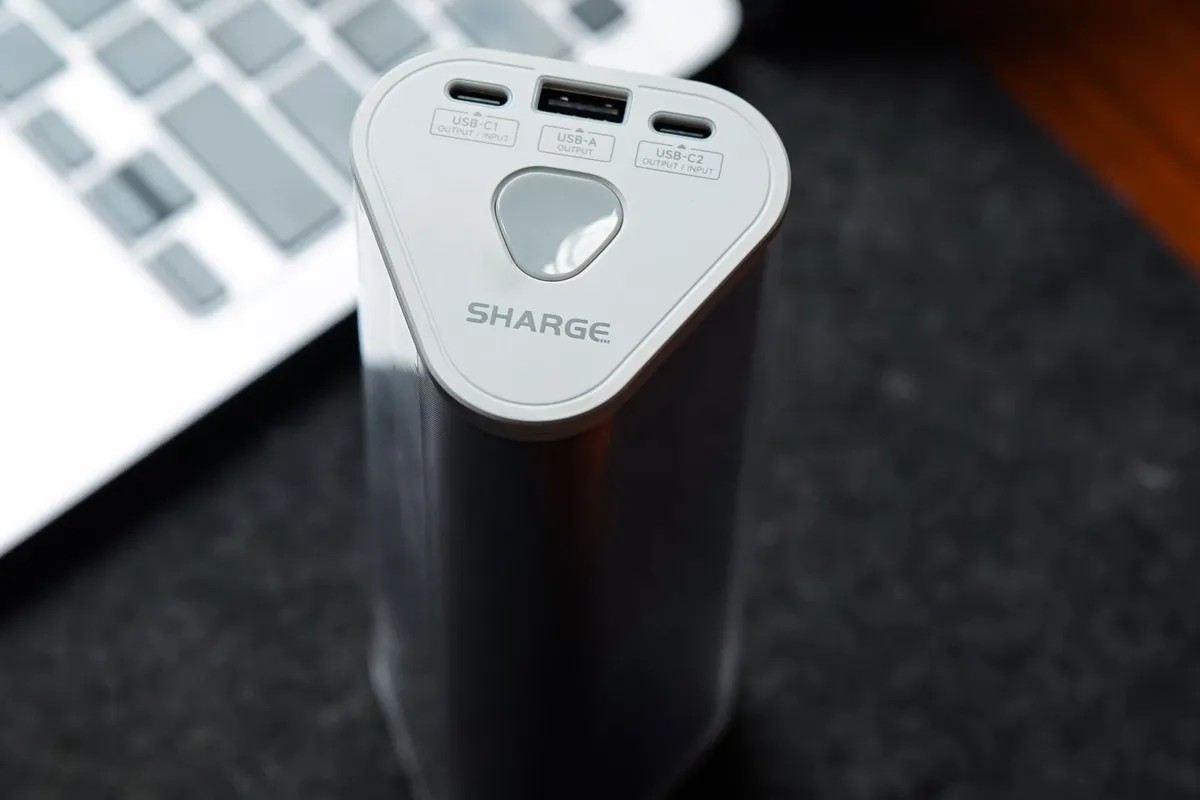
Start with the charger in the box. Read the output line printed on the adapter brick: it lists volts and amps, and usually the total in watts. That wattage is the number your power bank has to meet.
A thin 13 or 14 inch laptop often ships with a 45W or 65W adapter, while a larger performance laptop can ship with a 90W, 100W or 140W adapter. We go through essential inspection steps for refurbished PCs step by step in its own article.
USB Power Delivery, usually shortened to USB PD, is the standard that lets a laptop and a charger agree on a wattage over a USB-C cable.
The laptop asks for what it needs and the charger offers what it can give, and full power only flows when both sides agree. A bank rated higher than your laptop needs does not force extra power into the laptop.
A bank rated lower than your laptop needs is the real problem: it may charge the laptop slowly while it sleeps, or lose ground while you work.
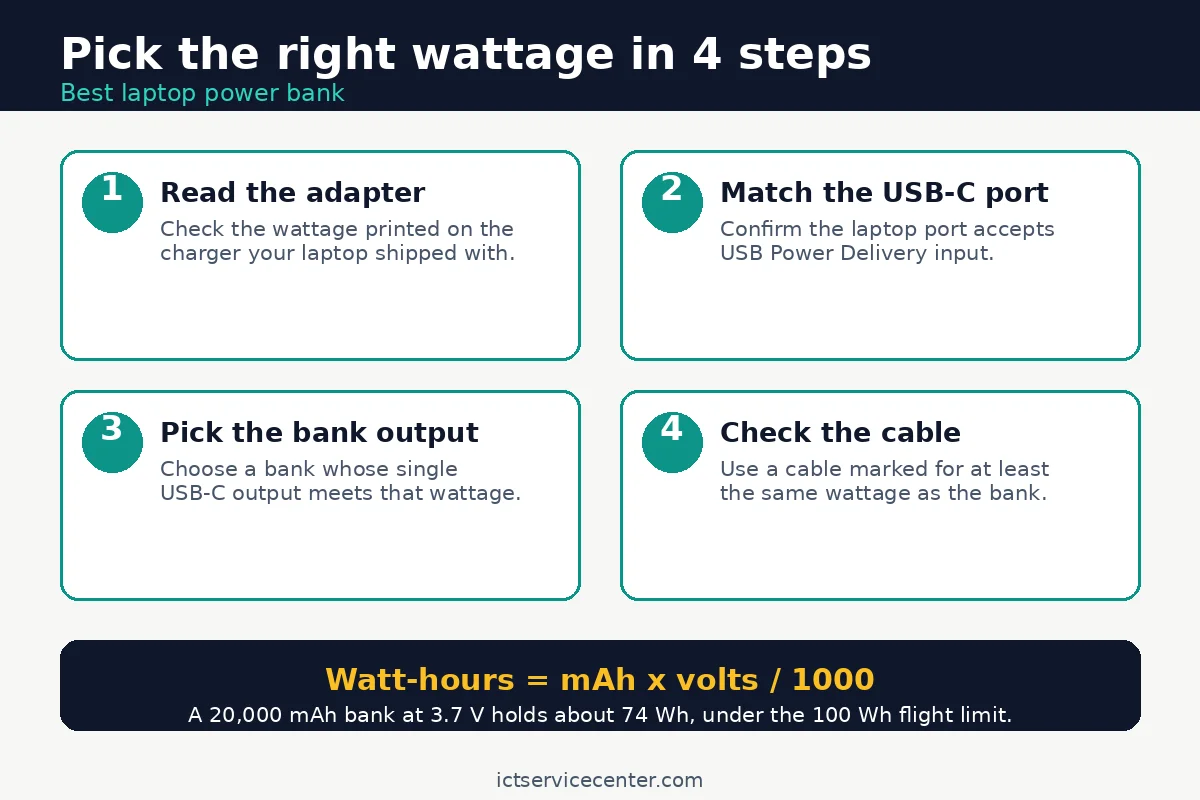
Check that your laptop can charge over USB-C at all. Not every USB-C port accepts power: some ports on older or budget laptops carry data only. The laptop manual or spec page lists the supported adapter wattage and whether the USB-C port accepts power input.
If your laptop charges only through a round barrel plug, a USB-C power bank will not charge it. Our guide to fixing a laptop that is not charging covers the same first check.
USB PD Revision 3.1 raised the ceiling from 100W to 240W, but that headroom only helps if the laptop, the bank and the cable all support the higher range. A 16-inch MacBook Pro ships with a 140W adapter, so it needs a bank and a cable built for that range. Most buyers do not need 240W: match your adapter, then stop.
How to read the capacity label
Power bank capacity is printed two ways, and only one of them decides whether it flies. Milliamp-hours, written as mAh, is the number on the box in big print. Watt-hours, written as Wh, is the number airlines use.
Convert with one formula: watt-hours equals milliamp-hours times volts divided by 1000. Most lithium-ion cells run at 3.7 volts, so a 20,000 mAh bank holds about 74 Wh, and a bank rated at 27,027 mAh at 3.7 volts sits at 100 Wh.
Read the watt-hour rating printed on the bank itself before a trip. If the label gives only milliamp-hours, do the math with the voltage printed next to it. If neither number is printed, treat the bank as unfit for flying: screeners can refuse an unmarked battery.
Capacity also decides how much charge you actually get. A bank never delivers its full rated capacity to the laptop: some energy is lost as heat when the bank steps voltage up and down, and the laptop uses power while it charges.
Plan on a partial charge for a full-size laptop battery. If your battery already runs down fast, check its health first, since a worn battery drains a bank quicker.
Our guide to checking laptop battery health shows how to read the wear level on Windows and Mac. There is more on laptops for video work in a separate guide.
Do not buy capacity you will never use. A bigger bank weighs more, charges slower from the wall, and can cross the 100 Wh flight limit. A 10,000 mAh bank suits a phone and a light top-up. A 20,000 mAh bank suits a working day away from an outlet.
The 5 laptop power banks at a glance
The table lists the class to look for with each pick, not a promise from the listing. Check the wattage and the watt-hour rating on the listing before you buy.
| Pick | Best for | USB-C output to look for | Capacity guide | Flight note |
|---|---|---|---|---|
| Nitecore NB10000 | Compact travel | 20W class | 10,000 mAh class | Well under 100 Wh |
| Anker 737 | High wattage | 100W or higher | 20,000 mAh class or higher | Check the Wh rating before flying |
| Anker PowerCore 10000 | Budget top-ups | 20W class | 10,000 mAh class | Well under 100 Wh |
| Baseus Blade | Slim carry | 100W class | 20,000 mAh class | Check the Wh rating before flying |
| Charmast 65W | Mac and Windows ultrabooks | 65W | 20,000 mAh class | Check the Wh rating before flying |
Nitecore NB10000: best compact travel pick
This bank suits a traveler who wants the smallest bank that still helps a laptop. The slim shape fits a jacket pocket or a small bag pocket, and the light body keeps the carry weight down. It tops up a phone fully and adds a useful charge to a thin laptop with a low-wattage adapter.
The one spec to check is the USB-C output against your adapter. A 20W class output suits a phone and a light ultrabook, but it will not keep up with a laptop that ships with a 65W adapter while you work. Charge the laptop while it sleeps, or close heavy apps while it charges. Skip it if your laptop needs 65W or more while running.
A slim shape and a light body fit a jacket pocket or a small bag pocket on travel days.
See options on AmazonAnker 737: best high-wattage pick
This bank suits a laptop that ships with a large adapter and a user who works away from an outlet. The high-wattage USB-C output can feed a performance laptop while it runs, which is the test most banks fail.
The one spec to check is the watt-hour rating before a flight. High-wattage banks tend to sit near the 100 Wh limit, and some versions cross it.
Read the rating printed on the bank and confirm it is at or under 100 Wh if you fly without approval. Also check the weight: this is the heaviest pick here, so it suits a laptop bag, not a jacket pocket. Skip it if your laptop ships with a 45W adapter.
A high-wattage USB-C output suits laptops that ship with a large adapter.
See options on AmazonAnker PowerCore 10000: best budget pick
This bank suits a buyer who wants the lowest spend that still does the job. The small capacity and simple design cover phone top-ups and a light charge for a thin laptop, and the size fits any bag pocket. It is the pick to buy when the laptop stays near an outlet most of the day and the bank is a backup.
The one spec to check is the USB-C output against your adapter. A 20W class output will charge a sleeping ultrabook and a phone, but it will not run a 65W laptop under load. Treat it as a top-up bank, not a work-through-the-day bank.
A small capacity and a simple design cover top-ups for a phone and a light laptop.
See options on AmazonBaseus Blade: best slim pick
This bank suits a laptop bag where every pocket is already full. The slim shape slides into a laptop sleeve pocket, so it adds no bulge to the bag. The 100W class USB-C output covers most thin and mid-size laptops while they run.
The one spec to check is the watt-hour rating before a flight, since a slim 100W class bank can still sit close to the 100 Wh limit. Read the rating on the bank, not the capacity in milliamp-hours on the listing. Also check the cable: a slim bank is easy to pair with a thin cable that caps the output, so use a cable marked for the same wattage.
A slim shape slides into a laptop sleeve pocket next to the laptop.
See options on AmazonCharmast 65W: best for Mac and Windows ultrabooks
This bank suits the most common laptop in use: a thin Mac or Windows ultrabook that ships with a 45W or 65W adapter. A 65W USB-C output matches that adapter, so the laptop charges at its normal speed while you work.
The one spec to check is the port: use the USB-C port marked for the full 65W output, not a second USB-C port that may offer less. Read the output table printed on the bank or in its manual, since the total wattage on the box can be split across ports. Skip it if your laptop ships with a 90W or larger adapter and you work under load.
A 65W USB-C output matches the adapter most thin laptops ship with.
See options on AmazonCan you take a laptop power bank on a plane
Yes, in your carry-on bag, if the rating fits the rules. The FAA treats a power bank as a spare lithium-ion battery, and spare batteries must travel in the cabin, never in checked luggage.
Batteries rated at 100 watt-hours or less are allowed in carry-on bags without airline approval. Batteries from 101 to 160 watt-hours need airline approval first, with a limit of two spares per person. Batteries over 160 watt-hours are forbidden on passenger aircraft.
Airlines can set stricter limits than the FAA, so check your carrier before you fly.
Pack the bank where you can reach it. Keep it in your personal item or carry-on, with the ports protected from short circuit: a pouch or case stops a loose coin or key from bridging the contacts.
If your carry-on is gate checked, take the power bank out first and carry it into the cabin. The TSA lists power banks as allowed in carry-on bags and not allowed in checked bags.
Our guide to protecting a laptop during travel covers the same habit.
Do not fly with a damaged bank. A swollen, cracked, hot or leaking power bank must not be carried on an aircraft. If the bank smells sweet or chemical, feels hot when it is not charging, or has a case that no longer sits flat, stop using it and take it to a battery recycling point. Never open a swollen battery: puncturing it can start a fire.
The cable matters as much as the bank
A good bank with a weak cable charges like a weak bank. USB-IF certified USB-C to USB-C cables carry a 60W or 240W power marking, printed on the cable or the box. A cable marked 60W caps the output at 60W, whatever the bank can supply. Use a cable marked for at least the wattage you need, and a 240W marked cable for anything above 100W.
Check the cable before you blame the bank. If the laptop charges slowly from a bank that should be fast enough, swap the cable first: it is the cheapest part of the chain and the most common weak point.
A cable with a loose connector or a frayed end should be retired, since a bad connection can heat up under load. Keep one good cable with the bank, in the same pocket.
A USB-C hub can add ports on the road, and our guide to the best USB-C hub for a laptop explains which hub features are worth paying for.
How to charge your laptop from a power bank
Charge the bank fully the night before, then plug the laptop into the bank with the right cable and the right port.
- Charge the power bank to full from a wall outlet before you leave. A half-charged bank holds a half charge for the laptop.
- Plug the USB-C cable into the bank port marked for the highest output, then into the laptop USB-C port that accepts power.
- Close heavy apps and lower the screen brightness while the laptop charges, so the bank feeds the battery instead of the workload.
- Check the charging icon and the battery percentage after a few minutes. If the percentage falls while you work, the bank output is below the laptop draw: save your work and let the laptop sleep while it charges.
- Unplug when the laptop is charged enough, and recharge the bank from the wall at the next stop.
Keep the bank cool while it works. A bank charging a laptop under load warms up, and heat cuts efficiency and shortens the life of the cells. Set the bank on a hard surface with air around it, not inside a zipped pocket.
If the bank feels hot to the touch, unplug it and let it cool. Our guide to maintaining laptop battery health explains the charge levels that keep a laptop battery healthy over time.
Mistakes to avoid
1. Buying by milliamp-hours alone. A big milliamp-hour number says nothing about wattage or flight rules. Fix it by checking the USB-C output and the watt-hour rating before you buy.
2. Using a phone charger bank for a laptop. A 10W or 15W bank lights the charging icon and still loses charge while the laptop runs. Fix it by matching the bank output to the adapter wattage on your charger.
3. Ignoring the cable rating. A 60W cable on a 100W bank caps the charge at 60W, and nothing warns you. Fix it by using a cable marked for at least the wattage you need.
4. Packing the bank in checked luggage. Spare lithium batteries are forbidden in checked bags, and a gate-checked bag counts as checked. Fix it by keeping the bank in your carry-on, in a pouch that protects the ports.
5. Charging a damaged bank. A swollen, hot or cracked bank can fail without warning, and charging it makes the risk worse. Fix it by retiring the bank at the first sign of swelling, heat or smell, and recycling it at a battery drop-off.
Frequently asked questions
Can any power bank charge a laptop?
No. A laptop needs a bank with a USB-C port that supports USB Power Delivery, and an output that meets the adapter wattage. A phone bank with a 10W or 15W output may show the charging icon while the battery still drains. Check the adapter wattage, then buy a bank whose single USB-C output meets or beats it.
What size power bank can I take on a plane?
A bank rated at 100 watt-hours or less flies in your carry-on bag without airline approval, under FAA rules. Banks from 101 to 160 watt-hours need approval and are limited to two spares per person. Banks over 160 watt-hours are forbidden on passenger aircraft. Power banks must always travel in carry-on bags, never in checked luggage.
How do I convert mAh to Wh?
Multiply milliamp-hours by volts, then divide by 1000. Most lithium-ion cells run at 3.7 volts, so a 20,000 mAh bank holds about 74 watt-hours. A bank rated at 27,027 mAh at 3.7 volts sits at 100 watt-hours, the flight limit without approval. Read the watt-hour rating on the bank itself, since that is the number screeners use.
Will a 100W power bank damage a 65W laptop?
No. USB Power Delivery lets the laptop and the bank agree on a wattage before full power flows, and the laptop draws only what it asks for. A 100W bank will not force 100W into a 65W laptop. The risk runs the other way: a bank rated below the adapter wattage charges slowly or loses ground while the laptop runs.
Can I use a laptop while it charges from a power bank?
Yes, if the bank output beats the power the laptop draws. Close heavy apps and lower the screen brightness so more of the bank output reaches the battery. If the battery percentage falls while you work, save your work and let the laptop sleep while it charges.
Bottom line: Read the wattage on your laptop adapter, buy a bank whose single USB-C output meets it, keep the rating at or under 100 watt-hours for flights, and pair it with a cable marked for the same wattage. The Nitecore NB10000 covers travel, the Anker 737 covers high-wattage laptops, and the Charmast 65W covers most ultrabooks. See the buying guides hub for more laptop buying advice.
Sources: FAA, Airline Passengers and Batteries; USB-IF, USB Charger (USB Power Delivery); TSA, What Can I Bring? Photos: Rubaitul Azad, Towfiqu barbhuiya, I’m Zion, Kaboompics, Lensmagicians via Pexels. Diagram: ictservicecenter.com