
You are comparing a CyberPowerPC tower but feel unsure if the listed specs match the price you are paying. This page breaks down exactly what is inside, how it performs in games, and where the build cuts corners so you know what to expect when it arrives.
In short: The standard CyberPowerPC gaming tier pairs an AMD Ryzen 7 8700F with an NVIDIA RTX 5060 Ti 8GB. It runs 1080p esports titles at over 100 fps and 1440p AAA games at 60 fps with DLSS. It is best for buyers who want a modern DDR5 platform with strong wireless connectivity and no need to build parts themselves.
Quick picks
Our shortlist for this job · tap one to see today's price
Lets you swap the stock PSU for a future-proof 850W unit when you upgrade to a heavier card.

Provides better heat dissipation than the stock tower cooler if the 8700F runs too warm under load.
What is inside the CyberPowerPC Ryzen 7 8700F build
The core of this system is the AMD Ryzen 7 8700F. It is a Zen 4 processor with eight cores and a base clock of 4.1 GHz. It lacks integrated graphics, so the system relies entirely on the dedicated GPU. This architecture offers significant IPC improvements over previous generations, meaning it handles modern game engines more efficiently. For the detail, see our notes on ryzen versus intel for gaming.
Graphics come from the NVIDIA GeForce RTX 5060 Ti 8GB. This card supports DLSS 3 and Ray Tracing. It is a step up from the base RTX 5060, offering slightly higher clock speeds and more CUDA cores for rendering tasks.
The 8GB of VRAM is a specific constraint; while sufficient for 1080p, it can be tight for 1440p in texture-heavy titles.
- RAM: 16 GB DDR5 (typically two 8 GB sticks). This dual-channel configuration maximizes bandwidth.
- Storage: 1 TB PCIe 4.0 NVMe M.2 SSD. This ensures fast load times and ample space for large game libraries.
- Motherboard: AMD B850 chipset. This board supports PCIe 5.0 for future storage upgrades.
- PSU: Usually an 850W or 1000W 80 PLUS Gold unit. This provides headroom for GPU upgrades.
The DDR5 platform is the main advantage here. It offers higher memory bandwidth than the DDR4 found in cheaper prebuilts. This helps in memory-intensive games and productivity apps that are still moving to faster standards. The B850 chipset also ensures better power delivery and compatibility with newer AMD processors if you decide to upgrade the CPU later.
Pro tip: Check the exact SKU on CyberPowerPC's website before buying. Specs change frequently, so verify the GPU model and RAM speed for the current build.
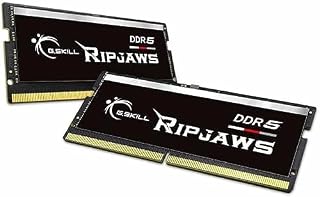
Doubles the memory capacity if you find 16GB too limiting for heavy multitasking or streaming.
- * Requires overclocking/BIOS adjustments. Maximum speed and performance depends on
- G.SKILL Ripjaws DDR5 SO-DIMM Series DDR5 SO-DIMM Memory Kit, Model
How the RTX 5060 Ti performs in real games
The RTX 5060 Ti targets 1080p and 1440p gaming. In competitive titles like Valorant or CS2, expect well above 144 fps on high settings. This is smooth even on high refresh rate monitors. The CPU’s 8-core performance ensures that frame generation is not bottlenecked by the processor, allowing the GPU to drive those high frame counts.
For demanding AAA titles like Cyberpunk 2077 or Alan Wake 2, the story is different. You should target 1440p Ultra with DLSS Quality mode to maintain 60 fps. Turning on Ray Tracing will drop frame rates, so use it selectively. There is more on minecraft cpu choice in a separate guide.
The 5060 Ti handles ray tracing better than its predecessor, but it is still a performance cost that must be managed.
The card has 8 GB of GDDR6 memory. This is enough for 1440p gaming in most titles today. However, heavily modded games or 4K texture packs can exceed this limit.
If you plan to run very high-resolution mods, keep an eye on VRAM usage in Task Manager. If VRAM usage consistently hits 8 GB, you will experience stuttering as the system swaps data to the main RAM.
- 1080p Ultra: 80-110 fps in most titles. This is the sweet spot for high refresh rate monitors.
- 1440p Ultra + DLSS: 60-75 fps in most titles. This provides a smooth experience at higher resolutions.
- Ray Tracing: Use with care, as it can halve performance. Combine with DLSS Frame Generation if available.
Pro tip: Enable DLSS in your game settings. It boosts performance with minimal visual loss and is essential for hitting high frame rates at 1440p.
Connectivity and ports you actually get
One of the strengths of the CyberPowerPC build is its I/O. It includes Wi-Fi 6 and Bluetooth 5.3. This matters if you use a wireless controller or mouse and need low latency. These standards ensure that wireless peripheral connections are stable and responsive, reducing the chance of input lag during fast-paced gameplay.
USB support includes two USB-C ports and multiple USB-A 3.2 ports. This is useful for fast data transfer and charging devices. The B850 chipset ensures these ports are native, not added via cheap expansion cards.
Having native USB-C is particularly handy for modern smartphones and high-speed external SSDs that use the same connector for data and power. If that sounds like your bench, read up on cyberpower ryzen gaming pc next.
The Wi-Fi 6 standard supports faster speeds and better stability in crowded networks. If you are on a 1 Gbps internet connection, Wi-Fi 6 helps you reach that speed wirelessly.
It also improves the range and reliability compared to the older Wi-Fi 5 standard found in budget prebuilts. The inclusion of Gigabit Ethernet ensures a wired connection is always available for competitive play where zero packet loss is critical.
- Wi-Fi 6: Better for 1 Gbps connections and multi-device households.
- Bluetooth 5.3: Lower latency for audio and controllers compared to older standards.
- USB-C: Convenient for charging and fast transfers with high-speed drives.
Common myths about prebuilt gaming towers
Myth: Prebuilts are not upgradeable.
Fact: The CyberPowerPC uses standard M.2 slots and DDR5 DIMM slots. You can add more storage or swap RAM easily. The PSU is usually high wattage, leaving room for a stronger GPU later. The standard ATX case form factor means any standard part will fit, provided you check clearance limits for the GPU length.
Myth: The stock cooler is weak.
Fact: The tower cooler is adequate for the 8700F. It keeps temperatures in check for normal gaming. Only if you see the CPU hitting 90C+ consistently should you consider a high-end air cooler. The stock cooler is sufficient for the power envelope of the 8700F, which is very efficient on the Zen 4 architecture.
Myth: 16GB RAM is not enough.
Fact: For gaming, 16GB is the current sweet spot. Modern games rarely exceed 12 GB. It is only if you stream, record, or run virtual machines that you need 32 GB or more. The DDR5 speed helps compensate for the lower capacity by moving data faster, reducing the bottleneck effect on the CPU.
- RAM upgrade: Buy two 16 GB sticks for the best dual-channel speed. This ensures you have enough bandwidth for heavy multitasking.
- Storage: Add a second M.2 SSD for games to keep the OS separate. This prevents the system drive from becoming fragmented or full.
Safety first: Always power off and unplug the PC before touching internal components. Hold down the power button for 10 seconds to drain residual charge.
An 850W Gold unit ensures you have enough power if you upgrade to a RTX 5070 or 5080 later.
- 80 PLUS GOLD CERTIFIED
- 10-year limited warranty, guaranteeing long term reliable operation
When to choose a CyberPowerPC over a custom build
Buying this system makes sense if you value time over tinkering. You get a working machine that is tested for compatibility. You do not have to worry about which RAM pairs best with which motherboard. The system comes fully assembled, cabled, and tested, saving you the hours of troubleshooting that can occur with a first-time custom build.
The warranty is a major factor. CyberPowerPC includes 1 year of parts and labor, plus lifetime tech support. If the system fails, you do not have to diagnose which part is bad.
The company handles the repair or replacement. This is a significant advantage over building your own PC, where you are responsible for finding the faulty component and paying for shipping to multiple vendors.
It is less ideal if you need specific aesthetics or ultra-low budget. Custom builds let you choose every component. Prebuilts use standard cases and parts that meet a target price.
If you are on a tight budget, a custom build with a used GPU might save money, but you lose the warranty convenience. For the average user, the peace of mind and ready-to-use state outweigh the small premium for the prebuilt service.
- Choose CyberPowerPC if: You want it done, need warranty support, or use Wi-Fi 6. This is the path of least resistance for a reliable system.
- Choose custom build if: You want specific case aesthetics or maximum value per dollar. This requires more technical knowledge and time to assemble and troubleshoot.
The bottom line
The CyberPowerPC Ryzen 7 8700F + RTX 5060 Ti is a solid middle-ground prebuilt. It offers a modern DDR5 platform, Wi-Fi 6, and a reliable warranty that saves you the hassle of building. For most gamers who want 1440p performance without custom assembly, it is a safe and practical choice.
- 80 PLUS GOLD CERTIFIED
- 10-year limited warranty, guaranteeing long term reliable operation
Frequently asked questions
Can I upgrade the GPU in a CyberPowerPC later?
Yes, the system supports long graphics cards. Ensure your case has enough length clearance. The stock PSU is usually high wattage, which allows for a higher-tier NVIDIA or AMD card without needing a power supply swap initially. Just check the specific PSU wattage in the product details to be sure.
Is 16GB DDR5 enough for modern games in 2026?
For pure gaming, 16GB is sufficient. Most titles run comfortably in that range. If you stream, record gameplay, or keep heavy browser tabs open while playing, consider upgrading to 32GB to avoid background slowdowns. The DDR5 speed helps keep the system responsive even at the 16GB limit.
What is the difference between the RTX 5060 and 5060 Ti?
The 5060 Ti has more CUDA cores and slightly higher clock speeds. It performs about 15-20% better in 1440p gaming. The base 5060 is a budget option, but the Ti is the recommended choice for a smooth high-resolution experience. The performance gap is most noticeable in CPU-bound scenarios and higher resolution targets.
Does the CyberPowerPC come with Windows installed?
Yes, it typically ships with Windows 11 Home pre-installed and activated. You will need to create a Microsoft account on first boot to complete the setup. No additional software is required to start using the machine, though you will want to install drivers for the GPU and network.