
You want a prebuilt gaming PC that handles 1440p modern titles without the hassle of building from scratch. This review checks if the CyberPowerPC Ryzen 7 8700F + RTX 5060 Ti delivers on that promise without hiding costly compromises.
In short: This system is a solid value for 1440p rasterization gaming, thanks to a fast 8-core CPU and DDR5 platform. Its main limit is the 8GB VRAM on the RTX 5060 Ti, which restricts ray tracing performance in newer titles. It suits gamers prioritizing high frame rates over heavy visual effects.
Quick picks
Our shortlist for this job · tap one to see today's price
Cleans up the bundled keyboard and monitor before you start playing your new games.
A future GPU drop that easily replaces the 8GB VRAM limit for heavier ray tracing.
Who it is for (and who should skip it)
This build targets players who care about high refresh rates. The Ryzen 7 8700F is an 8-core/16-thread processor, which is more than enough for competitive shooters like Valorant or Overwatch. You won’t bottleneck the GPU in these titles, ensuring smooth gameplay at high frame rates. The other half of this decision is maximizing your device utility.
- 1440p Gamers: Expect 80-100 fps in AAA titles without ray tracing. This is the sweet spot for this configuration, balancing visual detail and speed.
- Streamers: The extra CPU cores handle encoding while you play. You can record 1080p/60 or stream to Twitch without dropping frames in-game.
- Budget Builders: A good starting point if you hate cable management. It saves you the time and headache of assembling parts yourself.
Skip this if you want 4K gaming or heavy ray tracing. The 8GB VRAM limit will cause stuttering in future titles as graphics improve.
Also, if you need 64GB+ RAM for professional video editing or 3D rendering, this is not the right tool for the job. Stick to it if you game on a 1440p monitor and keep settings on High or Ultra without RT.

- AMD Ryzen 9 7900X, NVIDIA GeForce RTX 5070 12GB, 32GB DDR5 RGB 4800MHz 16x2 1TB NVMe
- Connectivity: 6 x USB 3.1 | 1x RJ-45 Network Ethernet 10/100/1000 | Audio: On board
What stands out in this configuration
The combination of DDR5 RAM and a PCIe 4.0 SSD keeps load times snappy. Windows boots in seconds, and game assets stream fast from the 1TB NVMe drive. This modern platform avoids the lag associated with older SATA drives or DDR4 memory.
The motherboard uses the AMD B850 chipset. This gives you PCIe 5.0 lanes, which means you can drop in faster GPUs or SSDs later without changing the board. It is a future-proof choice that extends the life of your machine beyond the initial specs.
- Connectivity: Wi-Fi 6 and Bluetooth 5.3 are built in, saving you from buying a USB dongle. Your wireless headset and mouse will connect directly to the system.
- Ports: You get 2x USB-C and 4x USB-A 3.2, enough for a whole desk of peripherals. No more hunting for adapters to plug in your controller or webcam.
- Cooling: While basic, the mid-tower case supports aftermarket fans if you want better airflow. The design allows for easy upgrades to improve temperature management later.
Pro tip: Check the box for two M.2 slots. One is used for the SSD; the empty one is your upgrade path for faster storage.
The drawbacks you should know before buying
The biggest issue is the 8GB VRAM on the RTX 5060 Ti. Newer games recommend 10-12GB for high textures. You will need to lower settings or use DLSS to maintain stable frame rates in demanding scenes. For the detail, see our notes on sleep vs hibernate which to use.
The included keyboard and mouse are basic membrane types. They work, but they feel mushy and will likely be replaced within a few months. Budget for better peripherals separately if you care about tactile feedback and durability during long sessions.
Storage space is tight. After installing Windows and five AAA games, you will run out of space on the 1TB drive. Modern titles can be over 100GB each, so plan to buy a second drive soon. The lack of high-speed cooling info is also a concern, as stock coolers can get loud under full load.
This cleaning kit lets you wipe down the bundled peripherals and screen before they collect dust in your bag.
- The macbook cleaning kit computer screen cleaner comes with a number of accessories
- The laptop screen cleaner keyboard cleaner can pull out the keycaps of gaming keyboards
Setup and use tips for the best performance
When you first power on the PC, open the RGB settings via the front panel button. Turn off flashy effects if you want a cleaner look or less heat. Many users prefer a simple white or blue light strip over complex patterns that distract from the gameplay.
Enable NVIDIA DLSS in your game settings. It helps hide the 8GB VRAM limit by lowering render resolution while using AI upscaling. This is the single most effective way to get higher frame rates without sacrificing too much image quality on this specific card.
- Drivers: Update your GPU drivers to the latest Studio or Game Ready version for better stability. CyberPowerPC sometimes ships with generic drivers, so a fresh install fixes many launch issues.
- Thermal Paste: The stock cooler may be loud. If it gets hot, check your CPU temps. If they exceed 85C at load, it is time to repaste. This improves performance and extends the life of the chip.
- BIOS Settings: Ensure XMP or EXPO is enabled for your DDR5 RAM. If not, the memory may run at base speeds, which hurts performance in memory-heavy games.
Safety first: Liquid metal is conductive. Do not spill it on your motherboard, and only apply it if you know how to clean it up properly.

High-conductivity liquid metal paste helps keep the 8-core chip cooler and quieter during long gaming sessions.
- Thermal Conductivity: Grizzly thermal paste has extremely high conductivity, perfect
- Long Action: Conductonaut PS5 liquid metal has high thermal conductivity and is stable
Alternatives worth a look
If the VRAM limit bothers you, look for a system with an RTX 5070 or wait for the RTX 5080. These cards have more VRAM and better ray tracing performance. They offer a smoother experience in newer titles that rely heavily on global illumination and reflections. Loaders in this spot often ask about gaming pc comparison as well.
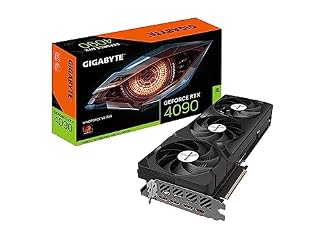
For a massive upgrade path, the Gigabyte RTX 4090 is the current peak. It is not just for gaming; it is for people who also render video or run AI models locally. It costs significantly more but eliminates hardware bottlenecks for years to come.
If you stay with this CyberPowerPC, the B850 board and DDR5 RAM mean you can swap in a better GPU later. The motherboard will not be the bottleneck. This makes it a decent base to start with if you can’t afford the top-tier cards right now.
Pro tip: A high-end GPU like this requires a larger power supply. Check your CyberPowerPC PSU wattage before buying one.
The bottom line
This CyberPowerPC is a strong buy for 1440p gamers who want to skip the build process. It has a fast CPU and modern platform, but the 8GB VRAM will limit ray tracing soon. If you prioritize frame rate over visual effects, it is a good value; if you want future-proofing for 4K, look for a GPU with more memory.
- The macbook cleaning kit computer screen cleaner comes with a number of accessories
- The laptop screen cleaner keyboard cleaner can pull out the keycaps of gaming keyboards
Frequently asked questions
Is the CyberPowerPC Ryzen 7 8700F build loud?
The stock cooler can be audible at full load. Most owners find it acceptable for gaming, but if you sit close to the PC, you might hear the fans spin up during heavy scenes. Using liquid metal paste can help lower temps and reduce fan speeds.
Can I upgrade the RAM in this system later?
Yes. The DDR5 platform is standard, and most B850 boards have four slots. If you only have 16GB now, you can add another 16GB later to reach 32GB. This helps with heavy multitasking and future games that demand more memory.
Does this PC come with Windows installed?
Yes, it usually ships with Windows 11 Home. You will just need to do initial setup and create a Microsoft account. It is ready to go out of the box, so you can start gaming immediately without waiting for installation media.