
You are trying to decide whether to build a PC with a Ryzen 7 or a 13th Gen Intel Core i7, specifically to run Minecraft smoothly. This guide tells you which chip actually matters for the game and why the difference might be smaller than you think.
In short: For Minecraft, both CPUs are more than capable, and the bottleneck is usually your graphics card or Java settings, not the processor. If you play heavy modpacks or use large servers, the Ryzen 7’s efficiency or the i7’s extra cores can help, but for vanilla gameplay, either choice will run the game easily at high settings.
Our pick
Tap to see today's price on Amazon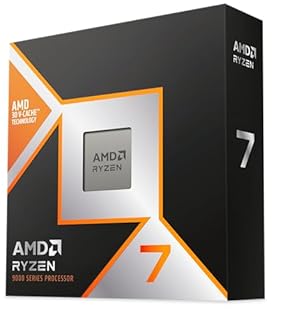
The 9800X3D’s large cache and low power draw make it ideal for smooth, quiet gaming sessions in Minecraft and other titles.
Minecraft Is Not a Heavy Game, So What Does It Actually Need?
Many buyers overthink the CPU for Minecraft. The game is not graphically intensive in the same way as Cyberpunk or Warzone. It relies heavily on single-thread speed and can be limited by Java overhead or world chunks. For the detail, see our notes on intel vs ryzen gaming and professional.
A modern CPU from the last five years will run vanilla Minecraft at 60 FPS or higher on high settings. The difference between a high-end Ryzen 7 and a 13th Gen Intel i7 is rarely visible in unmodded gameplay.
- Vanilla Minecraft: Any mid-range CPU works fine.
- Modpacks (FTB, All The Mods): Higher core counts and clock speeds help with loading times and simulation.
- Shaders: Your GPU matters far more than your CPU.
How Ryzen 7 and 13th Gen Intel i7 CPUs Work
AMD Ryzen 7 chips from the 5000 series use an 8-core, 16-thread design. They are efficient, run cool, and have high single-thread performance. The newer 9000 series adds a 3D V-Cache that improves gaming by storing data closer to the cores.
Intel 13th Gen Core i7 chips (like the i7-13700K) use a hybrid design. They mix fast Performance cores with efficient E-cores. This gives them a higher total thread count, which helps in background tasks, but can sometimes cause scheduling issues in older games if not managed well.
For Minecraft, the single-thread speed of both processors is well above the requirement. The Ryzen 7 often has the edge in sustained gaming due to lower heat, while the i7 wins in heavy multitasking.
Tip: If you plan to stream or run Discord and Chrome while playing, the Intel i7’s extra E-cores can handle that load with less impact on your frame rate.
When the CPU Actually Matters for Minecraft
There are two main scenarios where the processor choice changes your experience. The first is running massive modpacks with hundreds of mods. The second is playing on a server with many players or redstone contraptions that tick thousands of blocks per second. We cover cyberpowerpc vs yawyore in a guide of its own.
In these cases, the CPU has to process logic, not just render images. A CPU with more cores can handle the simulation better. However, in both cases, the difference between a top-tier Ryzen 7 and a 13th Gen i7 is still small. You will likely hit the ceiling of your monitor’s refresh rate long before either chip slows down.
If you are playing on a 1440p monitor with a mid-range GPU, the GPU will be the limit. If you are on 1080p with a powerful GPU, the CPU will handle the simulation, and both options will feel snappy.
| Scenario | Better Choice | Why |
|---|---|---|
| Vanilla + Shaders | Either | GPU is the bottleneck |
| Heavy Modpacks | Intel i7 | More cores for simulation |
| Low Power/Noise | Ryzen 7 | Runs cooler and quieter |
The 9800X3D is the best option if you want the smoothest and most efficient gaming experience without worrying about heat.
- The world’s fastest gaming processor, built on AMD ‘Zen5’ technology and Next Gen 3D
- 8 cores and 16 threads, delivering +~16% IPC uplift and great power efficiency
Common Myths About CPU Choice for Minecraft
A frequent misconception is that you need the fastest CPU to play Minecraft. You do not. The game is old enough that it scales well on almost any modern processor.
Myth: Java is always slow.
Fact: The difference between the Java and Bedrock versions has closed significantly. Bedrock is generally lighter, but Java is more moddable. Your CPU is not the reason Java feels slower.
Myth: More cores are always better.
Fact: Minecraft uses one main thread for the simulation. More threads help with background tasks and multi-world mods, but they do not magically make single-player vanilla games faster.
Myth: The new CPU will double my FPS.
Fact: If your current game is running at 200 FPS, a new CPU will not make it 400 FPS. You are already over the limit of the game engine or your monitor. Loaders in this spot often ask about ryzen 7 vs intel i7 as well.
Pro tip: Allocate more RAM to Minecraft (4GB–8GB) before upgrading your CPU. It is a free fix that often improves load times and stability more than any hardware change.
How to Choose: Ryzen 7 or 13th Gen Intel i7?
If you are buying a new system, choose based on the rest of your build and your priorities. There is no single “better” chip for Minecraft specifically, but there are better fits for your style.
Choose the AMD Ryzen 7 if: You want a quiet, cool-running machine. You plan to keep the PC for a long time (AM5 socket upgrade path). You mostly game and do not need heavy video editing power.
Choose the 13th Gen Intel Core i7 if: You do a lot of productivity work like video rendering or coding. You run many background apps while playing. You are already on an LGA 1700 motherboard and just want to drop in a new CPU.
Check the specific model number on the box. The i7-13700 and i7-13700K are different. The K version has an unlocked multiplier for overclocking, which you likely do not need for Minecraft.
Verdict: Which One Gets You the Smoothest Minecraft?
For Minecraft, both the Ryzen 7 and the 13th Gen Intel Core i7 are overkill. You will not notice a performance difference in vanilla gameplay. The deciding factor should be power efficiency, multitasking, or your existing motherboard.
If you want the absolute best gaming feel with the least heat, the AMD path is often smoother. If you need the PC to do everything from gaming to video editing, the Intel hybrid core design is the workhorse.
Start by optimizing your Java settings and RAM allocation. If that fixes your lag, you do not need a new CPU at all. If you are building from scratch, buy the chip that fits your budget and use case, knowing both will run Minecraft with ease.
The bottom line
For Minecraft, the choice comes down to system balance, not raw gaming power. Pick the AMD Ryzen 7 for efficiency and quiet operation, or the Intel 13th Gen i7 if you need extra cores for streaming and work. Most players should focus on RAM allocation and GPU choice rather than CPU micro-optimizations.
- The world’s fastest gaming processor, built on AMD ‘Zen5’ technology and Next Gen 3D
- 8 cores and 16 threads, delivering +~16% IPC uplift and great power efficiency
Frequently asked questions
Does Minecraft use multi-core CPUs?
Vanilla Minecraft primarily uses one core for the game simulation. More cores help if you are running large modpacks, server instances, or background applications. For standard single-player, single-core speed and clock frequency matter more than total core count.
Is a 13th Gen i7 faster than a Ryzen 7 in Minecraft?
In FPS benchmarks for Minecraft, they are statistically similar. The Intel i7 may have a slight edge in complex modded simulations due to higher thread counts, while the Ryzen 7 often runs cooler and more efficiently. The difference is not visible to the human eye in gameplay.
What CPU is best for 200+ FPS Minecraft?
At 200 FPS, you are usually GPU-limited, not CPU-limited. Both a Ryzen 7 and a 13th Gen Intel i7 can push this high. If you need to sustain 200+ FPS with heavy modpacks, look at the single-thread performance of the i7-13700K or the cache performance of a Ryzen 7 X3D chip.