ASUS Dual Radeon RX 9060 XT Review: The Smart Mid-Range Pick
You’ve saved up for a graphics card, and now you’re staring at a wall of boxes. The ROG Strix looks like a spaceship, the TUF looks like a tank, and the Dual just sits there, looking sensible. It’s easy to overlook the quiet one in the corner. That might be a mistake.

ASUS
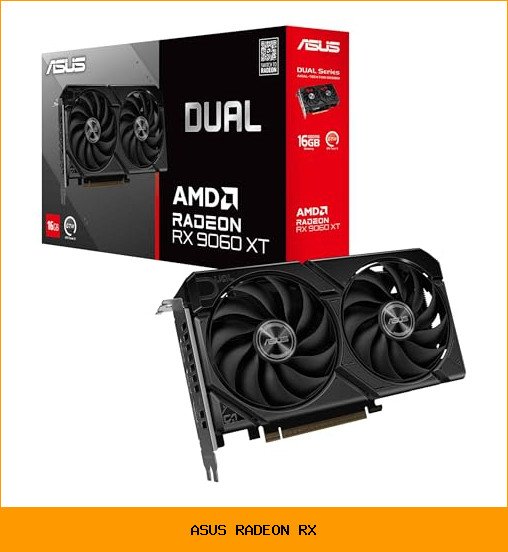
ASUS Dual Radeon RX 9060 XT 16GB…
- Axial-tech fans now feature a smaller fan hub that facilitates longer blades and a barrier ring that increases downward air pressu…
- 2.5-slot design allows for greater build compatibility while maintaining cooling performance
- 0dB technology lets you enjoy light gaming in relative silence
The ASUS Dual Radeon RX 9060 XT 16GB card doesn’t shout for attention. But after spending time with it, I think it’s the card most people should actually buy. It hits a sweet spot that the flashier models miss entirely.
Let me walk you through what this card does, where it cuts corners, and whether it belongs in your rig. I’ll also compare it to the other ASUS Radeon RX options so you can see the full picture.
Why the Dual Series Makes Sense in 2026
ASUS splits its graphics card lineup into three main tiers. The ROG Strix is the top dog, with massive coolers and factory overclocks. The TUF Gaming sits in the middle, promising durability and military-grade components. The Dual series is the value pick, but that label undersells it.
The Dual RX 9060 XT uses a 2.5-slot design. That’s thinner than the 3-slot behemoths from the Strix line. For most builds, that extra space matters. It clears larger CPU coolers and fits in smaller cases without choking airflow. You lose a little thermal headroom compared to a triple-fan monster, but you gain compatibility.
This card isn’t a compromise product. It’s a focused one. ASUS put the engineering effort into the things that actually affect your daily gaming experience, not just the RGB lighting.
The Cooling Story: Axial-tech Fans That Actually Work
The headline feature here is the Axial-tech fan design. ASUS shrunk the fan hub, which leaves room for longer blades. Longer blades push more air at the same RPM. There’s also a barrier ring on the fan shroud that forces air downward onto the heatsink instead of letting it scatter sideways.
Does it work? In practice, yes. The card runs cool under load, and the noise profile stays reasonable. You’re not getting the absolute lowest temperatures of the Strix, but the gap is smaller than the price difference suggests.
The fans ride on dual ball bearings. ASUS rates these to last up to twice as long as the sleeve bearing designs found on cheaper cards. That’s a longevity play. A GPU fan that dies after three years turns a working card into a paperweight. This design pushes that failure point further out.
0dB Technology: Silence When You Need It
Here’s the feature I appreciated most. The fans completely stop spinning when the GPU temperature stays below a threshold. Light gaming, desktop work, or watching video runs in total silence. The card becomes a passive heatsink.
This isn’t a gimmick. If you’ve ever sat next to a GPU that idles at 30% fan speed, you know the low hum gets old fast. The 0dB mode means the only time you hear this card is when it’s actually working hard. For anyone who leaves their PC on overnight or works in a quiet room, this alone justifies the purchase.
Dual BIOS: A Switch That Matters
Most people never touch the BIOS switch on their graphics card. That’s fine, because the default setting usually works well. But the Dual BIOS switch on this card gives you a real choice.
The Performance profile runs the fans more aggressively, keeping temperatures lower at the cost of noise. The Quiet profile does the opposite, letting the card run a bit warmer to keep fan speeds down. You flip the physical switch on the card’s edge to change modes.
My advice: leave it on Quiet for daily use. The performance difference between the two profiles is small, and the noise reduction is worth it. Switch to Performance if you’re benchmarking or running a long render session.
What the ASUS Dual RX 9060 XT Gets Right
Let me be direct about where this card shines. The 16GB of GDDR6 VRAM is the star of the show. Games are getting hungrier for memory. Titles that use heavy texture packs and ray tracing can eat 12GB without blinking. The 16GB buffer means you won’t be forced to drop texture quality settings for a couple of years.
The card supports PCIe 5.0, which future-proofs your connection bandwidth. You won’t see a massive performance jump from PCIe 4.0 today, but when GPUs start saturating the older bus, you’ll be ready.
Port selection is solid. You get HDMI 2.1b and DisplayPort 2.1a outputs. That covers modern 4K high-refresh monitors and the newest 8K displays if you ever go that route. Both standards support the bandwidth needed for high refresh rates at high resolutions.
I also like the build quality. The backplate is sturdy, the card doesn’t sag noticeably in a standard horizontal mount, and the overall construction feels solid. It’s not flashy, but it’s dependable.
Honest Weaknesses and Trade-offs
No card is perfect, and this one has a few quirks worth mentioning.
- The cooler is smaller than the Strix. Under sustained heavy load, temperatures run a few degrees warmer. The fans spin faster to compensate. You’ll hear it during long gaming sessions, but it’s not unpleasant.
- No RGB lighting. If your build is a light show, this card will look plain. The Dual series skips the LEDs entirely. Some people prefer that. Others won’t.
- Factory overclock is modest. You can push the card further manually, but the stock clock speeds are conservative. The headroom is there, but you’ll need to use software to access it.
- It’s a 2.5-slot card. That’s thinner than the Strix, but it still takes up more room than a true dual-slot card. Check your case clearance before buying, especially if you have other expansion cards nearby.
None of these are dealbreakers. They’re just the trade-offs you accept for a lower price point.
Who Should Buy This Card
This card is for the gamer who plays at 1440p and wants high refresh rates without selling a kidney. It handles demanding titles at that resolution with ease, and the 16GB VRAM gives you room to enable ray tracing where it makes sense.
It’s also a strong choice for anyone building a compact or mid-tower PC. The 2.5-slot design fits where a 3-slot card won’t. If you’re upgrading an older system with a smaller case, this is a safer bet than the bigger models.
Content creators on a budget will appreciate the VRAM. Video editing software and 3D rendering tools love memory. The 16GB buffer handles 4K timelines and complex scenes without swapping to system RAM.
If you’re running a multi-monitor setup, the four display outputs give you flexibility. You can run three displays plus a VR headset without swapping cables.
Who Should Skip It
If you’re gaming at 4K with all the settings maxed out, this isn’t the card for you. You want a higher-tier GPU with more compute power. The 16GB VRAM helps, but the raw processing power isn’t enough for consistent 4K ultra performance.
Hardcore overclockers chasing every last megahertz should look at the ROG Strix instead. That card has a beefier power delivery system and a larger heatsink designed for extreme tuning. The Dual’s components are good, but they’re not built for sub-zero cooling experiments.
If your case is truly tiny, like an ITX build with strict length limits, measure twice before buying. The 2.5-slot width is manageable, but length can still be an issue in some small form factor cases.
And if you already own a card with 16GB of VRAM and similar performance, this isn’t worth the upgrade cost. Wait for the next generation.
How It Compares to Other ASUS Radeon RX Cards
ASUS sells several Radeon RX variants, and the differences matter more than you’d think.
| Model | Cooler Size | Target User | Key Advantage |
|---|---|---|---|
| ROG Strix | 3-slot, triple fan | Enthusiasts, overclockers | Best thermals, highest factory clocks |
| TUF Gaming | 2.7-slot, triple fan | Durability-focused builders | Reinforced frame, military-grade components |
| Dual | 2.5-slot, dual fan | Mainstream gamers | Best compatibility, quiet operation |
The Strix is the performance king. It runs cooler and quieter under load because it has more heatsink surface area. But it’s also longer, taller, and heavier. You need a spacious case and possibly a GPU support bracket.
The TUF Gaming sits in between. It’s built like a brick, with a metal backplate and reinforced mounting points. It’s the card you buy if your PC lives in a dusty workshop or gets transported to LAN parties regularly.
The Dual is the sensible choice. It gives up a little thermal performance for significantly better case compatibility. For the vast majority of users, that’s the right trade. The AMD Radeon vs Nvidia comparison matters less when you’ve already picked a card that fits your build.
Choosing the Right ASUS Radeon RX Card for Your Budget
Start with your resolution and target frame rate. That determines the GPU tier you need. Then look at your case dimensions. That determines which cooler size you can fit.
For 1080p gaming, the Dual series is more than enough. You’ll crush frame rates at that resolution. For 1440p, the Dual RX 9060 XT is the sweet spot. For 4K, step up to a higher-tier card or consider the Strix variant.
Also check your power supply. This card needs a proper PCIe power connection, and your PSU should have enough wattage headroom. ASUS lists the requirements in the product documentation. Don’t skip this step.
If you’re building an all-ASUS system, the synergy is real. Pairing this card with an ASUS motherboard gives you access to unified software control. The ASUS gaming ecosystem extends beyond laptops to desktop components. You can monitor GPU temperatures, fan speeds, and clock speeds from the same dashboard you use for your motherboard.
Beyond Gaming: Content Creation and Professional Work
The 16GB VRAM makes this card genuinely useful for creative work. Video editing software like DaVinci Resolve uses GPU memory for color grading and effects. 3D modeling tools like Blender offload rendering tasks to the GPU. The extra memory prevents crashes and slowdowns when you’re working with large files.
Streaming is another strong use case. The AMD encoder handles video encoding efficiently, so you can stream gameplay without tanking your frame rates. The dual fans keep the card cool during long streaming sessions.
Machine learning hobbyists will also appreciate the VRAM. Training smaller models or running inference tasks benefits from the 16GB buffer. It’s not a data center GPU, but it’s more than capable for learning projects.
Tips for Getting the Most Out of Your Card
First, update your drivers. AMD releases regular driver updates that improve performance and fix bugs. The Radeon Software Adrenalin suite includes a one-click update feature. Use it.
Second, set a custom fan curve. The default curve is conservative. Using the bundled GPU Tweak II software, you can make the fans spin up earlier, which keeps temperatures lower. The card will run a bit louder, but the thermal headroom helps with sustained loads.
Third, enable Radeon Anti-Lag in your games. It reduces input latency, making the game feel more responsive. The difference is subtle but noticeable in fast-paced shooters.
Fourth, keep the card clean. Dust buildup on the heatsink reduces cooling efficiency. Every few months, use compressed air to blow out the fins. It takes five minutes and keeps the card running at peak performance.
If you run into issues, check the card’s seating in the PCIe slot first. A partially seated card causes all sorts of weird problems. Reseat it, make sure the latch clicks, and try again.
Maintenance and Longevity Considerations
The dual ball bearing fans are the key to this card’s long life. Sleeve bearing fans wear out over time, getting noisier until they eventually fail. Ball bearings maintain their smooth operation much longer. That’s a meaningful reliability advantage.
The 0dB mode also helps longevity. Fans that don’t spin don’t wear out. Since the fans only activate under load, they accumulate fewer total rotations over the card’s life compared to cards that always spin.
Keep the card in a well-ventilated case. Good case airflow lowers the GPU temperature, which means the fans don’t have to work as hard. It’s a simple equation that pays off in the long run.
Final Verdict: The Sensible Choice
The ASUS Dual Radeon RX 9060 XT 16GB is the card I’d recommend to most people without hesitation. It delivers strong 1440p performance, has enough VRAM for the next few years of games, and fits in cases that reject the bigger models.
It’s not the fastest card in the ASUS lineup. The ROG Strix beats it in raw performance and thermal headroom. But the Dual costs less, fits more builds, and includes the features that matter day to day. The 0dB fan stop, the dual BIOS switch, and the durable bearings all contribute to a better ownership experience.
Check the ASUS Dual RX 9060 XT listing on Newegg for current availability and pricing. If you’re building a new rig or upgrading an older one, this card deserves a spot on your shortlist.
For those who want the absolute top-tier performance, the ROG Strix Radeon RX 6800 remains the enthusiast pick. But for everyone else, the Dual is the right call. It’s the card that gets out of your way and lets you play.
Frequently Asked Questions
Does this card support ray tracing?
Yes. The Radeon RX 9060 XT supports hardware ray tracing. Performance varies by game, but you can enable ray tracing at 1440p with reasonable frame rates. The 16GB VRAM helps with the memory overhead that ray tracing requires.
Will this card fit in my small form factor case?
It depends on your case’s length limit. The card uses a 2.5-slot design, which is narrower than the 3-slot Strix models. Measure your case’s GPU clearance before buying. It fits most mid-tower cases without issue.
What power supply do I need?
ASUS recommends a 650W power supply for systems using this card. That gives you headroom for the CPU and other components. Make sure your PSU has the required PCIe power connectors. Check the product manual for exact requirements.
Does the 0dB technology work automatically?
Yes. The fans stop spinning when the GPU temperature drops below a threshold. You don’t need to configure anything. The card handles it automatically. The fans start spinning again when the card comes under load.
Is the Dual BIOS switch worth using?
Yes, but don’t obsess over it. The Quiet profile is fine for daily use. The Performance profile runs fans faster for lower temperatures. Flip the switch based on your current activity. It takes two seconds to change.
Can I use this card for streaming?
Absolutely. The AMD encoder handles video encoding efficiently. You can stream gameplay at 1080p or 1440p without a noticeable impact on frame rates. The 16GB VRAM also helps when running streaming software alongside games.
The ASUS Dual Radeon RX 9060 XT is a well-rounded graphics card that gets the fundamentals right. It’s quiet when you need it, fast when you want it, and built to last. That’s a combination worth paying for.
Ready to buy? Check the latest price on Amazon