
 By
You are scrolling Reddit threads and forum posts, seeing mixed opinions on whether an ASUS gaming laptop is actually worth the money. This page cuts through the noise and gives you the straight answer on performance, reliability, and where to look for specific specs.
In short: ASUS gaming laptops are good for gaming, but the right choice depends on which line you buy: TUF for value, Zephyrus for portability, or Strix for raw power. The main trade-offs are battery life, fan noise, and the learning curve of their control software. Match the series to your needs, and check the specific refresh's thermals before buying.
Our pick
Tap to see today's price on Amazon
Boosts multitasking and load times on the specific ASUS model this part fits.
How to Read Community Feedback on ASUS Reliability
Searches like “asus reddit” often pull up threads about coil whine, screen bleed, or hinge creaks. These are real issues, but they usually affect specific model years rather than the brand as a whole. Loaders in this spot often ask about zenbook vs vivobook comparison as well.
Check recent user reports for the exact model you are looking at. A Zephyrus unit from 2024 behaves very differently from one in 2021.
When a community flags a problem, look at the percentage of complaints. If 10% of owners mention a screen issue, it is a risk factor. If 90% are happy, the negatives are outliers.
- Coil Whine: A humming sound under load. Common in OLED panels. It is annoying but not a failure.
- Screen Bleed: Light leaking at the edges. Look for this in dark scenes on the backlit screen.
- Hinge Play: Wobble after a year of opening. Heavier models are usually stiffer.
Do not take single complaints at face value. One user with a defective unit does not mean the batch is bad. Look for patterns across multiple forums and retail review sections. If you see consistent reports of a specific part failing, that is a signal to wait for a new revision or choose a different model.
Pro tip: Always buy from a retailer with a generous return window. If you spot a defect, you need a clear exit strategy.
Which ASUS Gaming Series Fits Your Setup
ASUS does not make one “gaming laptop”. They build an ecosystem with distinct strengths. Knowing the line saves you from overpaying for features you will not use.
| Series | Best For | Main Trade-off |
|---|---|---|
| TUF | Budget value, durability | Dimmer screen, louder fans |
| Zephyrus | Portability, thin design | Higher cost, less cooling headroom |
| ROG Strix | Max desktop power | Heavy, bulky, poor battery |
The TUF line uses military-standard chassis. It survives bumps better but often uses lower-tier panels. The Strix is a desktop replacement. It runs the biggest graphics cards and needs a large power brick. Before you buy anything, it is worth looking at display panel comparison.
If you carry your laptop to a cafe or classroom, the Zephyrus is the only one that fits in a regular backpack while still running modern games. It uses liquid metal cooling in some models to keep the GPU stable in a thin frame.
This design allows it to run higher wattage components without overheating as quickly as a standard thin laptop.
Check the keyboard layout. Strix models often have a number pad, while Zephyrus units save space by removing it. If you use spreadsheets or numeric inputs a lot, the missing pad might be a dealbreaker. TUF models sit in the middle, often offering a number pad in larger 15-inch and 17-inch variants.
Thermals and Fan Noise: What to Expect
Cooling is where ASUS separates itself. They use a mixture of copper heat pipes and, on higher-end CPUs, liquid metal compound. This keeps performance consistent over long sessions.
However, “consistency” often means “louder”. A thin laptop must spin fans faster to keep a powerful chip cool. Expect high RPMs during competitive play. The noise is not just a nuisance; it is a sign that the thermal design is hitting its limit.
- Strix: Quietest under light load. Gets loud only when the GPU hits 100%.
- Zephyrus: Moderate noise. Fans cut in and out as temps swing.
- TUF: Can be noticeable. Simple fan design is easier to clean.
Check the specific model’s fan layout. Some have single fans, others have dual. Dual-fan setups share the heat load and usually run quieter at the same performance level. We cover weighing the specs of both laptops in a guide of its own.
Dust is the enemy of these systems. After six months of use, check the vents for buildup. A simple can of compressed air while the fan is stopped can drop temps by 10-15 degrees.
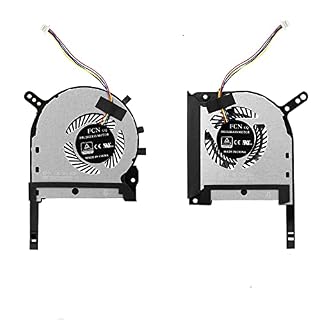
If fans die or clog, this replacement pair restores airflow for TUF models.
- Condition: Brand new
- DFS5K12304363H FMIU DFS5K12114262H FM1V
Upgrading: RAM, Storage, and Thermal Pads
Most ASUS gaming laptops allow you to open the bottom panel and add RAM or an SSD. This is the single best upgrade you can make for longevity. It is also the cheapest way to extend the life of the machine.
Check if your model has free M.2 slots. Many Strix and TUF units ship with one NVMe drive and have room for a second. Adding a 1TB drive for game installs frees up your system drive and keeps the operating system snappy. Always verify the SSD form factor; some older models use M.2 2230, which is shorter.
For RAM, dual-channel is critical. A single stick runs slower than two matching sticks. If you are on 8GB, move to 16GB. For heavy multitasking and streaming, 32GB or 64GB is the next step. Check your exact socket count. Some Zephyrus models solder the RAM, meaning you cannot upgrade it.
- RAM: Check your exact socket count (1 or 2).
- SSD: M.2 2280 is the standard size for most units.
- Thermal Pads: If you replace the cooling fan, the old silicone pads often fail. New ones keep heat moving from the VRM and chipsets.
When you do open the case, take a photo of the cable routing. It makes reassembly much easier and prevents you from snapping a fragile ribbon cable.
This specific kit replaces or expands memory in the Strix G15 line.
- Compatible for the ASUS ROG Strix G15 (2022) G513, G513RC, G513RM, G513RS, G513RW
- 64 GB RAM Kit, (2 x 32GB Modules); DDR5 SO-DIMM 262-Pin; Speeds up to 4800 MHz
Armoury Crate and BIOS: Mastering the Settings
ASUS uses Armoury Crate to control performance. It is powerful but cluttered. You can set fan curves, switch to “Silent” or “Performance” modes, and control RGB lighting. The interface can be slow to load, so expect a short delay when changing settings.
For gaming, set the fan curve to manual. Use the performance mode but keep fans at 70-80% for a balance of noise and temp. Letting them hit 100% constantly will degrade the motors. You can also set the CPU power limit, which often saves battery without dropping much FPS.
In the BIOS (press Del on startup), look for “Power Management”. Some models let you lock the GPU into high-performance mode, bypassing the power-saving switch. This gives a small frame-rate boost in heavy titles. Make sure you know your BIOS password if you set one, as it locks the device.
- ASUS MyASUS: The utility for system updates and battery health limits.
- BIOS: Use for boot order and hardware-level settings.
- Armoury Crate: Use for gameplay profiles and thermal management.
Keep the BIOS updated, but only when you are not running critical tasks. An interrupted update can prevent the laptop from booting.
Safety first: Never update the BIOS while gaming. An interruption can brick the board. Use a stable Wi-Fi connection and a plugged-in power source.
The Bottom Line on Value vs. Rivals
Compared to Alienware, ASUS offers more raw performance for the same budget. Alienware wins on build materials and a more subdued design. If you need to look professional in a boardroom, Alienware or a TUF model is the better fit.
Against MSI, ASUS often has better screen options and a more consistent keyboard feel. MSI sometimes allows easier physical upgrades because of a simpler case design. For most users, the ASUS warranty service is also more accessible in major cities.
For most buyers, the TUF and Zephyrus lines strike the best balance of price, cooling, and portability. If you need absolute power and will not move the laptop, the Strix is the clear choice. Stick with the line that matches your physical needs, not just the spec sheet.
Remember that “good for gaming” means different things to different people. If you play esports titles like Valorant, a TUF laptop is plenty. If you want to ray-trace at 4K, you need the cooling headroom of a Strix or a high-wattage Zephyrus. Match the hardware to your game library.
The bottom line
ASUS is a strong choice if you pick the right series: TUF for value, Zephyrus for portability, or Strix for desktop power. Upgrade the RAM to dual-channel early and manage fans with Armoury Crate to keep the system running cool. Start by identifying your specific model's thermal limits before buying.
- Compatible for the ASUS ROG Strix G15 (2022) G513, G513RC, G513RM, G513RS, G513RW
- 64 GB RAM Kit, (2 x 32GB Modules); DDR5 SO-DIMM 262-Pin; Speeds up to 4800 MHz
Frequently asked questions
Are ASUS gaming laptops good for battery life?
No. Gaming laptops, including ASUS, have short battery life under load. Expect 1-2 hours of gaming. For light work, you can get 4-6 hours, but the high-refresh screen drains the cell faster than in standard laptops.
Does ASUS use liquid metal in their cooling?
Yes, many newer Zephyrus and Strix models use liquid metal compound on the CPU. This improves heat transfer significantly compared to standard paste. You should not change it unless you know how to handle the conductive material safely.
Can I upgrade the GPU in an ASUS laptop?
No. The GPU is soldered to the motherboard. You can only choose the card when you buy the laptop. You can upgrade the RAM, storage, and cooling fans, but the graphics card is a fixed part of the system.
Is Armoury Crate necessary for gaming?
It is not strictly required for the games to run, but it is the only way to control the fan curves and performance profiles natively. Without it, the fans run on a default automatic curve, which may be noisier or less stable than a manual setting.