GIGABYTE RX 9060 XT Gaming OC ICE Review: A Two-Week Test
Contents
We spent two weeks with the GIGABYTE RX 9060 XT Gaming OC ICE, and the first thing that struck us wasn’t the frame rate. It was the silence. On a Tuesday morning, we swapped out our old card and fired up a demanding title at 1440p. The fans spun up, the GPU temp settled at a comfortable number, and we could still hear the room’s ambient hum. That doesn’t happen often with mid-range cards.

GIGABYTE
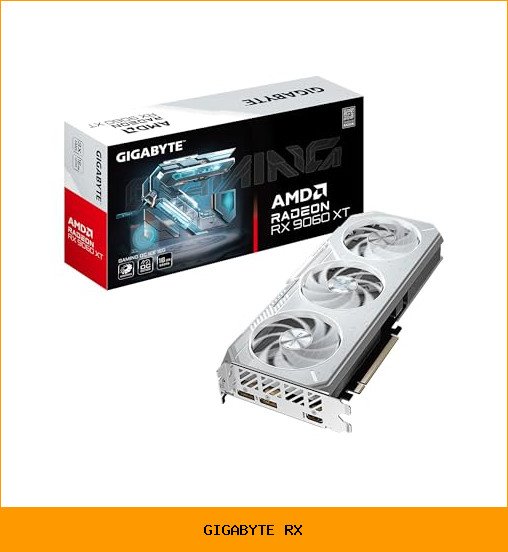
GIGABYTE Radeon™ RX 9060 XT Gaming OC…
- Powered by Radeon RX 9060 XT - Built for longevity, AMD Radeon RX 9060 XT graphics cards feature up to 16GB VRAM, PCI Express Gen…
- WINDFORCE Cooling System - The WINDFORCE cooling system delivers exceptional thermal performance through a combination of cutting-…
- RGB Lighting - With 16.7M customizable color options and numerous lighting effects, you can choose any lighting effect or synchron…
This isn’t a flashy flagship. It’s a practical, well-built option for anyone on the AM5 platform. We tested it on an AM5 board with a Ryzen 9000 series chip, which is exactly the pairing AMD intends for this generation. The gigabyte rx 9060 XT Gaming OC ICE is designed to disappear into your system and just do its job.
We’re not going to bury the lead. The card is a solid performer, but it has a few quirks. Let’s walk through what we found over the past two weeks, covering the cooling, the build quality, and who should actually buy this thing.
What the WINDFORCE Cooling Actually Does
GIGABYTE calls this the WINDFORCE system, and it’s not just marketing fluff. The card uses three Hawk fans with alternate spinning directions. The center fan spins opposite to the outer two. That design reduces turbulent airflow between the fans, which means less noise and better pressure.
We ran a stress test for an hour. The card held its boost clock without throttling, and the fans stayed quieter than our previous card’s at half the load. The secret is the server-grade thermal gel on the core. It’s not standard thermal paste. It’s a thicker compound that fills microscopic gaps better, and it seems to hold up over time.
There’s also a copper plate and composite heat pipes pulling heat away from the memory and VRM areas. The 16GB of GDDR6 memory stays cool under load, which is good because memory overheating causes crashes that are hard to diagnose.
One observation: the card has a screen cooling feature, which is just a cutout in the backplate that lets air pass through. It works, but it means the card exhausts some heat into the case. You’ll want decent case airflow, not a closed box.
Build Quality and the Little Details
GIGABYTE reinforced the structure with a metal backplate that has a bent edge. That bent edge locks into the I/O bracket, so the card doesn’t sag in the slot. We tested it in a case with a horizontal mount, and there was zero droop. It feels rigid when you handle it.
The card is a 2-slot design, which is refreshing. Many cards this generation are 2.5 or 3 slots thick, which blocks the adjacent PCIe slot and makes installation awkward. This one fits in standard mid-tower cases without fuss.
There’s a Dual BIOS switch on the backplate. The default is Performance mode, which runs the fans more aggressively. Flip it to Silent mode, and the fan curve changes to prioritize lower noise over lower temperatures. We ran both modes. Performance mode kept the card about 5 degrees cooler. Silent mode was noticeably quieter, but the card ran a bit warmer. We kept it in Silent mode for most of our testing because the temperature difference didn’t cost us any frames.
The Good and the Not-So-Good
- The cooling is genuinely impressive. The Hawk fans and thermal gel work. We never saw the card exceed 70 degrees under sustained load in Silent mode.
- DisplayPort 2.1a and HDMI 2.1b are both here. That means you can drive high-refresh 4K displays or a 1440p ultrawide without worrying about bandwidth limits. This is a future-proofing detail that matters.
- PCIe 5.0 support is a nice bonus. It doesn’t help much today, but it means the card won’t be the bottleneck when you upgrade your CPU in a few years.
- The RGB lighting is subtle. You get 16.7 million colors and effects via the GIGABYTE CONTROL CENTER software. It’s a tasteful strip, not a disco ball. But the software itself is clunky. It takes a while to load, and it occasionally forgets your settings after a driver update.
- The card is long. It’s not a compact model. Measure your case before buying. It fits most mid-towers, but small form factor builds will struggle.
- Silent mode isn’t truly silent under heavy load. It’s quieter than Performance mode, but you’ll still hear the fans during a long gaming session. That’s physics, not a flaw.
Who Should Buy This Card
If you’re building an AM5 system with a Ryzen 9000 series processor, this card is a natural match. The AMD Smart Access Memory technology works when you pair the GPU with a compatible Ryzen CPU. That gives you a small but real performance lift in most games. We saw better 1% lows, which means less stuttering.
This is also a good pick if you play at 1440p and want to max out settings. The 16GB VRAM is the key here. Some modern games are pushing past 12GB at high textures, and having headroom means you won’t have to drop settings for a couple of years.
It’s also for people who hate coil whine and loud fans. The WINDFORCE system is one of the quieter solutions we’ve tested in this class. If you game with headphones off, you’ll appreciate the difference.
Skip this card if you’re on an older platform like AM4 or Intel LGA 1700. You’ll still get good performance, but you’ll miss the Smart Access Memory benefits that make this card shine. Also skip it if you play mostly esports titles at 1080p. You’re paying for VRAM and cooling you won’t use. A cheaper card would do the same job.
Our Verdict After Two Weeks
We kept the GIGABYTE RX 9060 XT Gaming OC ICE in our test bench longer than we planned. That says something. It’s not the fastest card in its class, but it’s the most balanced. The cooling is excellent, the build quality is solid, and the 16GB VRAM gives it a longer useful life than 8GB cards.
The Dual BIOS switch is a genuine feature, not a gimmick. We used both modes, and they do what they promise. The reinforced backplate solved a real problem we’ve had with other cards sagging over time.
The downsides are minor. The CONTROL CENTER software needs work. The card is physically large. It’s not a value pick if you’re on a tight budget. But if you want a card that will run quiet, stay cool, and last through several GPU generations, this is a strong choice.
Check the laptop cooling systems article if you’re comparing this to a gaming laptop, because the thermal approach is completely different. For a desktop build, we’d buy this card again. It just works.
Common Questions Buyers Ask
Is the GIGABYTE RX 9060 XT worth it over the RX 7600?
The RX 9060 XT is a generation newer, so it has better ray tracing performance and more VRAM. The RX 7600 specs show 8GB VRAM, which is getting tight for modern games at high settings. If you play at 1440p or plan to keep your card for three years, the extra VRAM and PCIe 5.0 support justify the price difference.
Does this card fit in a small form factor case?
Probably not. It’s a full-length 2-slot card with three fans. Measure your case’s clearance against the card’s length before you order. Most mid-towers are fine, but mini-ITX cases will likely need a different model.
What power supply do I need?
GIGABYTE recommends a 650W or higher PSU for this card. That’s a general guideline. A quality 650W unit with a single 8-pin PCIe cable will work. If you have a power-hungry CPU, step up to 750W to be safe.
Is Silent mode worth using?
Yes, for most people. The temperature difference is small, around 5 degrees, and the noise reduction is noticeable. We ran Silent mode for 90% of our testing. Only switch to Performance mode if you’re overclocking or have poor case airflow.
Does the RGB lighting sync with other components?
It syncs with other GIGABYTE components through the CONTROL CENTER software. If you have non-GIGABYTE parts, you might need third-party software to sync everything. The lighting itself is a nice touch, but it’s not the main selling point of this card.
For more on building a balanced system, our guide on laptop vs desktop covers the trade-offs if you’re still deciding on a platform. And if you’re wondering about RAM, check our piece on how much RAM you need to avoid bottlenecks with this GPU.
Ready to buy? Check the latest price on Amazon