
 By
A good student gift gets used on the first day of term, not left in a drawer. The safest picks solve a daily annoyance, fit in a bag, and work with almost any laptop.
In short: The safest student gifts are a silent wireless mouse, a protective sleeve, and a laptop stand, because they fix daily annoyances without needing to know the exact laptop model, as long as you check size and port type.
Key takeaways
- Check screen size and port type before you buy, since those two facts decide most returns.
- A silent mouse, sleeve and stand suit almost any student and any laptop.
- Every pick below lists who it suits, the one spec to check, and who should skip it.
- A laptop stand only helps with an external keyboard and mouse paired with it.
- Power banks travel in carry-on luggage only, never in a checked bag.
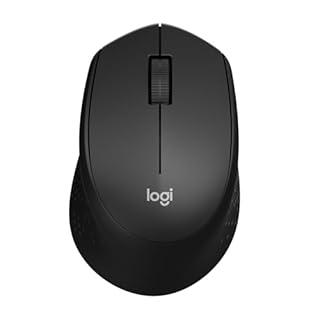
Silent clicks and a small shape suit library tables and shared dorm rooms.

A pocket case and a light fit suit lectures, calls and walks between classes.

Padded corners and a snug fit guard a laptop inside a plain bag.

A padded compartment and water repellent shell suit a daily campus carry.

A compact bank tops up a phone or tablet and can help a USB-C laptop in a pinch.

A fixed aluminum lift raises the screen and clears desk space underneath.

HDMI, USB-A and card slots restore the ports a slim laptop leaves out.
How to choose: size and ports before anything else

Start with two facts about the student’s laptop. The first is screen size, measured diagonally in inches. Common sizes are 13 inch, 14 inch, 15.6 inch and 16 inch.
Sleeves, bags and stands all depend on that number, and a guess is the main reason gifts get returned. Find it on the box or in system settings. There is more on best laptop for architecture students in a separate guide.
The second fact is the port mix. Look at the sides of the laptop and note the shapes. A flat oval port is USB-C.
A wider rectangular port is USB-A. A mouse, hub or charger that needs USB-C will not help a laptop that only has USB-A, and the reverse is true for some older gear.
A recent slim model may have USB-C only, which is why a hub appears in the higher tier.
Wireless gifts need one more check. Most wireless mice and earbuds use Bluetooth, which nearly every student laptop has built in. Some mice instead use a small USB receiver that plugs into a USB-A port. If that port is taken, or the laptop has none, a Bluetooth model is the safer gift.
A stand must fit the base of the machine and hold its weight, and a sleeve must match the screen size with a little room for the charger.
Our guide to the best laptop accessories for work from home covers desk setups in more depth, and the same size and port checks apply at a dorm desk.
For a student still picking the laptop itself, start with 13-inch vs 15-inch laptops for students, then match gifts to that machine.
Under $25

The lowest tier holds small gifts that need no setup and no help desk. Both picks work on their own, pair in minutes, and suit a student who already has a laptop they like.
Logitech M331 Silent Plus wireless mouse: quiet clicks for shared spaces
This mouse suits a student who works in libraries, lecture halls and shared dorm rooms, where a loud click carries across a quiet table. The buttons use a silent design, so clicks and scrolls stay low. The shape is compact, which helps on narrow student desks. It runs on a single battery, so there is no charging routine to learn.
The one spec to check is the connection type. This model pairs through a small USB receiver that sits in a USB-A port. Check that the student’s laptop has a free USB-A port, or pick a Bluetooth mouse instead.
Skip this gift if the student already owns a mouse they like, games at a high level and wants a wired gaming model, or uses a laptop with no free USB-A port and no wish for adapters. It helps to understand budget friendly options for college before going further.
Silent clicks and a small shape suit library tables and shared dorm rooms.
- Quieter Click: Logitech’s SilentTouch Technology reduces over 90 percent (1) of
- Crafted for Comfort: Design with naturally shaped contoured plastic grips, the M330
JLab Go Air Pop wireless earbuds: small buds for lectures and calls

These earbuds suit a student who listens to recorded lectures, joins video calls, and walks between classes with music or a podcast on. The case is small enough for a coat pocket or the front pocket of a backpack. Each bud can be used on its own for a call, which helps in halls and stations.
The one spec to check is fit, and fit matters more than case size or Bluetooth version here. Earbuds ship with tips in a few sizes, and the right tip seals the ear so bass sounds full and the bud stays put. If the student has said that in-ear buds fall out or hurt, this style of gift is a poor match no matter how tidy the case looks.
Skip this gift if the student needs over-ear headphones for long study sessions, wants strong noise cancelling for a loud house, or owns earbuds they already reach for daily.
A pocket case and a light fit suit lectures, calls and walks between classes.
- 🎶AUTO ON & CONNECT: The Go Pop+ True Wireless earbuds turn on and connect to each other
- 🤏 SMALLER FIT EARBUDS: Smaller than a credit card, the Go Pop+ buds case fits in your
Under $50
The middle tier holds the carry and power gifts. These picks protect the laptop on the move and keep a phone alive through a long day on campus. Size checks matter most in this tier.
tomtoc 360 Protective Laptop Sleeve: padded cover for a bag you already own
This sleeve suits a student who carries a laptop inside a tote, a gym bag or a plain backpack with no padded section. Padding wraps the corners and edges, the spots that take knocks in a locker or a hard set-down. A front pocket holds a charger and cable.
The one spec to check is the exact screen size. Match the sleeve to 13 inch, 14 inch, 15.6 inch or 16 inch, and check the internal measurements against the laptop if the model sits between sizes. A tight sleeve strains the zip, and a loose one lets the laptop slide and bang around. The other half of this decision is best silent desktop pc.
Skip this gift if the student already carries a padded backpack with a laptop compartment, since a sleeve inside a padded bag adds bulk with little gain. Also skip it if you cannot find out the screen size. Guessing a size is the most common way this present misses, so add a gift receipt.
Padded corners and a snug fit guard a laptop inside a plain bag.
- Military-Grade Protection: To combat the toughest situations: from falls to shocks to
- Quality Meets Performance: The premium spill-resistant recycled fabrics, YKK zippers
Matein Laptop Backpack: a campus bag with a real laptop section
This backpack suits a student who walks or rides to campus daily and carries a laptop, books, a water bottle and a charger in one bag. The shell is water repellent, so light rain on a short walk is less of a threat to the contents. A separate padded compartment keeps the laptop away from books and keys.
The design includes a USB charging port on the outside, with a cable inside that connects to a power bank the student supplies. The port itself holds no charge. The one spec to check is the laptop compartment size. This bag fits laptops up to 15.6 inch, so measure or confirm the screen size first, and check that a thick gaming laptop fits the padded section before buying.
Skip this gift for a student who only carries a tablet, since the bag will feel half empty and oversized for that load. Also skip it if the student has a bag they love or needs a formal bag for a placement.
A padded compartment and water repellent shell suit a daily campus carry.
- Lots of Storage Space&Pockets: One separate laptop compartment hold 15.6 Inch Laptop as
- Functional&Safe: A luggage strap allows travel laptop bag fit on luggage/suitcase
Anker PowerCore 10000 portable charger (321): pocket power for long days

This power bank suits a student whose phone runs low before the day ends. Field trips, lab sessions and train rides drain a phone that also serves as a map, ticket and sign-in tool. A bank of this size is light enough for a jacket pocket and holds enough charge to refill a phone and still help a tablet.
It can also top up some USB-C laptops slowly in a pinch, as an emergency trickle to finish an essay, not as a laptop charger. The one spec to check is the port on the student’s phone and tablet. Confirm the cable in the box or in their bag matches, since a bank helps no one if the lead is wrong.
One travel rule is strict. Power banks use lithium cells, and airline rules place them in carry-on luggage only. The FAA PackSafe guidance for portable electronic devices and batteries is clear that spare lithium batteries and power banks must not go in checked bags. Never wrap this gift and pack it in a suitcase hold bag, and tell the student the rule when you give it.
Skip this gift if the student rarely leaves campus power outlets, already owns a bank, or flies with hand luggage only on routes where they prefer to travel with no spare batteries at all.
A compact bank tops up a phone or tablet and can help a USB-C laptop in a pinch.
- Slim Size, Big Power: One of the slimmest and lightest 10,000mAh portable chargers on
- Lightweight and Compact: With its compact 5.99 × 2.81 × 0.61-inch size and weighing a
Under $100
The top tier holds desk upgrades. These picks change how a small dorm desk feels for a full term. Both need a quick check on the laptop and desk first.
Soundance Aluminum Laptop Stand: a fixed lift for a small desk
This stand suits a student who works at the same desk for hours and ends the day with a sore neck from looking down. The aluminum frame raises the screen by about 6 inches, which brings the display closer to eye level. The space under the stand stores a keyboard or notebook.
Say this part plainly: a stand only works with an external keyboard and mouse. Once the laptop is raised, its own keyboard and trackpad sit too high and too far back for typing. Pair the stand with a keyboard, or gift the silent mouse from the first tier with it, so the setup is complete on day one.
The one spec to check is fit and weight. This stand suits laptops up to 15.6 inch and has a weight limit, so check a large or heavy gaming laptop against the product page details before buying. Skip this gift if the student works from a bed or sofa, moves rooms daily with no fixed desk, or has no external keyboard and no plan to get one.
A fixed aluminum lift raises the screen and clears desk space underneath.
- Improve Viewing Comfort – Elevate your screen by 6 inches to an optimal eye level. This
- High-Strength Stability – Constructed from premium 5mm thickened aluminum alloy, this
UGREEN USB C Hub Multiport Adapter: the ports a slim laptop leaves out
This hub suits a student whose slim laptop has one or two USB-C ports and nothing else. It adds an HDMI port for a seminar room screen, USB-A ports for a mouse receiver or flash drive, and card slots for a camera card. One short cable runs the whole set.
The one spec to check decides if the HDMI port will work at all. The laptop’s USB-C port must support video output. Not every USB-C port carries a display signal, since some carry data and charging only.
Check the laptop maker’s spec page for video or display wording near the port list. If the spec page is silent on video, assume the HDMI port will not work and choose a different gift.
The hub also passes charging through to the laptop, so one port can handle power and peripherals at the same time. Charging through a hub can run slower than a direct plug. Skip this gift if the laptop has no USB-C port, has a full set of ports already, or belongs to a student who never plugs into a screen, drive or card.
HDMI, USB-A and card slots restore the ports a slim laptop leaves out.
- 5 in 1 Connectivity: The USB C Multiport Adapter is equipped with a 4K HDMI port, a
- 4K Stunning Display: The HDMI port supports video output at resolutions up to 4K@30Hz
Mistakes to avoid
Buying the wrong sleeve size. Screen size is a diagonal measure, and two laptops with the same screen size can still differ in body size. Check internal sleeve measurements, not just the size label, and keep the receipt in the box.
Buying a hub for a laptop with no USB-C. A USB-C hub cannot plug into a USB-A port with a cheap adapter and still pass video. If the laptop has no USB-C port, pick a mouse, sleeve or power bank instead.
Giving a stand with no keyboard to pair with it. A raised laptop with no external keyboard leads to raised shoulders and a sore back, the opposite of the goal. Budget for a basic keyboard or gift the stand later.
Wrapping a lithium power bank for checked luggage. A power bank in a checked bag breaks airline rules and can be removed by security staff. Hand the gift over in person, or post it by a service that accepts lithium batteries, and pass on the carry-on rule.
Frequently asked questions
What is the safest tech gift if I do not know the laptop model?
Choose the silent wireless mouse if the laptop has a free USB-A port, or the sleeve if you can learn the screen size from a photo of the laptop box or settings screen. Both solve daily problems, need no software, and work with almost any machine a student owns.
How do I find a laptop screen size without spoiling the surprise?
Ask what laptop they use for class, then look up that model name on the maker site, where screen size sits near the top of the spec list. A photo of the box, a settings screenshot, or the model number under the base will also give the size without direct questions.
Will a USB-C hub work with any laptop that has a USB-C port?
No. The port must support video output for the HDMI socket to send a picture, and some ports handle data and charging only. Check the maker spec page for display or video wording near the port list. USB-A ports, card slots and charging pass-through work on a wider range of machines.
Can a student take a power bank on a plane?
Yes, in carry-on luggage. Airline and FAA guidance places power banks and spare lithium batteries in the cabin bag, never in checked luggage. The bank should travel in a pocket or pouch where the ports stay covered, and the student should keep it with them at the seat during the flight.
Is a laptop stand worth it for a student in a small dorm room?
Yes, if the student works at one desk and pairs the stand with an external keyboard and mouse. The raised screen helps posture during long writing sessions, and the space below stores small gear. If the student works from a bed, sofa or library seats, a sleeve or mouse helps more.
Bottom line: Buy the gift that fixes a daily annoyance, and check size and ports first.
A silent mouse is the safest small gift, a sleeve or backpack protects the laptop all term, and a stand or hub turns a cramped desk into a workable one.
For a student who just got a new machine, pair any pick here with our steps to set up a new laptop on day one, and compare course needs with the best laptops for school students before spending on bigger gear. More student friendly picks sit in our Buying Guides hub.
Sources: USB-IF, USB Power Delivery (https://www.usb.org/usb-charger-pd); FAA PackSafe, portable electronic devices and batteries (https://www.faa.gov/hazmat/packsafe/lithium-batteries). Photos: credited per image.