
 By
You are staring at two desktop PC specs and wondering if the extra cost of the i5 is worth it for your daily use. This page gives you the exact core, thread, and heat numbers so you can pick the right chip without guessing.
In short: For most buyers, the Intel Core i5 desktop is the safer choice because its extra cores keep the machine fast during heavy multitasking and light gaming. The i3 wins when your budget is tight and your work is limited to web browsing, basic office files, and streaming.
Quick picks
Our shortlist for this job · tap one to see today's price
Gives you the 10-core i5 headroom for multitasking, light games, and a longer lifespan.

The 4-core i3 keeps a home or office PC quiet and cool for everyday web and file work.
The differences at a glance
The gap between these two chips is mostly in multi-core work and how much heat they push. The core counts below are typical for current desktop generations. Check the maker’s current spec sheet before you buy, because a specific model’s numbers can shift. There is more on comparing prices in the market in a separate guide.
| Feature | Intel Core i3 Desktop | Intel Core i5 Desktop |
|---|---|---|
| Core layout | Usually 4 P-cores | Usually 6 P-cores plus 4 or 8 E-cores |
| Total threads | 4 | 16 to 20 |
| Typical TDP | About 60 watts | About 65 to 154 watts |
| Best for | Light daily tasks and tight budgets | Heavy multitasking, gaming, and content work |
For a machine that needs to handle a dozen open apps at once, the i5 wins that spot. The i3 still handles one main task at a time with less strain, but it will slow down if you open more.
When the i5 wins: where the extra cores actually help
The i5’s advantage shows up the moment you open more than one heavy program. The extra cores and threads mean the system does not have to constantly boost its clock speed to keep up with your demands.
- Running 30 or more browser tabs while a video call is active in the background.
- Compiling code, running Docker containers, or managing multiple virtual machines for testing.
- Editing photos or videos in 4K, where the i5 often finishes rendering nearly twice as fast as the i3.
If you buy an i3 and later find your workflow has outgrown it, the upgrade usually means a new motherboard and a new CPU together. You spend more later than you would have saved by choosing the i5 from the start.
This i5 model gives you the 10-core layout that handles the heavy multitasking and virtual machines above without stuttering.
- 10 cores (6 P-cores plus 4 E-cores) and 16 threads
- Performance hybrid architecture integrates two core microarchitectures, prioritizing
When the i3 wins: quiet, cool, and enough for daily use
If your desktop job is email, spreadsheets, watching YouTube, and light word processing, the i3 does not waste money on cores you will never use. It runs cooler and can fit easily into a small form-factor PC without needing a large cooling system. The other half of this decision is ultrabook processor choice.
Because it draws less power, you can pair it with a basic system cooler and still keep the machine quiet. That makes the i3 a clean fit for a bedroom PC, a kids’ machine, or a quiet home-office setup where noise is a concern.
The i3 struggles if you try to push it into video editing, heavy coding, or modern gaming. Once the CPU hits 100 percent usage, the whole system slows down and becomes unresponsive. If you plan to add new, heavy software in the next two years, the i3 might feel too limiting. For the detail, see our notes on cpu brand differences.
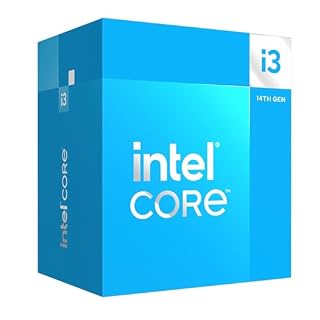
This 4-core part is the right fit for a quiet, low-power desktop that only handles everyday files and web browsing.
- 4 cores (4 P-cores + 0 E-cores) and 8 threads. Integrated Intel UHD Graphics 730
- Performance two core microarchitecture, prioritizing and distributing workloads to
Gaming: why the i5 usually pulls ahead of the i3
Modern games use more than four CPU threads, which is exactly where the i3 runs out of room. On a system with a mid-range GPU, the i5 gives noticeably higher frame rates and fewer stutters during heavy, fast-paced scenes.
If you plan to game at all, even casually, the i5 is the better bet. The i3’s integrated graphics are also weaker, so a desktop without a dedicated GPU will struggle more on an i3 compared to the i5, which can handle light titles better without extra hardware.
Pro tip: If you buy the i5 without a dedicated graphics card, its built-in graphics still handle light games better than the i3's.
Heat, power, and your motherboard: the part people skip
The i5 pushes more heat, which matters if your PC lives in a small case or a tight desk space. An i5 in a cramped case will thermal-throttle and slow itself down to stay safe, effectively reducing its performance advantage. The i3 rarely has this problem due to its lower power draw.
Before you choose, look at the thermal limits of your case. A basic stock cooler might be fine for an i3, but an i5 usually wants a better air cooler to stay fast under load and avoid throttling during long work sessions.
Both chips use the same socket on recent desktops, which means you can upgrade from one to the other later. You do not have to rebuild the whole PC to make the swap, provided the generation of the i5 is supported by your specific motherboard. If that sounds like your bench, read up on Ryzen 5 vs Intel i5 Desktop next.

This twin-tower air cooler keeps an i5 running at full speed without hitting heat limits in a standard-sized case.
- Thermalright is a Taiwan brand with more than 20 years of development. It has a certain
- Thermalright PA120 SE; CPU Cooler dimensions: 125(L)x135(W)x155(H)mm (4.92x5.31x6.1
Which should you buy?
Use this list to match the chip to your actual daily workflow and future needs.
- Buy the i3: You only do web browsing, office documents, and streaming, and your budget is tight or the PC is for light use.
- Buy the i5: You multitask heavily, game even casually, edit media, or want the PC to stay fast for several years without an upgrade.
- Check the generation: A newer generation i5 will always beat an older i3 in multi-core tasks. Always verify the specific chip number.
- Plan the cooling: If you choose the i5, pair it with a solid air cooler so it does not slow down when the fan speed is limited.
For most people, the i5 saves you the cost and frustration of upgrading within a year or two as your software needs grow.
The bottom line
If you want a desktop that will still feel fast when you add more apps and projects later, get the i5. If your machine is strictly for basic tasks and you want it to stay quiet and cheap, the i3 is fine. The next step is to check your motherboard's socket and cooling limits before you place the order.
- 10 cores (6 P-cores plus 4 E-cores) and 16 threads
- Performance hybrid architecture integrates two core microarchitectures, prioritizing
Frequently asked questions
Is an Intel i3 enough for a home desktop?
Yes, if you stick to everyday tasks like browsing, email, and streaming video. The i3 handles one main program well. It slows down noticeably if you open many apps at the same time or try to edit video files.
Can I upgrade from an i3 to an i5 later?
In most modern desktops, yes. Both use the same physical socket, so you can swap the CPU later without a new motherboard. You only need a CPU that matches your board’s supported chip generation and BIOS version.
Which processor is better for gaming?
The i5 is the stronger choice for gaming. Modern games use more than four threads, and the i5’s extra cores prevent the frame drops and stuttering that often happen when an i3 maxes out its CPU usage. It helps to understand 2020 hp laptop value before going further.
Does the i5 run much hotter than the i3?
Yes, the i5 has a higher power draw and pushes more heat under load. That is why pairing an i5 with a good air cooler, rather than the small stock cooler, helps it keep its speed during long tasks.