
 By
You are staring at an HP laptop from around 2020, wondering if it is time to replace it or give it one more year. This page gives you a fast, practical checklist to check your specific model’s health and decide if it still fits your daily work.
In short: Most 2020 HP Intel Core laptops are still worth keeping if the storage is an SSD and the battery is in good shape. If your machine has an i5, an SSD, and a functional battery, it will handle browsing, office work, and video streaming comfortably. If it has an i3, a hard drive, or a degraded battery, you should plan for an upgrade or replacement within 12 months.
Quick picks
Our shortlist for this job · tap one to see today's price
A 32GB memory upgrade solves lag when opening many tabs and apps at once on your HP.

Replaces the slow hard drive to make the laptop boot and open apps in seconds.
How to check if your specific HP model still holds up
Start by opening Task Manager. Press Ctrl + Shift + Esc on your HP laptop. Click the Performance tab to see your actual CPU model and RAM speed. This tells you if you have the baseline power for modern workloads. For the detail, see our notes on intel vs ryzen gaming and professional.
Look for two main clues. If the CPU column shows an Intel Core i5, your laptop has a stronger baseline than an i3. If the RAM is only 4GB, that is a common bottleneck for a 2020 machine. Modern browsers often need more than that just for smooth scrolling.
- i5-1035G1 or newer: Comfortable for 4+ years of basic use. It handles heavy multitasking well.
- i3-1005G1 or similar: Fine for school or email, but it will feel slow with many tabs. It works best for light tasks.
- 4GB RAM: A major drag on speed; upgrading to 16GB makes a big difference. It stops the system from using the drive as memory.
Next, check your storage type. In the System tab of Task Manager, look at the disk drive name. If it says SSD, keep it. If it says HDD or a model name without SSD, that is your biggest performance problem. Mechanical drives are the biggest reason older laptops feel slow.
Pro tip: If you cannot find the exact model, open Command Prompt and type systeminfo. This lists your CPU and memory details in plain text.
When a 2020 HP laptop is no longer worth keeping
There are three clear signs that your laptop has outlived its useful life. Check these before spending money on repairs. If two or more are true, the machine is likely to frustrate you more than help.
- Slow startup: If it takes more than 30 seconds to reach the desktop, the storage or software is too slow. This often means the drive is failing or the system is bloated.
- Overheating: If the fan is always loud and the bottom is hot to the touch, thermal paste has dried out. This stresses the CPU and can shorten its life.
- Battery failure: If it does not hold 40 minutes of charge when unplugged, the battery is degraded. This makes it hard to use away from a power outlet.
If two or more of these are true, a 2020 model is likely a hassle to use. Replacing it is often faster than fixing these underlying issues. However, if only one is wrong, you can often fix it with a part.
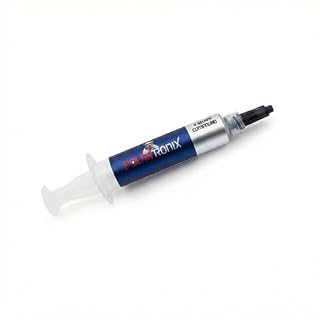
A high-conductivity thermal paste upgrade lowers CPU temperatures and reduces fan noise on your aging HP laptop.
- Thermal Conductity 12.8 W/mK - 4 Gram Compound - USA Made With Premium Materials
- Non-Conductive Formula: Safe to use on all types of CPUs and GPUs without the risk of
Use HP PC Health Check to get a professional diagnosis
HP has a free tool called HP PC Health Check that tests your hardware components. Download it from the HP support page for your region. This tool is designed specifically for HP machines and checks for common failure points. We cover ultrabook processor choice in a guide of its own.
Run the tool and let it test the battery, hard drive, and RAM. It gives you a simple pass or fail score for each part. This saves you from guessing which component is causing the slowness.
- Battery test: If it fails, the battery will not hold a charge. You need a new battery. This is a common issue with 2020 models.
- Hard drive test: If it fails, the storage is dying. Backup your files immediately. Do not wait, as data loss can be sudden.
- RAM test: If it fails, the memory is bad. You need to replace the module. This is rare but possible after years of use.
If the tool says everything passes, your hardware is healthy. If it fails on one part, you know exactly what to fix. This makes your next step clear and prevents unnecessary repairs.
Why the CPU generation matters for a 2020 HP laptop
A 2020 HP laptop usually has a 10th or 11th generation Intel Core processor. These chips are efficient but designed for lighter workloads. They are not as powerful as the latest models, but they are still capable for daily tasks.
Compare your CPU to a modern i5. A 2020 i3 has fewer cores and no hyper-threading, which makes multitasking slow. A 2020 i5 has more cores, so it handles background apps better. This means you can switch between apps without waiting.
If you only use one app at a time, the i3 is fine. If you have 20 Chrome tabs, a PDF, and a video playing, the i5 will feel much smoother. The extra processing power keeps the system responsive under load.
Adding more RAM lets your 2020 CPU keep more apps open without slowing down the whole system.
- Actual memory speed may vary depending on the system, CPU, motherboard, BIOS settings
- Adherence to JEDEC and compliance to RoHS with respect to environmental protection
Common myths about keeping an older Intel laptop
Myth: A laptop must be new to be fast.
Fact: A 2020 laptop with an SSD and 16GB of RAM feels faster than a new model with a hard drive and 4GB of RAM. Storage speed is the biggest factor in perceived performance. Loaders in this spot often ask about i3 versus i5 as well.
Myth: If the fan is loud, the CPU is dying.
Fact: Loud fans usually mean dust or old thermal paste, not a dead processor. Cleaning and repasting can fix it. This is a common and inexpensive repair.
Myth: Windows 11 will make my old laptop slower.
Fact: Windows 11 runs well on a 2020 i5 with an SSD. It may be slower on an i3 with 4GB RAM. The minimum requirement is 4GB, but 8GB is recommended for smooth performance.
Pro tip: If you are keeping the laptop, do a fresh Windows install once a year to remove background bloat.
How to extend the life of your HP laptop today
You can make a 2020 HP laptop feel new with three simple fixes. Do these before deciding to replace it. These steps are low-cost and often have a big impact.
- Clean the vents: Use compressed air to clear dust from the side vents and under the keyboard. Dust blocks airflow and causes overheating.
- Update drivers: Use HP Support Assistant to get the latest BIOS and audio drivers. Updated drivers can fix stability issues and improve performance.
- Limit startup apps: In Task Manager, go to the Startup tab and disable apps you do not need. This speeds up boot time and frees up memory.
These steps reduce heat and free up memory. If your laptop still feels slow after these fixes, the hardware is likely the limit. Consider upgrading the SSD or adding more RAM.
Safety first: Always power off and unplug the laptop before cleaning vents or opening the case. Never use a hairdryer on the vents.
The bottom line
Keep your 2020 HP Intel Core laptop if it has an i5, an SSD, and a healthy battery. Replace it if it has an i3, a hard drive, or a failing battery. Your next step is to run HP PC Health Check and upgrade the RAM or thermal paste if needed.
- Actual memory speed may vary depending on the system, CPU, motherboard, BIOS settings
- Adherence to JEDEC and compliance to RoHS with respect to environmental protection
Frequently asked questions
Is a 2020 HP laptop still good for Windows 11?
Yes, if it has an i5 or i7 processor and an SSD. Windows 11 runs well on these models. If you have an i3 and 4GB of RAM, Windows 11 will be slower and you may hit the minimum memory requirement.
How do I know if my HP laptop battery is bad?
Run HP PC Health Check and look at the battery test result. If it fails, or if the laptop only lasts 15-20 minutes on battery, the battery is degraded. You can also check the battery health in Settings under System > About.
Should I upgrade the hard drive to an SSD?
Yes, this is the single best upgrade for a 2020 HP laptop. If you still have a mechanical hard drive, replacing it with a 512GB SSD will make the laptop boot and open apps much faster.
Is an i3 2020 laptop enough for college?
It is enough for word processing and light browsing. However, it will struggle if you need to run video editing software, large spreadsheets, or many browser tabs at the same time.