
You are staring at two very different price tags and wondering if the extra money actually gets you a usable difference. This page cuts through the specs to tell you exactly where a cheap card fails and where a top-tier card earns its cost.
In short: For most gamers and creators, a high end GPU wins because it unlocks 4K resolution, stable frame rates at high settings, and future-proofing for video editing. However, a budget GPU is the better choice if you only play at 1080p on a low-end monitor, as it delivers playable performance for a fraction of the cost.
Quick picks
Our shortlist for this job · tap one to see today's price
Gives smooth frame rates and DLSS support without needing a huge power supply or premium price.
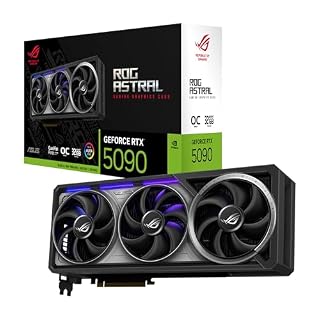
Handles heavy ray tracing and 8K video workflows that budget cards simply cannot run.
The differences at a glance
| Feature | Budget GPU | High End GPU |
|---|---|---|
| VRAM | 6-8 GB | 16-24 GB |
| Power Draw | Under 200W | 300-450W |
| Resolution | 1080p | 4K and above |
| Lifespan | 2-3 years | 5+ years |
The table above shows why most users end up in the middle of the market. A budget card is optimized for power efficiency, drawing less electricity and running cooler. A high end card prioritizes raw speed and memory capacity, which demands a stronger power supply and better case airflow. Loaders in this spot often ask about desktop gpu vs laptop gpu as well.
Do not buy a high end GPU just because it has more VRAM. If your monitor is only 1080p, you will never use the extra bandwidth that a premium card offers. Match the GPU to the resolution you actually play at.
Where the budget card wins on value
For a standard desktop build focused on 1080p gaming, a budget GPU is the smart move. You get enough performance to run modern titles on medium-to-high settings. The money you save can go toward a faster processor or more RAM, which also affects your game loading times.
The Gigabyte RTX 4060 is a great example of this middle ground. It brings next-gen features like DLSS 3 to a price point that keeps the rest of your build affordable.
- Lower power supply requirements, often working with a 500W unit.
- Quieter operation because the fan does not need to spin as fast.
- Easier to resell in two years when the next generation arrives.
Winner: Budget GPU. It gives you the playable experience most people want without the financial risk of a premium upgrade.
Pro tip: Check your power supply unit wattage before buying. A high end GPU can fry a cheap PSU that is not rated for its peak load.
This card balances modern features with low power draw, making it the perfect step up from integrated graphics.
- Powered by NVIDIA DLSS 3, ultra-efficient Ada Lovelace architechture, and full ray
- 4th Generation Tensor Cores: Up to 4x performance with DLSS 3
Why the high end card earns its cost
If you edit 4K video or want to play with ray tracing enabled, a high end GPU is a productivity tool. The difference in render times is massive. A task that takes twenty minutes on a mid-range card might finish in four minutes on a top-tier model. Before you buy anything, it is worth looking at gaming laptop.
The ASUS ROG Astral RTX 5090 is built for these demanding tasks. Its cooling system is designed to handle the intense heat that comes with premium performance.
- Stable 60+ FPS at 4K resolution with maximum settings.
- Large VRAM pools that prevent stuttering in VRAM-heavy games.
- Advanced AI upscaling features that maintain high frame rates.
Winner: High End GPU. It is the only choice if you refuse to compromise on resolution or visual fidelity.
Safety first: Ensure your case has enough space for the card's length. Large high-end GPUs often exceed 300mm and can crowd out your RAM or power supply.
This premium card provides the VRAM and power needed for 4K gaming and professional creative work.
- Powered by the NVIDIA Blackwell architecture and DLSS 4 OC mode: 2610 MHz/ Default
- Quad-fan design boosts air flow and pressure by up to 20%. Compatibility: 357.6mm
How to install and fit your card
Installing a GPU is straightforward, but heavy cards can pull away from the slot over time. This is especially true for high end models that are physically large and dense.
If you want to show off a large card or simply improve airflow by keeping the hot air out of the main chassis, a vertical mounting kit is a worthwhile accessory. The NZXT kit uses a sturdy steel bracket to hold the card securely.
- Disconnect your power and PCIE cables before touching the card.
- Install the bracket and cable according to the manufacturer’s layout.
- Ensure the riser cable has no sharp bends that could damage the connectors.
Winner: High End GPU owners need this more. The weight of a top-tier card makes a vertical mount a very practical addition. We go through deciding if spending more is actually worth it step by step in its own article.

The steel bracket prevents sagging and keeps the massive high-end cards secured to the case.
- The thick steel bracket holds even heavy graphics cards vertically and prevents them
- PCIE 4.0 RISER CABLE: Utilizing PCIe 4.0, the Riser Cable facilitates the high-speed
Which one should you actually buy?
Your final decision should be based on your monitor and your creative goals. Do not let the marketing hype for the newest model cloud what you actually need. Focus on the resolution you are comfortable with.
- For 1080p gaming on a 144Hz monitor: Buy a budget or mid-range card.
- For 1440p gaming with high settings: Buy a mid-range card like the RTX 4070.
- For 4K gaming or heavy 3D rendering: Buy a high end GPU.
- For video editing and professional work: Always choose the high end GPU for speed.
If you are still unsure, start with the most efficient card that fits your budget. You can always upgrade in two years, and the resale value of even budget cards remains decent.
The bottom line
For most people, a mid-range or budget GPU is the best value for 2026, as it saves money for other components. High end GPUs are only worth it if you have a 4K monitor or do professional video work. Start with the Gigabyte RTX 4060 if you want to stay within a reasonable budget.
- Powered by NVIDIA DLSS 3, ultra-efficient Ada Lovelace architechture, and full ray
- 4th Generation Tensor Cores: Up to 4x performance with DLSS 3
Frequently asked questions
Is a budget GPU good enough for gaming?
Yes, for 1080p. A modern budget card like the RTX 4060 can handle most titles at high settings. It will struggle with 4K resolution and heavy ray tracing, but for a standard setup, it is more than enough.
How much VRAM do I need for 2026?
8GB is the minimum for future-proofing a budget build. If you are buying a high end GPU, look for 16GB or more to ensure you do not hit a bottleneck in VRAM-intensive games like Cyberpunk 2077 or Black Myth: Wukong.
Can I use a high end GPU with an old power supply?
Only if the wattage is high enough. A 500W PSU will likely not handle a high end GPU. You must check the card’s power requirements and ensure your PSU has enough headroom and the correct number of power connectors. For the detail, see our notes on 144hz 60hz laptop.
When should I buy a new GPU?
Buy a new GPU when your current one cannot run your favorite games at your monitor’s resolution and refresh rate. If you are still getting 60 FPS at 1080p, there is no financial reason to jump to a 4K high-end card.