
You are staring at a price difference between two RAM kits, wondering if 32GB is a smart buy or just an expensive flex. This page cuts through the marketing noise to tell you exactly when 16GB holds up and when you need the extra headroom.
In short: For most everyday users, 16GB is enough and the better value. You need 32GB if you run virtual machines, edit 4K video, or keep dozens of browser tabs open while gaming. Choose 16GB for a focused gaming rig, 32GB for heavy multitasking and creative work.
Quick picks
Our shortlist for this job · tap one to see today's price
Fast DDR5 kit that gives modern desktops the breathing room for heavy multitasking.

Compact module that doubles your laptop's memory for smoother background tasks.
The differences at a glance
The gap between these two amounts of memory is not about raw speed; it is about capacity. 16GB is the comfortable baseline for Windows 11 and daily workloads. 32GB is the threshold where the operating system stops having to hunt for space to park your background apps. It helps to understand key differences gaming laptops vs professional laptops before going further.
When a system hits its memory limit, it swaps data to the hard drive. This is a hard bottleneck that no amount of RAM speed can fix. If your usage stays under the limit, the extra memory sits idle.
| Feature | 16GB | 32GB |
|---|---|---|
| Best For | General use, light gaming | Heavy multitasking, creative work |
| Cost | Budget to mid-range | Premium |
| Future Proof | 2-3 years | 4-5+ years |
The table above shows the primary split. 16GB handles the present, while 32GB prepares you for the future. 32GB wins on longevity, but only if you actually use the extra space daily.
Pro tip: Check your current memory usage in Task Manager before buying. If you are consistently using more than 12GB, 16GB will feel tight.
Daily use and office work favors 16GB
If your computing is web browsing, document editing, and video calls, 16GB is the sweet spot. A typical Windows 11 system with a dozen Chrome tabs, Discord, and Spotify uses about 10-12GB. You will have headroom, but not infinite space. This buffer is enough to handle occasional spikes without slowing down.
32GB wins this factor only if your “office work” involves running a local database server alongside your IDE, or if you keep 50+ tabs of heavy web apps open constantly. For most standard corporate environments, 16GB is the industry standard because it balances cost and performance well.
16GB wins for the majority of users because it covers the requirements of modern operating systems without the extra cost. It is the safe choice if you are not a power user. Buying more than you need is a waste of money in this scenario. The other half of this decision is refurbished vs new.
Pro tip: For laptops, check if your RAM is soldered to the motherboard. If it is, this is your only chance to buy the right amount.
A simple 16GB module doubles your laptop's memory if it is currently running on 8GB.
- A-Tech 16GB RAM Module, DDR4 SO-DIMM 260-Pin, 3200MHz PC4-25600 (PC4-3200AA)
- Non-ECC Unbuffered, JEDEC DDR4 Standard 1.2V Operating Voltage
Gaming and heavy multitasking push you toward 32GB
For a pure, focused gaming rig, 16GB is still the target. Most modern games at 1440p run smoothly with just 16GB, with frame rate differences of less than 3%. Your graphics card is the bottleneck, not your memory. The game loads its assets into the 16GB available and runs efficiently.
The situation changes when you game while a browser is open, Discord is running, and a music player is streaming. This is the “multitasking gamer” scenario. 32GB eliminates the minor stutters that happen when the game fights the operating system for memory. The system can keep the game and all your chat and browser apps active at the same time.
Titles like Microsoft Flight Simulator or heavily modded open-world games can exceed 16GB. In these specific cases, 32GB wins because it allows for smoother texture streaming and fewer loading hitches. If you play these types of simulation games, the upgrade is worth it.
Pro tip: If you buy a 32GB kit for a desktop, check your motherboard manual for the maximum supported RAM speed.
This DDR5 kit is ideal for desktop users who want a premium setup for heavy gaming and background apps.
- Boosts System Performance: 32GB DDR5 RAM laptop memory kit (2x16GB) that operates at
- Accelerated gaming performance: Every millisecond gained in fast-paced gameplay
Creative work and 3D rendering require 32GB
Video editing and 3D rendering are the classic cases where 16GB fails. When you scrub through a 4K timeline in DaVinci Resolve or Premiere, the software relies on RAM to cache clips and effects.
Without enough cache, the software has to go back to the hard drive, which is much slower. This causes the choppy playback you see when underpowered. Before you buy anything, it is worth looking at choosing optimal memory.
With 16GB, you will likely experience choppy playback and slower export times because the system has to constantly manage a memory shortage. With 32GB, the timeline remains responsive and render times can be 10-15% faster. The software stays in the “fast lane” of memory. This keeps your workflow moving without interruptions.
32GB wins by a wide margin for any professional or serious creative workflow. It is not a luxury; it is a necessity for high-resolution work. If you sell your time to clients, this extra memory pays for itself in saved time.
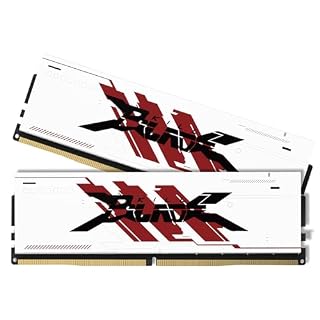
Creative desktops often use older DDR4 boards, making a 3200MHz kit the right choice over newer DDR5.
- Supercharge your rig with 32GB (two 16GB modules) of high-speed memory. Designed for
- Experience ultra-responsive multitasking with speeds up to 3200MHz (PC4-25600) and
Which one is better value for the price?
32GB kits are a premium product. The cost is roughly double that of a 16GB kit of the same speed and generation. If you do not use that extra capacity daily, you are paying for a safety margin that provides no immediate benefit. Your money is better spent on a better graphics card or storage drive in most cases.
For desktops, buying a 2x16GB kit now is often cheaper than buying a 2x8GB kit today and a matching 2x8GB kit a year from now. Finding an identical match later is difficult. Prices for older memory modules fluctuate. It is simpler to get what you need now.
16GB wins on pure value if your workflow is clear. 32GB wins on long-term investment value if you plan to keep the computer for more than four years. The premium pays off in durability. It is a judgment call based on how long you keep your hardware.
Which should you buy?
- If you are a student or office worker: Get 16GB. It is comfortable and a smart budget choice. You will not see a difference with this amount.
- If you are a focused gamer: Stick with 16GB, but ensure it is in a dual-channel configuration. This gives you the best frame rates. Do not overspend on memory you do not use.
- If you keep 40+ tabs open: Get 32GB. Your system will feel much snappier. The browser will stop slowing down when you add new tabs. This is the biggest day-to-day improvement.
- If you run virtual machines: Get 32GB. Allocating 8-16GB to a VM requires the headroom of a 32GB host. Without it, your host system will lag. The VM will eat your memory and crash the OS.
- If you do video or 3D work: Get 32GB. It is the entry point for professional-grade performance. This will save you from having to render proxies or lower your resolution.
This list covers every major user type. Use it to make your final decision. If you are on the fence, 16GB is the safer bet. It is the minimum recommended for modern operating systems. 32GB is the upgrade for the heavy users. It buys you peace of mind and a longer useful life for the machine. If that sounds like your bench, read up on why this is next.
The bottom line
For most people, 16GB is the sensible, performance-capable choice. If your workflow is complex, evolving, or professional, 32GB is the more confident investment that eliminates daily friction. Start with 16GB if you are on a budget and your use case is clearly defined. If you do not feel the need for more, do not buy it.
- Boosts System Performance: 32GB DDR5 RAM laptop memory kit (2x16GB) that operates at
- Accelerated gaming performance: Every millisecond gained in fast-paced gameplay
Frequently asked questions
Is 32GB RAM overkill for gaming?
For a focused gaming rig, yes. Most games at 1440p do not need more than 16GB. However, if you stream, run a guide in the background, or use flight simulators, 32GB makes the experience much smoother. It prevents the game from stuttering when other apps open.
Can I mix 16GB and 32GB RAM sticks?
You can, but it is not ideal. The system will run in a flexible mode that is slower than a matched pair. For the best performance, buy two identical 16GB modules to reach 32GB. This ensures you get the full speed of dual-channel memory. Mixing sizes leads to uneven performance.
Will more RAM make my computer faster?
It makes it more responsive. If your system is already using less than 16GB of memory, adding 32GB will not provide a noticeable speed increase. The benefit only appears when you are running out of space. It stops the system from swapping to the hard drive, which is much slower than RAM.
Is DDR4 16GB the same as DDR5 32GB?
No. DDR5 is faster and more power-efficient, but capacity is about capability. A 16GB DDR4 system will feel just as fast as a 32GB DDR5 system for simple tasks like web browsing. The generation of RAM matters less than the total amount for most users. However, DDR5 is the future standard for new builds.
How much RAM does a Mac need?
For a Mac, 16GB is the baseline for smooth performance in Big Sur and later. Because you cannot upgrade the RAM later on most Apple Silicon models, the initial choice is critical. You must decide on the amount before you buy the machine. There is no later upgrade path like with a PC. If that sounds like your bench, read up on 8gb vs 16gb ram next.