
You are choosing between 8GB and 16GB of RAM, unsure if the extra memory is worth the cost. This guide shows you exactly which workload breaks 8GB and where 16GB delivers smooth performance for your specific tasks.
In short: For most users, 16GB is the safe and efficient choice. It prevents the system from relying on slow storage drives, allowing for seamless multitasking. Only minimal setups for basic typing or web browsing truly need just 8GB.
Quick picks
Our shortlist for this job · tap one to see today's price
A single high-capacity module that upgrades most DDR4 laptops to comfortable 16GB performance.

A 32GB kit that pairs 16GB modules for users who want future-proofing on newer systems.
The differences at a glance
RAM is your computer’s short-term memory. When you run out, the system uses your storage drive as slow backup space, causing lag. We cover desktop vs laptop for streaming in a guide of its own.
8GB is the minimum for a basic Windows 11 laptop. It handles light tasks but fills up quickly.
| Factor | 8GB RAM | 16GB RAM |
|---|---|---|
| Web Browsing | 10-15 tabs max | 30+ tabs easily |
| Gaming | Esports only | Esports + Modern AAA |
| Video Editing | Struggles with 1080p | Smooth 1080p/4K |
| Windows 11 Comfort | Tight | Relaxed |
16GB provides the headroom for modern operating systems and background apps to run without slowing down your main task.
Multitasking: Where 8GB hits the wall
Windows 11 uses about 3-4GB of RAM just to boot and run background services. That leaves you with less than half your memory for apps.
On an 8GB system, opening a browser, a chat app, and an office program uses up most of your space.
When you add a second heavy app, the computer starts swapping data to your hard drive. This feels like a noticeable pause or stutter.
With 16GB, that same workload barely registers. You can keep your browser open with many tabs, run your music app, and work in a document simultaneously. Before you buy anything, it is worth looking at should you buy faster or more ram.
- 8GB User: Must close apps and tabs to work comfortably.
- 16GB User: Can leave apps open in the background indefinitely.
Pro tip: Check your RAM speed (e.g., DDR4-3200) in Task Manager before buying to ensure compatibility.
This single module upgrades your laptop to 16GB, eliminating the need to constantly close browser tabs.
- 16GB Module ( 1x 16GB ) | DDR4 3200 MHz ( PC4-25600 / PC4-3200AA )
- DIMM ( 260-Pin ) | Non-ECC Unbuffered | 2Rx8 - Dual Rank x8 | 1.2V - DDR4 Standard
Gaming: Esports vs. Modern AAA titles
For competitive games like Valorant or League of Legends at 1080p, 8GB is usually enough if you run no other apps.
However, most players have Discord, a browser, or a microphone app running in the background. This pushes 8GB systems into stuttering territory.
Modern open-world games like Cyberpunk 2077 or Microsoft Flight Simulator consume 12-14GB of RAM on their own.
16GB is the safe baseline for any gaming setup. It ensures the operating system and background tasks do not steal resources from your game frames.
16GB wins this category because it handles the modern standard of running a game and a chat application simultaneously. It helps to understand determining sufficient memory for tasks before going further.
While the article focuses on 16GB, this 32GB kit is for gamers building a new DDR5 desktop who want zero compromises.
- Boosts System Performance: 32GB DDR5 RAM laptop memory kit (2x16GB) that operates at
- Accelerated gaming performance: Every millisecond gained in fast-paced gameplay
Creative work: Editing and design
Video editing software like Adobe Premiere Pro or DaVinci Resolve requires large amounts of RAM to scrub through timelines.
On 8GB, you will see significant freezing or lag when applying effects or rendering a 1080p video.
16GB allows for a smooth creative workflow, especially when working with 4K footage or complex color grading.
If you use these tools for work or hobby, 16GB is not optional; it is the minimum requirement to maintain productivity.
16GB wins this category because consistency prevents workflow interruptions during long editing sessions.
Pro tip: Always close other applications while rendering video to give your RAM the maximum available space. For the detail, see our notes on Skytech Gaming O11 Vision vs Thermaltake LCGS View.
Cost and value: Is the upgrade worth it?
The difference between an 8GB and a 16GB system is often less than the cost of a new pair of headphones.
On a laptop, 16GB is usually the standard configuration in mid-range and premium models.
If you are building a desktop, the cost difference between 8GB and 16GB kits is minimal relative to the total system price.
Buying 16GB now extends the useful life of your machine. You avoid the frustration of a slowing computer two or three years from now.
- 8GB: Best only if your budget is extremely tight.
- 16GB: The best value for long-term performance and longevity.
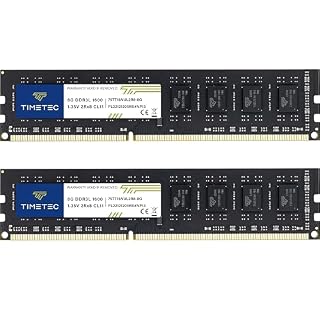
This kit is an option for older laptops that still use DDR3, upgrading them to 16GB where compatible.
- PCB color may vary (black or green) depending on production batch. Quality and
- DDR3L / DDR3 1600MHz PC3L-12800 / PC3-12800 240-Pin Unbuffered Non-ECC 1.35V / 1.5V
Which should you buy?
The right choice depends entirely on how you use your computer daily. Here is the breakdown for specific user types.
- Basic Office User: Stick with 8GB if you only use web browsers and spreadsheets.
- Student: Choose 16GB to handle research tabs and writing software without lag.
- Casual Gamer: Choose 16GB to keep background chat and browser apps from killing frame rates.
- Content Creator: Choose 16GB minimum; 32GB is better for heavy 4K video work.
- Programmer: Choose 16GB to run virtual machines and local containers smoothly.
For anyone using the computer as a primary tool, 16GB is the new baseline.
The bottom line
For 90% of users, 16GB is the clear winner. It handles modern web browsing, gaming, and creative apps without the constant pressure to close tasks. If you are on a strict budget or only doing basic typing, 8GB will suffice, but you will hit performance limits quickly.
- 16GB Module ( 1x 16GB ) | DDR4 3200 MHz ( PC4-25600 / PC4-3200AA )
- DIMM ( 260-Pin ) | Non-ECC Unbuffered | 2Rx8 - Dual Rank x8 | 1.2V - DDR4 Standard
Frequently asked questions
Is 8GB RAM enough for Windows 11?
It is technically enough to install and run Windows 11. However, the system runs more slowly because the operating system and background services use much of the available memory. 16GB provides a much smoother experience.
Can I upgrade from 8GB to 16GB later?
On most desktops and some laptops, yes. You can replace one 8GB stick with a 16GB stick. However, some laptops have soldered RAM that cannot be changed, so check your specific model before buying.
Does more RAM make games load faster?
Not directly. Game loading speed depends mostly on your storage drive (SSD vs HDD). RAM affects gameplay smoothness and frame rate consistency, not initial loading times.
What is the difference between 16GB and 32GB RAM?
32GB is for heavy professional workflows like 3D rendering or running multiple virtual machines. For standard gaming, web browsing, and video editing, 16GB is usually sufficient and offers better value.