
You just boot up your desktop and the cursor spins for ten seconds, then your fan kicks on like a plane taking off. This page breaks down the specific parts that actually move your speed needle and tells you which upgrade helps the most.
In short: Desktop speed comes from how well your processor, memory, storage, and graphics card talk to each other. A fast CPU is useless if your RAM is too slow or your hard drive is too clunky. Most speed problems are solved by upgrading your storage to a solid-state drive and adding faster memory. The other half of this decision is connection bottlenecks affecting performance.
Quick picks
Our shortlist for this job · tap one to see today's price
Turns a sluggish computer into a snappy one by cutting boot times and app loading in half.
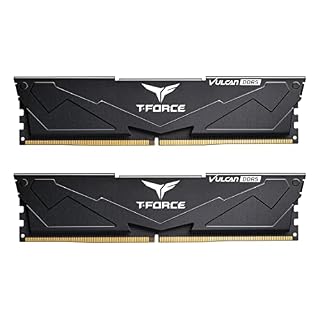
Prevents your computer from freezing when you keep many tabs or large projects open at once.
How the CPU sets the pace, and why more than one core matters
Your processor is the brain of the desktop. It runs your programs and handles your clicks. The speed of this chip is measured in Gigahertz, or GHz. We cover gpu basics for beginners in a guide of its own.
Higher GHz numbers usually mean the computer thinks faster. But there is a catch. Some programs use only one or two of the CPU’s cores, while others spread work across all of them.
- Single-core speed: This matters for everyday tasks, like opening a document or browsing. A faster single-core speed makes your daily life feel snappier.
- Multi-core speed: This matters for heavy lifting. If you do video editing or 3D rendering, you need a processor with more cores to do the work in parallel.
If your computer feels slow when opening simple apps, you likely need a chip with a higher single-core clock speed. If it chokes on large projects, you need more cores. For most users, a modern 6-to-8 core processor with a high boost clock is the sweet spot.
Why your RAM size and type decide how many apps you can run
RAM is your computer’s short-term memory. It holds the data the CPU needs right now. If your RAM is too small, your computer gets stuck. It starts saving data to your hard drive instead, which is painfully slow.
This is called paging, and it is a major reason desktops feel sluggish. For a modern, fast PC, 16GB is the minimum you should aim for. It lets you run your web browser and a few other programs without stuttering.
- For everyday use: 16GB of fast RAM is plenty.
- For heavy multitasking: 32GB lets you keep your music, code, and 3D tools open at the same time.
- For virtual machines: 64GB gives your software more space to work.
Also, look at the RAM speed. Newer DDR5 memory is faster than the older DDR4 standard. Pairing an NVMe SSD with this TEAMGROUP T-Force Vulcan DDR5 kit ensures your whole system moves data at full speed.
Pro tip: Check your current RAM speed by pressing the Windows and R keys together and typing 'msinfo32'. Your current speed is listed under 'Installed Physical Memory'. Before you buy anything, it is worth looking at explaining display smoothness metrics.
Gives your system more room to work and a faster speed for opening heavy apps.
- Ideal Product
- Power Management ICs (PMICs) Equipped for Stable, Efficient Power Usage
The storage upgrade that makes your entire PC feel new
Storage is the place where your programs and files live. This is the single biggest place where desktop computer speed is won or lost. A traditional spinning hard drive is like a library. It takes time to find the book. A solid-state drive, or SSD, is like a memory card. You get the data instantly.
An NVMe SSD is the fastest type of SSD. It plugs directly into your motherboard and uses a special high-speed lane. The speed difference is not small. It is massive. A computer with an NVMe drive boots in seconds, not minutes.
- Hard Drive: Cheapest. Very slow. Only use it for storing old, rarely used files.
- SATA SSD: A big jump. Good for older computers that don’t have a new slot.
- NVMe SSD: The fastest. Best for a new or modern desktop where you want zero lag.
If you are starting your upgrade journey, this is the first part to buy. The Kingston NV3 is a mid-price option that gives you high-speed performance for your everyday programs and games.
The fastest way to make an old, slow desktop feel like a brand new machine.
- Ideal for high speed, low power storage
- Gen 4x4 NVMe PCle performance
When your graphics card becomes the speed limit
For most work, your computer’s built-in graphics are fine. But if you are gaming, editing video, or working with 3D models, you need a dedicated graphics card, or GPU. The GPU does the heavy lifting of drawing images.
A fast GPU can make a massive difference in frame rates. But a fast GPU is only useful if the rest of your system can keep up. If your CPU is too slow, it cannot feed the GPU data quickly enough.
This is called a bottleneck. The GPU then sits and waits, and you do not get the full speed of the part you paid for. Before you buy anything, it is worth looking at computer speed factors.
- For everyday tasks: A mid-range card is more than enough.
- For high-quality gaming: You need a high-end card with a lot of video memory.
- For a new monitor: Match your GPU to your screen’s resolution. A powerful GPU with a 4K monitor gives you a smooth, sharp image.
Before you buy a top-tier GPU, make sure your CPU and memory can handle it. A balanced system is faster than a mismatched one.
The hidden speed killers: cooling and software bloat
You can have the best parts in the world, but if your computer gets too hot, it will slow down. This is called thermal throttling. The CPU and GPU turn themselves down to protect themselves from the heat. You get a slow computer, not a fast one.
Your desktop needs good airflow. A dusty fan, or a weak stock cooler, can hold your parts back. A better cooling system keeps the chips cool and lets them run at their top speed for longer. The Bewinner water cooling kit is one option for a powerful cooling setup.
Software is the other hidden killer. Your computer comes with a lot of extra programs you never asked for. These run in the background and steal your speed. A clean system is faster than a bloated one.
- Clean out the dust: Use compressed air to clear your fans and vents. Good airflow is free speed.
- Manage your startup programs: Open Task Manager and disable apps you don’t need starting up.
- Do a clean install: If your system is years old, a fresh install of your operating system will make it feel light and fast.
Sometimes the best upgrade is not a new part. It is a cleaner, cooler system. Fix the software and cooling first, then buy new hardware.
The bottom line
A fast desktop is a balanced one. Start by cleaning your system and fixing any cooling problems. If your computer is still slow, your next step is to install a solid-state drive.
For most people, a 32GB DDR5 memory kit and an NVMe SSD are the two upgrades that change everything. This pairing makes your everyday tasks feel instant. The other half of this decision is how multitasking works on desktop.
- Ideal for high speed, low power storage
- Gen 4x4 NVMe PCle performance
Frequently asked questions
What is the fastest part of a desktop computer?
The speed of your desktop depends on the balance of all the parts. The processor does the thinking, the memory holds the work in front of it, and the storage holds the files. The graphics card draws the images.
No single part is the fastest, but a solid-state drive and fast memory usually make the biggest difference in how fast the system feels.
Is 16GB or 32GB of RAM better for a fast PC?
For most users, 16GB is the minimum you should aim for. It is enough for everyday work and light gaming. If you are doing heavy multitasking, or running virtual machines, 32GB is better. It gives your computer more space to work and stops it from stalling.
Do I need a dedicated graphics card for speed?
Not for everyday tasks. A built-in graphics chip is fine for work and web browsing. But for gaming or video editing, a dedicated card is a must. It takes the load off your main processor and makes your images much smoother.
Why is my desktop slow even with new parts?
This is usually a cooling issue or a software problem. If your computer gets too hot, the parts will slow down to stay safe. Also, a large number of background programs can use up your resources. Make sure your fans are clean and your startup programs are managed.