
You are choosing between two AMD mini PCs that promise dual 2.5G Ethernet, triple displays, and enough power for home use or light gaming. This page tells you exactly which chip, memory, and storage setup wins for your workload so you stop guessing.
In short: The GMKtec M6 Ultra is faster for gaming and CPU-heavy tasks because it uses a newer Zen 4 processor and DDR5 memory. The BOSGAME P4 Ultra is the smarter value pick for most people because it ships with double the storage and runs cooler and quieter for 24/7 duty.
Quick picks
Our shortlist for this job · tap one to see today's price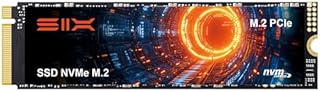
A fast PCIe 4.0 drive fills the GMKtec's empty M.2 slot so you stop worrying about 512GB.

Mounts the quiet BOSGAME directly behind your screen, keeping your desk clear and organized.
The differences at a glance
The two units target the same buyer but take very different paths under the hood. One prioritizes peak performance, the other prioritizes capacity and silence. We cover gmktec m5 ultra vs bosgame p4 ultra in a guide of its own.
| Feature | GMKtec M6 Ultra | BOSGAME P4 Ultra |
|---|---|---|
| Processor | AMD Ryzen 5 7640HS (Zen 4) | AMD Ryzen 7 7730U (Zen 3) |
| Memory | 16 GB DDR5 | 16 GB DDR4 |
| Storage | 512 GB SSD | 1 TB SSD |
| Typical Power | 45–60 W | 15–28 W |
| Graphics | Radeon 760M | Radeon Graphics |
Both machines include dual 2.5G LAN ports, WiFi 6E, Bluetooth 5.2, and triple display output. The split is entirely in CPU generation, memory type, and out-of-the-box storage.
While the port lists look identical on paper, the silicon inside dictates how well the system handles heavy workloads. The GMKtec uses a high-performance mobile chip, while the BOSGAME uses a low-power efficiency chip.
Pro tip: Check the current spec sheet from each manufacturer before buying. Sellers occasionally change the included storage or RAM configuration.
The GMKtec M6 Ultra wins on raw speed
The GMKtec M6 Ultra runs the Ryzen 5 7640HS, a Zen 4 chip on a 4nm process. This is a significant leap in single-core performance over the older architecture used in the BOSGAME. Single-core speed determines how fast individual applications launch and how quickly they respond to your clicks.
For tasks that lean heavily on a single thread, like compiling code, opening large files, or running modern games, the GMKtec pulls ahead. The newer CPU handles these tasks noticeably faster. In real-world use, this means less waiting for Windows updates or large media files to process.
The integrated graphics also favor the GMKtec. The Radeon 760M iGPU runs at a higher clock speed and is fed by faster DDR5 memory. This combination handles 1080p gaming at medium settings far better than the BOSGAME’s graphics chip. You can play titles like Fortnite or Overwatch at high settings without dropping frames. For the detail, see our notes on our notes on ultra mini pc.
DDR5 memory feeds the graphics chip more data per second than DDR4. This is why the GMKtec maintains higher frame rates in games. If you plan to do light video editing or 3D rendering, the extra bandwidth helps too.
Winner: GMKtec M6 Ultra. If your main goal is maximum performance for gaming or creative work, this is the better machine. It squeezes more work out of every second.
The BOSGAME P4 Ultra wins on storage and value
Out of the box, the BOSGAME P4 Ultra gives you 1 TB of storage. The GMKtec gives you 512 GB. For many users, this means the BOSGAME is ready to use without opening the case on day one. You can install your operating system and several large games immediately.
The BOSGAME also supports a higher maximum total storage capacity. If you plan to build a media server or store large files, the extra M.2 slot makes it easier to expand to 16 TB. The GMKtec has two slots, but the maximum capacity is lower. This matters if you have a massive library of high-resolution videos.
Because it uses an older, lower-power processor, the BOSGAME typically costs less. You get more storage for the same budget, making it the better value for home office or media use. You save money upfront and still have plenty of space for your documents and media.
For a home office, the extra gigabytes mean you do not need to buy an external hard drive right away. The 1TB drive holds thousands of high-resolution photos and dozens of large applications. Loaders in this spot often ask about gmktec m5 vs m6 as well.
Winner: BOSGAME P4 Ultra. If you want more storage up front and a lower purchase price, this is the smarter buy. It provides more value per dollar.
If you choose the GMKtec, this fast PCIe 4.0 drive lets you expand beyond the 512 GB limit and match the BOSGAME's capacity.
- Unleash Upgraded power - Employing PCIe Gen4x4 High Speed Interface, SIX X7400 nvme m.2
- Work and Play - Whether you pursue science or culture, X7400 m.2 ssd 1TB accentuates
Noise and heat: the quiet one wins for offices
The GMKtec M6 Ultra runs at a higher TDP, meaning it generates more heat. Under sustained load, the fan ramps up and becomes audible. It is not annoying, but it is louder than the BOSGAME. The fan will spin faster when you are gaming or rendering video.
The BOSGAME P4 Ultra uses a low-power 7730U chip that sips 15–28 W. The fan barely spins during normal office work, making it a silent neighbor in a home office or living room. You can hear the fan only if you place your ear right next to the vents.
If you will be using the PC in a quiet space or running it 24/7 as a home server, the cooler running machine will not warm up your room or create background noise. It is ideal for bedrooms or living rooms. The GMKtec is better for a garage workshop or studio where some noise is acceptable.
The lower power draw of the BOSGAME also means it is more efficient. Over several years, this difference in electricity usage adds up. It is a more eco-friendly choice for always-on tasks like backups or music streaming.
Winner: BOSGAME P4 Ultra. For quiet, always-on use, this machine is the better fit. It keeps your environment comfortable. The other half of this decision is kamrui ak1plus mini pc vs bosgame p4 ultra mini pc.
Pro tip: Listen to a video review of the specific model you plan to buy. Fan noise profiles can vary between batches.
Connectivity: a tie, but with one small edge
Both machines offer dual 2.5G Ethernet ports, WiFi 6E, Bluetooth 5.2, and the same four USB-A ports. For most users, the connection options are identical. You can connect two monitors and a keyboard without issue.
The only real difference is the USB-C port. The GMKtec uses USB4, which supports 8K video output. The BOSGAME uses a standard USB-C port limited to 4K. This means the GMKtec can drive a single high-resolution monitor if you have one.
Unless you own an 8K monitor or need the specific data transfer speeds of USB4, this difference will not affect your daily use. Do not let this port choice sway you away from the better machine for your other needs. The USB-A ports are sufficient for most mice and keyboards.
WiFi 6E is excellent on both. It offers faster speeds and less congestion in crowded areas. If you are using a WiFi 6E router, both mini PCs will make full use of it. You do not need to worry about wireless performance differences.
Tie. Choose based on performance or value, not ports. The connectivity is similar enough that it should not be your deciding factor.
Which should you buy?
Your choice depends on what you actually do with the machine. Use this list to match your needs to the right box. It helps you avoid buying a machine that is overkill or underpowered for your tasks.
- Light Gamer or Content Creator: Buy the GMKtec M6 Ultra. The Zen 4 CPU and DDR5 memory make a real difference in 1080p gaming and video editing. It handles the load better.
- Home Office or Media Hub: Buy the BOSGAME P4 Ultra. The 1 TB drive means you are ready to go, and the quiet fan keeps your workspace peaceful. It fits the environment.
- Budget-Conscious Buyer: Buy the BOSGAME P4 Ultra. It usually costs less and gives you twice the storage. You get more for less money.
- Home Lab Enthusiast: Either works. The GMKtec handles more simultaneous virtual machines, but the BOSGAME is cheaper to run 24/7. Choose based on your workload.
- First-Time Mini PC User: Buy the BOSGAME P4 Ultra. You will not need to buy extra storage immediately after unboxing. It is the easiest start.
The bottom line
The GMKtec M6 Ultra is the faster machine and the right choice if gaming or heavy creative work is your priority. The BOSGAME P4 Ultra is the smarter buy for most people who want a quiet, ready-to-use box with more storage for less money. Choose the GMKtec for speed; choose the BOSGAME for value and silence.
- Unleash Upgraded power - Employing PCIe Gen4x4 High Speed Interface, SIX X7400 nvme m.2
- Work and Play - Whether you pursue science or culture, X7400 m.2 ssd 1TB accentuates
Frequently asked questions
Can I upgrade the RAM on both mini PCs?
Yes, both units have open M.2 slots for RAM. The GMKtec uses DDR5, which is faster, while the BOSGAME uses DDR4, which is cheaper to buy. Check the manufacturer’s website for the maximum supported capacity for your specific model. Always power off the unit before upgrading.
Which mini PC is better for running a Plex server?
The BOSGAME P4 Ultra is better for a 24/7 Plex server. It runs cooler and uses less power, which lowers your electricity bill over time. It also ships with more storage, making it easier to hold your media library. The quiet fan is a plus for living rooms.
Do both mini PCs support three monitors?
Yes, both the GMKtec M6 Ultra and BOSGAME P4 Ultra support triple display output. You can connect monitors via HDMI and DisplayPort. The GMKtec also supports 8K output through its USB4 port, but 4K is the standard for most setups. Check your monitor cables for compatibility.
Is the difference between DDR4 and DDR5 noticeable?
For everyday office work, you will not notice a difference. The gap becomes visible in gaming and tasks that heavily use the integrated graphics, where the GMKtec’s DDR5 memory gives the iGPU more bandwidth. It results in smoother frame rates in games.