
 By
You are staring at a long list of affordable laptops, but most of the options look underpowered or come with sketchy specs. This guide cuts through the noise to show you which five models actually deliver reliable performance for real work.
In short: The best laptop in the budget tier depends on your specific daily tasks. For most users, a 15-inch machine with a Ryzen 5 or Intel Core i5, 16GB of RAM, and a solid SSD is the sweet spot. Below are the five models that hit that balance without cutting corners on screen quality or port selection.
Quick picks
Our shortlist for this job · tap one to see today's price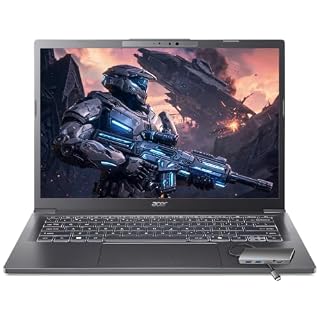
32GB RAM and an NPU accelerate browser-heavy workloads and photo editing without slowdowns.

A 17-inch FHD display with a numeric keypad is ideal for data entry and media at home.

The 14-inch ultralight build and 4GB RAM fit simple email and web browsing on the go.
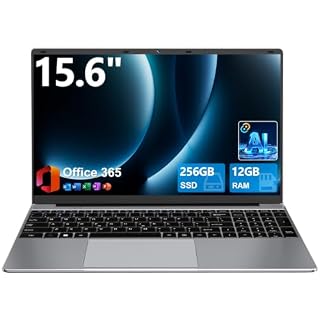
A 180-degree hinge lets you flip the laptop around to share your screen with a coworker.
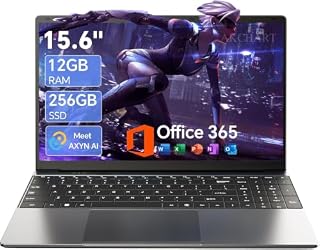
Includes built-in AI assistance for summarizing text, which helps if you want basic automation.
Best for heavy multitasking: Acer Aspire Laptop 2026
If you keep twenty browser tabs open while editing a document, memory is your first bottleneck. The Acer Aspire Laptop 2026 handles this workload better than most machines in the premium budget tier. It pairs an Intel Core Ultra 7 processor with a dedicated NPU for AI tasks. It helps to understand charging laptops away from outlets before going further.
The standout spec here is 32GB of LPDDR5X RAM. Most budget laptops cap out at 8GB or 16GB, which can cause lag when you run multiple applications. This extra headroom means the system stays responsive even when you are moving large files or running virtual machines.
Key strengths
- 32GB RAM for smooth, heavy multitasking
- Intel Arc 140V graphics for light photo editing
- Intel Core Ultra 7 with an NPU for AI acceleration
The main drawback is the higher price point within this category. If you only need a laptop for email and streaming, you are paying for power you will not use. Skip this model if you prioritize raw battery life over sustained CPU performance.
Product to know: Acer Aspire Laptop 2026. This is the best choice if your workflow is memory-heavy, as the 32GB RAM removes the most common upgrade bottleneck.
The 32GB RAM and NPU handle heavy workloads that crash cheaper models.
- AI-Powered Efficiency: NEXT-GEN AI ACCELERATION – Powered by the Intel Core Ultra 7
- Remote Work Champion: BUILT FOR THE REMOTE WORK ERA – 32GB LPDDR5X RAM ensures smooth
Best for large screen real estate: HP 17 inch Business Laptop
Not everyone wants a laptop they can tuck into a small bag. If you work from a fixed desk, a bigger screen reduces eye strain and gives you room to view more data at once. The HP 17 inch Business Laptop delivers a 17.3-inch Full HD display in a portable enough package.
It features a 10-key number pad, which is a huge plus for anyone doing data entry or spreadsheet work. The brushed keyboard and FHD anti-glare screen make long sessions more comfortable than a cheap, glossy 15-inch alternative.
Key strengths
- 17.3-inch FHD anti-glare display
- Full-size keyboard with a 10-key number pad
- Preloaded Windows 11 and Office 365 for Web
The catch is weight. A 17-inch chassis is significantly heavier than a 14-inch ultrabook. Do not buy this if you are a student who carries your laptop to every class. It is a workstation, not a travel companion. We go through architecture student tech step by step in its own article.
Product to know: HP 17 inch Business Laptop. Choose this when you want desktop-like screen space without plugging into a separate monitor.
The 17.3-inch screen and number pad replace a desktop setup for home offices.
- All In The Detail: The HP laptop has a beautiful brushed full-size keyboard with 10-key
- Immersive Full HD Display: Experience high performance with the HP laptops featuring a
Best for travel and light tasks: HP 14” Ultra Light Thin Laptop
Portability wins when your laptop lives in a backpack all day. The HP 14” Ultra Light Thin Laptop is built to be moved, with a slim chassis and an ultra-wide viewing angle. It is the most portable option on this list.
It runs on an Intel N150 processor and includes 4GB of DDR5 RAM. This combination is enough for web browsing, email, and streaming video. It will not run heavy applications or compile code. Think of it as a dedicated email and entertainment machine.
Key strengths
- Ultra-light 14-inch form factor
- Intel N150 quad-core processor for basic tasks
- 628GB total storage via SSD and external drive
If you need to run photo editing software or multiple virtual machines, this laptop will choke. The 4GB RAM limit is the biggest hurdle here. Skip it if your job requires more than light multitasking.
Product to know: HP 14” Ultra Light Thin Laptop. This is the pick for commuters who only need a device for email, Slack, and web video.
The lightweight design makes it the easiest machine to carry all day.
- 【4GB DDR5 RAM + 628GB Storage (128GB SSD + 500GB External)】Experience responsive
- Up to 3.6 GHz with Intel Turbo Boost Technology, 6 MB L3 Cache, 4 cores, 4 threads
Best for flexible viewing angles: DRKAKO 15.6" FHD IPS Student Laptop
Sometimes you need to show someone else what is on your screen without turning around. The DRKAKO 15.6-inch laptop has a hinge that opens to 180 degrees. This is rare in budget models and changes how you collaborate in a pinch. There is more on finding the right laptop for the classroom in a separate guide.
It runs on a Celeron J4105 processor with 12GB of RAM. This is a more balanced combination than the 4GB HP 14-inch option. It handles standard office work and can manage a reasonable number of browser tabs without slowing down.
Key strengths
- 180-degree hinge for easy screen sharing
- 12GB RAM for better multitasking than 4GB models
- Includes a 1-year Office 365 subscription
The Celeron processor is the weak point here. It is not fast by modern standards, so you will notice a boot-up delay and slower performance in heavier apps. If speed is your priority over flexibility, look at the Acer or HP 17-inch options instead.
Product to know: DRKAKO 15.6″ FHD IPS Student Laptop. This model works best for students or remote workers who frequently share their screen with others.
The 180-degree hinge makes it easier to show a client or classmate your work.
- Laptop 180° Open Angle: This laptop's hinge opens flat to 180 degrees, giving you the
- Office 365 & AI Assistance Included: The laptop comes with a 1-year Office 365
Best for budget AI features: AKCHART 15.6'' AI Laptop
AI features are everywhere, but most are hidden in premium pricing. The AKCHART 15.6-inch laptop brings basic AI assistance to a lower price point. It includes tools for writing, summarizing, and task management built into the Windows 11 interface.
Like the DRKAKO, it uses a Celeron J4105 processor but pairs it with 12GB of DDR4 memory. The screen is a 15.6-inch FHD IPS panel, which gives you good viewing angles and color accuracy for casual media consumption.
Key strengths
- Built-in AI tools for text summarization
- 15.6-inch FHD IPS display for wide viewing
- 256GB M.2 SSD for fast boot times
Do not buy this if you need the AI features for professional-grade work. The tools are designed for basic assistance, not complex analysis. If you are a coder or data scientist, the NPU in the Acer Aspire will be far more useful to you. It helps to understand hardware for data work before going further.
Product to know: AKCHART 15.6” AI Laptop. Pick this if you want to try AI-assisted writing and summarizing without paying for a premium tier.
It bundles basic AI tools for writing and summarizing at a lower entry price.
- Stunning 15.6" FHD IPS Display: Experience crisp 1920x1080 resolution on this 15.6 inch
- Celeron J4105 Processor & 256GB SSD: Powered by a reliable Celeron J4105 processor
How to choose the right laptop in the budget tier
With five different strengths on the table, the right choice comes down to what you do every single day. Do not buy a 17-inch workstation if you need to carry a laptop on a plane. Do not buy a 4GB RAM machine if you run a lot of software.
Focus on three things first: your primary task, your storage needs, and your portability requirement. A spreadsheet expert needs a number pad. A content creator needs a color-accurate screen. A traveler needs a 14-inch chassis. Match the hardware to the job, not the other way around.
- RAM: 16GB is the new standard for heavy multitasking. 4GB is only for light web use.
- Storage: An M.2 SSD is required. Skip any model that relies solely on eMMC or a single spinning hard drive.
- Screen size: 14 inches for travel, 15.6 inches for a home office, 17 inches for a fixed desk setup.
- Processor: An N150 or Celeron is entry-level. A Ryzen 5 or Core Ultra 7 handles real workloads.
Comparison table
| Product | Best For | Key Strength | Main Drawback |
|---|---|---|---|
| Acer Aspire 2026 | Heavy multitasking | 32GB RAM and NPU | Premium price in class |
| HP 17-inch | Home office | Large screen and number pad | Heavy and bulky |
| HP 14-inch | Travel | Ultralight 14-inch design | 4GB RAM limit |
| DRKAKO 15.6 | Collaboration | 180-degree hinge | Slow Celeron processor |
| AKCHART 15.6 | Basic AI tools | Integrated AI assistance | Basic AI features only |
Pro tip: Always check the specific model number before you buy. Spec sheets change quickly, and a '16GB' model may actually be a 2x8GB configuration that is not user-upgradable.
The bottom line
For most people, the Acer Aspire 2026 is the smartest buy because its 32GB RAM and NPU make it future-proof for heavy workloads. If you need a large screen at home, the HP 17-inch is the clear winner.
If you are just checking email on the go, the HP 14-inch is the lightest option. Your next step is to decide if your daily workflow is memory-heavy or portability-heavy, then pick the machine that matches.
- AI-Powered Efficiency: NEXT-GEN AI ACCELERATION – Powered by the Intel Core Ultra 7
- Remote Work Champion: BUILT FOR THE REMOTE WORK ERA – 32GB LPDDR5X RAM ensures smooth
Frequently asked questions
Is 8GB of RAM enough for a laptop in 2026?
It is okay for light web browsing and word processing, but it will slow down if you run multiple applications. For a machine you plan to keep for three years, 16GB is the safer choice. It helps to understand hp laptop stress resistance before going further.
Which processor is better, Intel N150 or Celeron J4105?
The Intel N150 is the newer, more efficient chip and uses less power. The Celeron J4105 is older and consumes more battery. Both are entry-level, so neither is good for heavy video editing or gaming.
Can I upgrade the storage on a budget laptop later?
Yes, most of the models listed here use M.2 SSDs that you can swap out for a larger drive. This is the easiest upgrade you can make and costs much less than buying a new laptop.
Why do some 'best' laptops in the budget tier have only 4GB of RAM?
Manufacturers cut costs to hit the price target. These models are fine for a single user doing basic tasks, but they are not for professionals. Always check the RAM spec before you assume a mid-price machine is powerful.