
Your current PC stutters when you switch between a video call, a spreadsheet, and a rendering timeline, or your fans scream every time you open a dozen tabs. This guide gets you a desktop that keeps those apps running smoothly without forcing you to close everything else to free up resources.
In short: The best desktop for heavy multitasking pairs a modern multi-core CPU with at least 32GB of fast DDR5 RAM and an NVMe SSD. This combination ensures applications load instantly and stay responsive while the processor divides heavy workloads efficiently. If you render video or 3D, adding a dedicated GPU prevents the bottleneck that integrated graphics cause.
Quick picks
Our shortlist for this job · tap one to see today's price
Handles office suites, databases, and AI tools simultaneously without the clutter of a gaming rig.

Pairs a powerful CPU with a discrete GPU to accelerate rendering and 3D timelines.

Provides 64GB of RAM and 2TB storage for virtual machines and massive spreadsheets.
Offers an entry-level path to AI features and basic office multitasking for smaller teams.

Moves heavy media files off your internal drive to keep your system snappy.
Best for AI-Ready Business Multitasking: Dell Desktop Tower
This machine is built for professionals who juggle spreadsheets, video conferences, and AI-assisted tools all day. It uses an Intel Core processor with a hybrid architecture that handles bursts of heavy work while sipping power during lighter tasks.
The integrated NPU accelerates Windows 11 AI features, keeping real-time background blur and document summarization from stealing cycles from your main applications. It helps to understand our notes on for 3d rendering before going further.
32GB of DDR5 RAM and a 1TB PCIe SSD mean you can load a dozen apps and switch between them instantly. Dual 4K monitor support via DisplayPort and HDMI gives you a spacious digital desk for complex workflows.
The main drawback is the integrated graphics. They are fine for business apps and 4K video, but you cannot edit heavy 4K video or play modern games at high settings. The included USB WiFi adapter works well but feels less elegant than a built-in solution.
- Best for: Business professionals needing future-ready AI features and rock-solid office multitasking.
- Specs: 14-core hybrid CPU, 32GB DDR5, 1TB SSD, Windows 11 Pro.
- Who should skip: 3D artists, video editors, and gamers who need a dedicated GPU.
A high-core-count tower gives you the processing headroom to keep these office and AI tasks running smoothly.
- Powered by a 12th Gen Intel Core i9-12900K processor with 16 cores, 24 threads, 30MB
- Configure your system with up to 64GB of DDR5 Memory for ultra-smooth multitasking and
Best for Creative and Professional Rendering: HP OmniDesk M03 Tower
This desktop brings serious muscle for creative professionals who need more than just office speed. It pairs a high-thread-count Intel processor with an NVIDIA RTX discrete GPU, making it the only option here that handles real-time 3D rendering and video editing timelines.
The dedicated graphics card accelerates workflows in Adobe Premiere Pro, Blender, and DaVinci Resolve. Front USB Type-C ports at 10Gbps make transferring large files from cameras or external drives fast, which is a huge time saver for media pros.
The main drawback is the base frequency of the processor, which can run warm under sustained load. Adequate ventilation is essential to prevent throttling. Also, the bundled keyboard and mouse are basic and will likely be replaced by serious users.
- Best for: Content creators and professionals needing GPU acceleration for rendering and light gaming.
- Specs: 20-core CPU, RTX 5060 GPU, 32GB DDR5, 1TB SSD, Wi-Fi 6.
- Who should skip: Users whose work is purely data-heavy and do not need GPU power.
- High-Performance 20-Core Processor: Powered by the Intel Core Ultra 7 265F processor
- RTX 5060 Discrete Graphics: Equipped with an NVIDIA GeForce RTX 5060 discrete graphics
Best for Memory-Heavy Workloads: 64GB HP OmniDesk M03 Variant
This variant doubles the memory and storage, making it an extreme multitasking machine for users who live in virtual machines or large spreadsheet models. It uses the same powerful processor as the creative model but relies on integrated graphics, prioritizing raw memory capacity over GPU power. We cover cheap desktop build in a guide of its own.
64GB of DDR5 RAM is the star here. You can keep a hundred browser tabs open, run two or three virtual machines, and have Outlook, Slack, and a code editor active at the same time without the machine flinching.
The 2TB SSD provides ample room for local project files. The limitation is the lack of a dedicated GPU, so you cannot use this for video editing or 3D modeling. It is a pure productivity beast for data-heavy, non-creative workloads.
- Best for: Developers, data scientists, and financial analysts running large simulations or multiple VMs.
- Specs: 20-core CPU, 64GB DDR5, 2TB SSD, Integrated Intel graphics.
- Who should skip: Creative professionals who rely on GPU acceleration for their daily work.
- Upgrade-ready performance: choose Intel Core i5-14500 for everyday office work, web
- Configure your system with up to 64GB of DDR5 Memory for ultra-smooth multitasking and
Best for Budget-Friendly Office Upgrades: 16GB Dell Pro Tower
This entry-level cut of the business tower lowers the RAM to 16GB and the storage to 512GB to make it more affordable. It retains the same processor and integrated NPU, giving you a taste of next-gen AI features without overspending.
In practice, 16GB of DDR5 RAM handles typical office multitasking, such as Word, Excel, a browser, and email. It is a solid choice for small businesses or professionals who want a reliable machine without the premium price tag.
Heavier workloads will cause the system to swap to the SSD, slowing down performance. This is a good starter desktop, but you will likely want to upgrade the RAM or storage later if your workload grows.
- Best for: Budget-conscious professionals and small offices needing basic AI-ready features.
- Specs: 14-core CPU, 16GB DDR5, 512GB SSD, Windows 11 Pro.
- Who should skip: Users who routinely run more than five heavy applications at once.
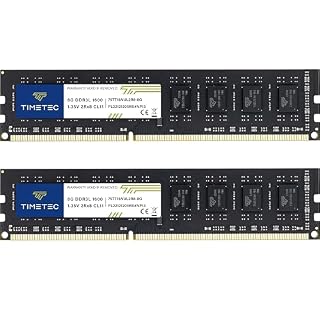
A 16GB memory kit is the specific upgrade path to keep this budget system smooth when the default 16GB starts to feel tight.
- PCB color may vary (black or green) depending on production batch. Quality and
- DDR3L / DDR3 1600MHz PC3L-12800 / PC3-12800 240-Pin Unbuffered Non-ECC 1.35V / 1.5V
Best for Offloading Heavy Media Files: Netac Portable NVMe SSD
When your internal drive fills up with large project files, a fast external drive keeps your desktop snappy. This portable SSD offers high-speed performance, moving files at speeds up to 2000MB/s read. We go through best desktop for graphic design step by step in its own article.
It is pocket-sized and easy to carry, making it perfect for moving large media libraries or backup files between your desktop and a mobile workstation. The endurance is built to handle frequent trips and transfers without losing data.
It is a storage add-on, not a replacement for your internal drive. Use it to offload active projects so your internal SSD stays fast for the operating system and applications.
- Best for: Creatives and data users who need fast external storage for large files.
- Key feature: Up to 2000MB/s read speed and a compact, durable design.
- Who should skip: Users who do not need to move files between machines frequently.
This external drive gives you the fast transfer speeds needed to keep heavy files off your internal drive.
- High-Speed Performance: Netac ZX20 2TB Portable SSD provides file transfer at speeds up
- Endurance that is second to none: Take a trip without any apprehension with Netac
How to Choose the Right Multitasking Desktop
Picking the right machine comes down to matching the spec to your specific bottleneck. Use these criteria to narrow down the field before you commit to a tower.
- RAM Capacity: For heavy multitasking, 32GB is the new baseline. If you run VMs or large databases, jump to 64GB.
- CPU Cores: Look for a hybrid architecture (Performance and Efficient cores) to handle both heavy bursts and light background tasks.
- Storage Type: An NVMe SSD is essential. 1TB is the minimum for a serious workflow to avoid running out of space.
- Graphics Card: Integrated is fine for office work. You need a dedicated GPU for video, 3D, or AI training.
- Connectivity: Wi-Fi 6 and USB-C ports at 10Gbps make file transfers and networking significantly faster.
Comparison Table:
| Product | Best For | Key Strength | Main Drawback |
|---|---|---|---|
| Dell Desktop Tower | Business / AI | NPU and hybrid CPU | No dedicated GPU |
| HP OmniDesk M03 | Creative / Video | RTX 5060 GPU | Runs warm under load |
| 64GB HP OmniDesk | Data / VMs | 64GB RAM | Integrated graphics only |
| 16GB Dell Tower | Budget Office | Low entry price | 16GB RAM limit |
Pro tip: Always check the manufacturer's current spec sheet for exact RAM expansion limits before buying. Some towers cap out at 32GB or 64GB.
The bottom line
For most professionals, the Dell Desktop Tower is the safest choice for smooth, AI-ready office multitasking. If you edit video or 3D content, the HP OmniDesk M03 with its dedicated GPU is the only option that won't bottleneck your workflow. Start by identifying whether your bottleneck is memory, processing power, or graphics, then pick the tower that matches that specific need.
- Powered by a 12th Gen Intel Core i9-12900K processor with 16 cores, 24 threads, 30MB
- Configure your system with up to 64GB of DDR5 Memory for ultra-smooth multitasking and
Frequently asked questions
How much RAM do I need for heavy multitasking?
For a smooth experience with many applications open, 32GB of DDR5 is the recommended baseline. If you run virtual machines, large spreadsheets, or multiple browser instances with many tabs, 64GB is the better choice to prevent the system from using its storage as swap memory.
Do I need a dedicated graphics card for multitasking?
Not for standard office or business tasks. Integrated graphics are sufficient for video calls, spreadsheets, and web browsing. However, if you use software like Adobe Premiere, Blender, or DaVinci Resolve, a dedicated GPU is essential to accelerate rendering and keep the interface responsive.
Can I upgrade the RAM and storage on these desktops later?
Most business towers allow you to add more RAM and swap out the SSD, but you should check the specific model’s manual. Some compact designs have fixed components. Always verify the maximum supported RAM speed and capacity before buying extra sticks.
Why does my desktop get loud when I have many apps open?
When the CPU is working hard to keep multiple applications active, the cooling system must spin up to prevent overheating. This is normal behavior. If the fans are loud even when idle, check your dust filters and ensure the tower has adequate ventilation.