
You are staring at a used business PC that looks like a steal next to a new mid-range rig with a shiny warranty. This page tells you exactly where used computers win on value and where they will fail you under heavy load.
In short: For most people, a certified refurbished desktop from a major brand is the smartest buy in 2026. It costs half as much as a new machine and handles office work, web browsing, and video calls without breaking a sweat.
You only need to buy new if you are gaming, editing 4K video, or need a multi-year warranty. We go through old laptop step by step in its own article.
Quick picks
Our shortlist for this job · tap one to see today's price
Turns a slow used hard drive into a modern-feeling system without a full rebuild.

Fixes missing USB-A or HDMI ports on compact used business PCs.
The differences at a glance: price vs. performance
The gap between the two options is not just about cost. It is about how long the machine will stay relevant. A new desktop in 2026 ships with DDR5 RAM and NVMe Gen4 storage. A used machine from 2021 usually has DDR4 and a slower SSD. That difference changes everything from boot times to multitasking smoothness. Loaders in this spot often ask about laptop versus desktop graphics card as well.
When you look at the hardware, the new system is designed for longevity. It supports future CPU upgrades and high-power GPUs. The used system is a fixed point in time. You get what you get, and you cannot easily fix the motherboard or power supply later.
| Feature | New Desktop (2026) | Used/Refurb Desktop (2022-2024) |
|---|---|---|
| Price Range | Premium | Budget to Mid |
| RAM | DDR5 (32GB+) | DDR4 (16GB) |
| Storage | 2TB NVMe Gen4 SSD | 1TB NVMe Gen3 SSD |
| Warranty | 1-3 Years | 90 Days – 1 Year |
| Upgrade Potential | High | Low to Medium |
| Power Efficiency | Modern efficient CPU | Older, higher draw |
Price and value: where the used desktop wins on budget
The main draw of the used desktop is the price. For the cost of one new entry-level PC, you can often buy a high-end used business workstation. These machines are built by Dell, HP, or Lenovo to last in corporate offices for five to seven years. They use standard parts, which means they are cheaper to manufacture and buy.
However, the used price is not just lower; it is often drastically lower. A professional-grade i7 system from 2023 can be found at a price that only buys you an i5 new laptop. This is the “sweet spot” where performance per dollar is highest.
You are not getting the latest features, but you are getting enough power for almost any non-gaming task.
Here is where the new desktop earns its premium. It includes a full warranty, fresh battery on any bundled accessories, and the latest chip architecture. If your budget is tight, the used route saves you enough to buy accessories like a new mouse or monitor. If you can afford the new price, you are buying insurance against hardware failure.
- Best value: Used certified refurbished (Dell Optiplex, HP EliteDesk)
- Safest value: New entry-level desktop (HP ProDesk, Lenovo ThinkCentre)
Pro tip: Always look for "Certified Refurbished" rather than "Used." Certified means the seller tested the machine and fixed any faults. Used means it is sold as-is, which is a risk. There is more on optimizing a specific budget tier in a separate guide.
Adding a fast external SSD lets you move files off the old slow hard drive instantly, making the used machine feel snappy.
- Get NVMe solid state performance with up to 1050MB/s read and 1000MB/s write speeds in
- Up to 3-meter drop protection and IP65 water and dust resistance mean this tough drive
Performance: when the new desktop is the only option
For web browsing, email, and spreadsheets, a used desktop is fine. The hardware from 2022 or 2023 is still powerful enough to run Windows smoothly. You will not notice a lag when opening Chrome or typing in Word. This is the sweet spot for home office work.
The moment you start gaming or video editing, the used machine falls behind. Modern games and 4K editing require specific GPU power and fast memory bandwidth. An older GPU in a used PC cannot handle new titles.
You will have to lower settings or wait for longer render times. The new desktop’s newer CPU and GPU architecture handle these heavy tasks with ease.
If you are buying for a student or a remote worker, the used desktop handles the job. If you are a creative or a gamer, the performance gap is too wide to ignore. The new machine is not just faster; it is capable of tasks the used one physically cannot do well.
Pro tip: If buying a used desktop for gaming, check the GPU. A used PC with a weak graphics card is not a gaming PC. You need a dedicated GPU with at least 8GB of VRAM.
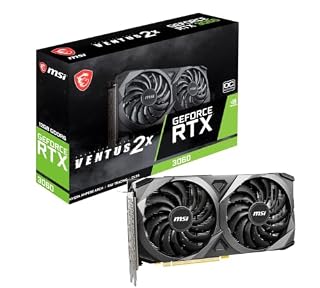
- Chipset: NVIDIA GeForce RTX 3060
- Video Memory: 12GB GDDR6
Reliability and warranty: the hidden cost of "as-is" sales
Warranty is the biggest stress point for used buyers. A new desktop comes with a full 1 to 3-year warranty. If the power supply fails in year two, the manufacturer fixes it. If that sounds like your bench, read up on refurbished desktop vs new desktop india 2026 next.
With a used desktop, that window is much shorter. Many private sellers offer no warranty at all. Certified refurbished sellers usually offer a 90-day to 1-year warranty, which is better but not as safe as new.
Reliability also ties to the age of the parts. Capacitors on older power supplies dry out over time. Fans wear down.
While a used business PC is a tough machine, it has already lived three or four years. You are buying the remaining life. A new machine has its full life ahead of it.
This matters if you plan to keep the PC for five years or more.
For most readers, the warranty on a new desktop is worth the extra cost. It removes the risk of a broken machine. If you choose used, stick to major brands with a clear return policy. Avoid random marketplace sellers if you are not comfortable fixing hardware yourself.
Upgrade path: which platform lets you grow?
New desktops are built for the future. They use standard sockets and power supplies that allow you to swap in a new CPU or GPU in three years. This keeps the machine relevant.
The used business desktop is often a “locked” box. The motherboard and power supply are proprietary. You cannot easily upgrade the graphics card because the power supply does not have the right connectors. We cover upgrade your pc or buy a new desktop? key factors in a guide of its own.
However, not all used PCs are locked. Some HP and Lenovo models use standard ATX parts. If you find one of these, you can add a new graphics card.
This turns a cheap office machine into a decent entry-level gaming box. But it is rare. Most used business PCs are small form factor and hard to open.
Check the model number before you buy if upgrade potential matters to you.
Adds a 4K HDMI output and USB-A ports to used models that only have USB-C or no video out at all.
- Sleek 7-in-1 USB-C Hub: Features an HDMI port, two USB-A 3.0 ports, and a USB-C data
- Flawless 4K@60Hz Video with HDMI: Delivers exceptional clarity and smoothness with its
Which should you buy?
The right choice depends entirely on what you need the computer to do. There is no single winner for everyone. Match the machine to your task, and you will save money and avoid frustration.
- For Gaming: Buy New. Used GPUs are weak and power supplies are often too small for modern graphics cards.
- For Home Office: Buy Used. A certified refurbished Dell or HP is perfect for email, calls, and documents.
- For Content Creation: Buy New. You need the latest CPU and fast RAM to render video and edit images quickly.
- For a Home Server: Buy Used. They are quiet, efficient, and cheap enough to run 24/7 without worrying.
- For a Kid’s PC: Buy Used. It is durable, cheap to replace if broken, and good enough for schoolwork.
Maintenance tip: keep any desktop running cooler
Whether you buy new or used, heat is the enemy of performance. Dust clogs the fans and forces the CPU to run hotter. This slows down the machine and shortens the life of the components. A quick clean of the thermal paste on the processor helps the heat move away from the chip.
Applying new thermal paste is a simple task. You need a small amount of high-conductivity paste to fill the gap between the CPU and the heatsink. This keeps temperatures stable even under heavy load. It is a cheap way to extend the life of a used desktop by several years. The other half of this decision is new battery not showing.
The bottom line
For most people, a certified refurbished desktop is the best value. It gives you 80% of the new performance for 50% of the price. If you need a long warranty or are gaming, buy new. If you are on a tight budget for office work, buy used.
- Get NVMe solid state performance with up to 1050MB/s read and 1000MB/s write speeds in
- Up to 3-meter drop protection and IP65 water and dust resistance mean this tough drive
Frequently asked questions
Is a used desktop safe to buy in 2026?
Yes, if you buy from a reputable source. Look for certified refurbished units from major brands like Dell, HP, or Lenovo. These come with a warranty and have been tested. Avoid random marketplace sellers if you are not comfortable troubleshooting hardware yourself.
Can I upgrade a used business desktop?
It depends on the model. Some small form factor units have proprietary parts that cannot be changed. Larger tower models often use standard parts, allowing you to add a new graphics card or more RAM. Always check the specific model number’s specs before buying.
Which is better for streaming: used or new?
A new desktop is better for streaming. Streaming requires a powerful CPU to handle the game and the broadcast at the same time. A new mid-range CPU handles this easily. An older used CPU may struggle, causing lag in your gameplay.
How long does a used desktop last?
Most used business desktops from 2021-2023 will last another 3-5 years for light use. They are built to be reliable. The main limit is the power supply and battery life of any attached peripherals, not the CPU or RAM.