Types of Computers: A Practical Breakdown for Buyers
Contents
You’re surrounded by computers. The phone in your pocket, the device you’re reading this on, the systems managing traffic lights. But when someone says “computer,” what do you picture? The landscape of computer categories is vast, from pocket-sized gadgets to room-filling behemoths. Choosing the right one starts with knowing the options.
This guide breaks down the primary types of PC and computer systems. We’ll explain their core purposes, strengths, and ideal use cases. Whether you’re a student, a creative professional, or a business owner, you’ll learn how to match a machine’s capabilities to your needs.
Understanding Computer Categories and Form Factors
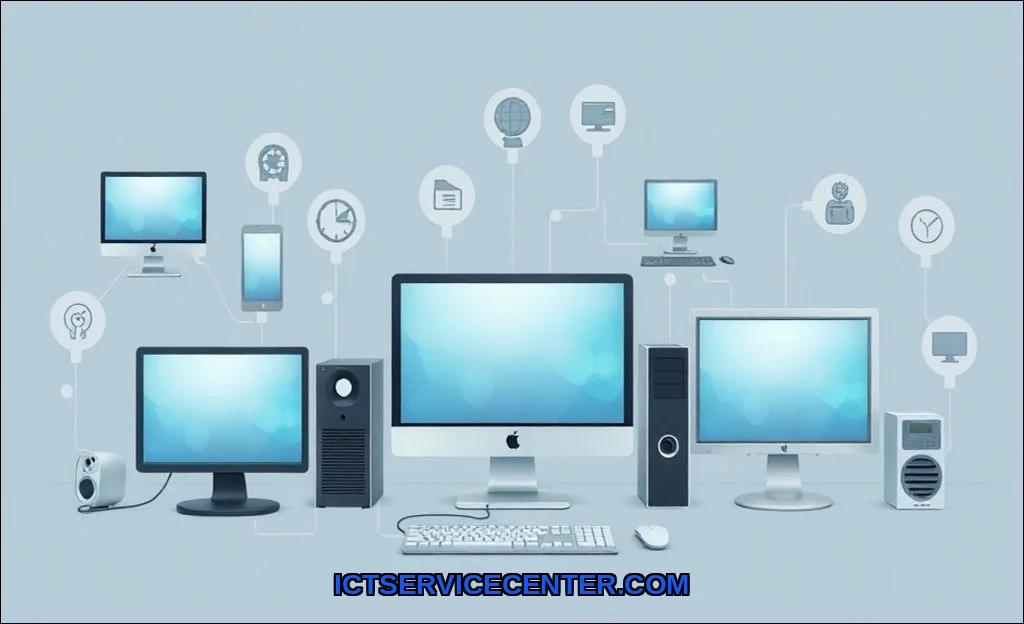
At the highest level, computer classifications often start with two concepts: portability and purpose. Portable computers like laptops and tablets are designed for mobility. Stationary computers, like desktops and servers, prioritize power, cooling, and expansion in a fixed location. The physical design, or form factor, is a direct result of these priorities.
Your choice fundamentally hinges on the trade-off between power and mobility. Need raw processing power and easy upgradability? A stationary desktop is your friend. Need to work from a caf or a classroom? Portability becomes non-negotiable. Let’s start with the classic anchor of computing.
Desktop Computers: The Traditional Powerhouse
The desktop PC is the quintessential personal computer. Its defining trait is a separate system unit (the tower), monitor, keyboard, and mouse. This modularity is its superpower. You get superior cooling, ample space for powerful components, and unmatched flexibility for future upgrades. For intensive tasks like video editing, 3D rendering, or high-end gaming, a well-configured desktop is often unbeatable.
Common computer form factors in this category include the full tower, mid-tower, and the compact small form factor (SFF). The All-in-One (AIO) is a popular subcategory that integrates the computer into the monitor, saving desk space at the cost of limited upgradability. For a reliable, business-ready desktop that balances performance and manageability, many IT departments turn to models like the Dell OptiPlex 7050. It’s a workhorse for office productivity, light design work, and as a point-of-sale terminal.
Key Advantages of Desktops:
- Maximum Performance: Can house the most powerful CPUs and graphics cards.
- Superior Cooling: Larger cases allow for better airflow and quieter operation.
- Easy Upgrades: Swapping out RAM, storage, or a graphics card is typically straightforward.
- Cost-Effectiveness: More power per dollar compared to equivalent laptops.
Laptop Computers: Portable Productivity
Laptops (or notebooks) consolidate all core componentsscreen, keyboard, touchpad, and batteryinto a single clamshell unit. This is the ultimate tool for mobility. Modern laptops span from ultra-portable ultrabooks to powerful mobile workstations and dedicated gaming rigs. The core compromise is often in thermal constraints, which can limit sustained performance, and soldered components that reduce upgradability.
The difference between desktop and laptop computer choices often comes down to lifestyle. If your work or study demands movement, a laptop is essential. For a deeper dive into the nuances of portable computing, explore our guide on the different types of laptops available today.
Tablets and Hybrids: Mobile Computing Evolved
Tablets prioritize touch-first interaction and extreme portability. They run mobile operating systems (iOS, Android) or full desktop OSes (Windows). The line has blurred with convertible 2-in-1 devices that switch between laptop and tablet modes. These are perfect for content consumption, light note-taking, digital art, and on-the-go media.
Think of a tablet as a companion device rather than a primary computer for most. Its strength is instant-on usability and app-based simplicity. Brands like Apple (iPad), Samsung (Galaxy Tab), and Microsoft (Surface) dominate this space, with Lenovo and Honor offering strong alternatives.
Workstations and Servers: Professional & Enterprise Grade
This is where computer uses shift from general to specific. A workstation is a high-end desktop engineered for reliability and accuracy in professional applications like CAD, scientific simulation, and 4K video production. They use error-correcting memory, professional-grade GPUs (NVIDIA RTX A-series, AMD Radeon Pro), and certified drivers. So, what is a workstation vs a desktop? It’s the difference between a pickup truck and a semi-truckboth haul, but one is built for heavy, mission-critical loads.
Servers are computers designed to provide data, services, or resources to other computers (clients) over a network. They are the backbone of the internet, hosting websites, managing emails, and storing company files. They’re built for 24/7 uptime, remote management, and often lack a direct user interface.
A related, lightweight concept is the thin client. These are minimal, low-power terminals that rely on a central server or cloud for all processing. You’ll see them in call centers and libraries, where security, cost, and manageability are key.
Mainframes and Supercomputers: High-Performance Computing
These are the titans. Mainframes are exceptionally reliable, powerful computers used for bulk data processing by large organizationsthink banking transactions, census data, and airline reservations. They excel at handling thousands of concurrent, smaller tasks with flawless reliability.
Supercomputers are the opposite: they’re built to solve one enormous, complex calculation as fast as possible. They’re used for weather modeling, molecular research, and cryptanalysis. Comprised of thousands of interconnected processors, they represent the absolute peak of processing power.
Beyond the Basics: Other Computer Systems
The ecosystem includes other important computer hardware types. Single-Board Computers (SBCs), like the Raspberry Pi, pack a full computer onto a credit-sized circuit board. They’re fantastic for learning, prototyping, and lightweight dedicated tasks (like a retro gaming console or smart home hub).
We’ve also touched on the specialized realm of Gaming PCs, which are high-performance desktops (and some laptops) optimized for frame rates and visual fidelity. Their architecture is similar to a high-end desktop but with a laser focus on gaming performance and often, flashy aesthetics.
How to Choose the Right Type of Computer for You
Stop thinking about specs first. Start with your use case. Ask these questions:
- Where will you use it? (Static desk vs. multiple locations)
- What software must it run? (Office apps, Photoshop, AutoCAD, specific games)
- What’s your non-negotiable? (Battery life, screen quality, raw speed, budget)
- How long do you expect to keep it? (This affects the importance of upgradability)
For most general home and office tasks, a modern laptop or mid-range desktop is perfect. Creative professionals and hardcore gamers lean towards powerful desktops or mobile workstations. Students and frequent travelers prioritize portability. Remember, a computer is a tool. The best tool fits the job you actually do. To understand how your choice handles running multiple applications, our article on how computer multitasking works explains the hardware and software behind the scenes.
Still debating portability? For a excellent brand-specific comparison that echoes many of these principles, check out this external resource on the practical differences between laptops and desktops.
Quick Decision Table
| Type | Best For | Key Consideration |
|---|---|---|
| Desktop | Power users, gamers, fixed workstations | Maximum performance and upgrade path |
| Laptop | Students, professionals, anyone mobile | Balance of performance and portability |
| Tablet/Hybrid | Media, light work, presentations | Touch interface and ultra-portability |
| Workstation | Engineers, scientists, professional creators | Reliability, precision, certified hardware |
The world of different kinds of computers is diverse because our needs are diverse. There’s no single “best” type, only the best fit for your specific situation. By understanding the core strengths of each form factorfrom the versatile laptop to the specialized supercomputeryou move from being a passive consumer to an informed decision-maker. Match the machine to the task, and you’ll get a partner that helps you work, create, and connect more effectively.