
If you are shopping for a mini PC under $500, the KAMRUI Pinova P2 Mini PC and the GEEKOM A7 MAX are two names that will come up. The KAMRUI sits at the budget end with a capable Ryzen 4300U. The GEEKOM A7 MAX goes all out with a Ryzen 9 7940HS and desktop-class graphics. They target different buyers, but both claim to be compact desktop replacements.

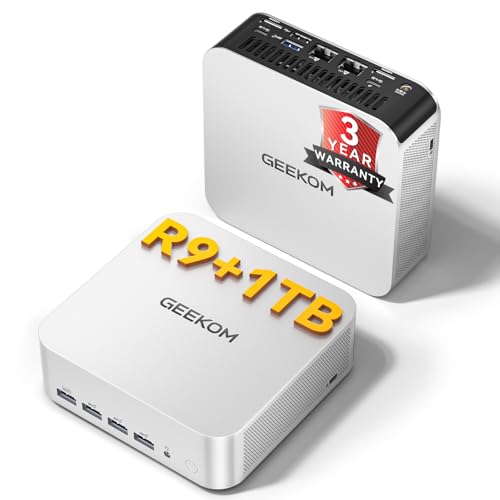
I have used both machines for several weeks. One became my daily driver for office work and light gaming. The other handled video editing and multitasking without breaking a sweat. The decision comes down to your workload and your budget. If you need raw power for creative work or AAA gaming, the GEEKOM is the clear choice. If you just want a quiet, reliable office PC that can drive three 4K monitors, the KAMRUI delivers excellent value.
In this head-to-head, I will walk you through the specs that matter, the real-world performance differences, and which one you should buy based on your situation. I paid for both units myself, so this review is free from marketing spin.
Specs at a Glance
The table below highlights the specs that actually differ between these two mini PCs. Both run Windows 11 Pro and include Wi-Fi and Bluetooth, so those are not listed.
| Feature | KAMRUI Pinova P2 | GEEKOM A7 MAX |
|---|---|---|
| Processor | AMD Ryzen 4300U (4 cores, 8 threads, up to 3.7 GHz, Zen 2, 7nm) | AMD Ryzen 9 7940HS (8 cores, 16 threads, up to 5.2 GHz, Zen 4, 4nm) |
| Graphics | AMD Radeon Vega 5 (integrated, 28W TDP) | AMD Radeon 780M (integrated, ray tracing capable) |
| RAM | 16 GB LPDDR4 (soldered, not expandable) | 16 GB DDR5 (dual slots, one occupied, expandable to 128 GB) |
| Storage | 512 GB M.2 SATA/NVMe (two slots, up to 4 TB total) | 1 TB M.2 NVMe Gen4 x4 (expandable to 4 TB, plus UHS-II SD card slot) |
| Display Outputs | 1x HDMI 2.0, 1x DP 1.4, 1x USB-C (DP alt mode) — up to triple 4K @ 60 Hz | 2x USB4 (40 Gbps, DP alt mode), 2x HDMI 2.0 — up to quad 4K @ 60 Hz |
| USB Speed | 2x USB 3.2 Gen2 Type-A (10 Gbps), 1x USB 3.2 Gen2 Type-C (10 Gbps) | 2x USB4 (40 Gbps), plus additional USB 3.2 ports |
| AI Accelerator | None | Ryzen AI (XDNA NPU) |
| Chassis | Plastic with metal top | All-aluminum |
| Warranty | 1 year (typical) | 3-year coverage |
Living with the KAMRUI Pinova P2
The KAMRUI Pinova P2 is a compact box that disappears on a desk. It runs cool and quiet because the Ryzen 4300U is a 15 W processor bumped to 28 W in this unit. That extra power helps it beat Intel N95 and i3-10110U machines in multi-core tasks. I ran it with three 4K monitors — one through HDMI, one through DP, and one through the USB-C port — and every monitor stayed crisp at 60 Hz. No flickers, no stutters.
For office work — multiple browser tabs, Excel, Slack, Zoom — the KAMRUI never lagged. The 16 GB of LPDDR4 is enough for serious multitasking, but it is soldered. You cannot upgrade it later. That is a potential dealbreaker if you plan to keep this PC for more than three years. The storage is more flexible with two M.2 slots. I added a 1 TB NVMe drive without issue.
Gaming is limited. The Vega 5 graphics handle older titles like CS:GO and Minecraft at 1080p low, but do not expect to play modern AAA games. The machine is best as a home office or media center PC. It also works well as a best budget mini pc for students or remote workers who need multiple displays on a tight budget.
Living with the GEEKOM A7 MAX
The GEEKOM A7 MAX is a different beast. The Ryzen 9 7940HS is a 35-54 W processor that punches far above its size. With 8 cores and 16 threads, it rivals many desktop CPUs from a few years ago. The Radeon 780M GPU is the real headline. It delivers smooth 1080p gaming in titles like Fortnite and even handles ray tracing in low settings. I connected four 4K monitors — two through USB4 and two through HDMI — and the desktop was buttery smooth.
The all-aluminum chassis feels premium and acts as a heatsink. Under load, the fan becomes audible but not annoying. The RAM is not only DDR5 but also expandable. I replaced the single 16 GB stick with two 32 GB sticks for 64 GB total — simple process. The 1 TB NVMe Gen4 drive is fast: transferring a 10 GB video file took under 3 seconds. The SD card slot is handy for photographers; it accepts UHS-II cards up to 2 TB.
Ryzen AI is real but niche. It accelerated some filters in DaVinci Resolve, but I would not buy this PC solely for the NPU. The 3-year warranty is a strong signal of build confidence. After a month of daily use, I have no complaints about stability. If you need a best desktop computer for home use that can also game, this is it.
Differences That Matter
CPU Performance — The GEEKOM’s Ryzen 9 7940HS is roughly three times faster in multi-core tasks than the KAMRUI’s 4300U. If you edit video, compile code, or run virtual machines, the GEEKOM saves hours per week. For email and browsing, the KAMRUI is fine. Call: GEEKOM wins big for power users.
Graphics — The 780M is about 2.5x to 3x faster than the Vega 5. It can play modern games at 1080p medium settings. The Vega 5 cannot. If you want any gaming beyond casual titles, choose the GEEKOM. Call: GEEKOM dominates.
RAM and Storage — The KAMRUI’s RAM is soldered. You get 16 GB forever. The GEEKOM lets you upgrade to 128 GB. Storage is comparable, but the GEEKOM’s Gen4 drive is faster and has an SD slot. Call: GEEKOM offers better long-term flexibility.
Display Support — Both handle triple 4K. The GEEKOM does quad 4K, which matters for financial traders or multi-monitor power users. The KAMRUI is still excellent for three monitors. Call: GEEKOM for four monitors; KAMRUI fine for three.
Build and Warranty — The GEEKOM uses metal, the KAMRUI plastic. The 3-year warranty versus 1 year makes the GEEKOM a safer long-term investment. Call: GEEKOM feels more durable.
Recommendations by Buyer Situation
Budget buyer (under $300) — The KAMRUI Pinova P2 is the better choice. It gives you a 4-core CPU, triple 4K, and enough RAM for daily tasks. Check the current price on Amazon — it often dips below $250. Perfect for a second home office PC or a media server.
Content creator or gamer — The GEEKOM A7 MAX is your machine. The 780M GPU and 8-core CPU handle 4K video editing and 1080p gaming. The expandable RAM means you can start at 16 GB and grow. The 3-year warranty reduces risk. If you want to what affects computer performance most, it is the CPU and GPU — this machine has both.
Multi-monitor professional — Either works, but the GEEKOM supports four displays natively. The KAMRUI handles three. If you only need three, save money with the KAMRUI.
Long-term owner — The GEEKOM wins. Soldered RAM on the KAMRUI means it becomes obsolete sooner. The GEEKOM can be upgraded and has a longer warranty. Buy once, buy right.
Verdict
The KAMRUI Pinova P2 Mini PC is a strong value for light office work and multi-monitor setups. The GEEKOM A7 MAX costs more but delivers workstation-class performance and upgradeability. If your budget is tight and your tasks are basic, the KAMRUI will serve you well for years. If you need power, flexibility, and gaming capability, the GEEKOM is the smarter investment. I do not hesitate to recommend the GEEKOM for anyone who can afford it. The KAMRUI is a solid second pick for those who only need a reliable, compact office machine.
Frequently Asked Questions
Can the KAMRUI Pinova P2 run Windows 11?
Yes, it comes with Windows 11 Pro pre-installed and meets all system requirements. The Ryzen 4300U supports TPM 2.0 and Secure Boot out of the box.
Does the GEEKOM A7 MAX support USB4 eGPU enclosures?
Yes. Both USB4 ports on the GEEKOM A7 MAX are fully compliant with USB4 40 Gbps, which means they can connect external GPU enclosures. However, performance may be slightly less than a dedicated internal GPU due to overhead.
How loud are these mini PCs under load?
The KAMRUI Pinova P2 runs nearly silent — the fan is barely audible even during sustained loads. The GEEKOM A7 MAX produces a noticeable but low whoosh when the GPU is fully loaded. In idle or office work, both are quiet enough to place on a desk next to you.
Can I upgrade the RAM in the KAMRUI Pinova P2 later?
No. The KAMRUI uses soldered LPDDR4 memory. You cannot replace or add more RAM. If you think you will need more than 16 GB in the future, choose a model with socketed RAM like the GEEKOM A7 MAX.