
Your laptop is ignoring the RAM you installed, or crashing randomly when you multitask. You suspect dust is blocking the connection, but you are afraid of scratching the delicate pins with a hard tool.
In short: The best way to clean a laptop RAM slot with a toothbrush is to use a soft-bristled brush with a little isopropyl alcohol. It reaches tight spaces without bending pins. Follow these steps to fix contact issues safely and avoid metal tools.
Quick picks
Our shortlist for this job · tap one to see today's price
Blasts out loose debris before you brush, preventing dirt from smearing into the slot.
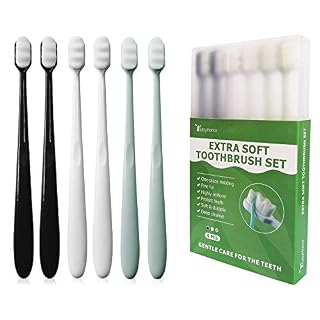
Ultra-fine bristles are gentle enough for delicate pins without scratching the gold plating.

A known-good stick verifies if the slot works after you finish cleaning the pins.
Why Use a Toothbrush Instead of Metal Tools
Many guides suggest a plastic spudger or even a pencil eraser. A soft toothbrush is often safer because the bristles are flexible and short. They bend around the pins instead of pressing into them. Loaders in this spot often ask about upgrading to a faster drive as well.
Metal tweezers or screwdrivers can scratch the gold contacts permanently. Once that plating is gone, the pins corrode faster and fail over time. You want a tool that cleans without leaving micro-abrasions.
Use a soft-bristled toothbrush, like one for sensitive gums. Stiff bristles can still bend pins if you press too hard. The goal is to sweep the dust out, not scrub it off.
- Soft bristles only: Avoid stiff brushes or dental picks.
- No fibers: Ensure the brush head is intact and not shedding.
- Dry first: Use air duster before applying any liquid.
Safety first: Never use a cotton swab inside the slot. Leftover fibers cause intermittent contact errors that look like a dead board.
This ultra-soft brush is a safe substitute if you do not have a dedicated ESD brush at hand.
- Using Japanese soft toothbrush technology, more than 20,000 micro fine bristles are
- The ultra fine BPA free bristles get into more difficult corners and spaces between
Tools You Need Before You Start
You do not need expensive electronics kits for this job. You just need three things: a can of compressed air, isopropyl alcohol (90% or higher), and your soft brush. Avoid rubbing alcohol with additives, as it leaves residue.
Compressed air is the first line of defense. It blows out the loose dust that sits on top of the pins. If you skip this step, you will just smear the dust into the slot when you brush.
Isopropyl alcohol evaporates quickly and leaves no marks. It removes the oily film that builds up from your hands or oxidation. You only need a small amount, enough to dampen the brush bristles. For the detail, see our notes on the safe process for drive replacement.
- Compressed air: Short bursts only, hold the can upright.
- Isopropyl alcohol: Minimum 90% concentration for fast drying.
- Soft brush: Toothbrush or ESD-safe soft brush.
A simple duster can replace the need for expensive canned air if you just need a quick dusting.
- Removes dust, dirt and lint from hard-to-reach places
- You must be 18 years or older to purchase this product.
Step 1: Prep the Laptop and Remove the RAM
Power down the laptop completely. Unplug the charger and remove the battery if it is user-accessible. Hold the power button for 10 seconds to drain any residual charge in the capacitors.
Locate the RAM slots. Most modern laptops hide them under a bottom panel secured by screws. Use a plastic spudger to pop the clips and release the RAM stick. Lift it out at a 30-degree angle.
Place the stick on a clean, non-conductive surface, like a piece of cardboard. Do not touch the gold contacts with your bare fingers. Oils from your skin can create new conductivity issues you will have to clean later.
- Power off and unplug the device.
- Remove the bottom cover panel.
- Release the side clips and lift the RAM stick out.
- Place the stick on a static-free surface.
Pro tip: Take photos as you go. RAM slots are easy to mix up if your laptop has two slots of different speeds.
Step 2: Blow Out the Loose Debris
Hold the can of compressed air upright. Tilt it slightly and give the slot two or three short bursts. You are trying to push the dust out of the slot, not deeper into the motherboard traces.
Listen for a hiss and watch for dust puffs. If you see a lot of gray dust coming out, repeat the process. Do this before you touch the slot with any tool. We cover swapping out the old stick in a guide of its own.
If you do not have compressed air, you can use a shop vac on a very low setting, but keep the nozzle at least two inches away. Suction is risky because it can pull small parts inside the slot. Air is safer for pushing things out.

An electric duster provides a more consistent airflow than a shaking can of compressed air.
- Powerful Turbo Fan:WOLFBOX MegaFlow 50 electric air duster reaches speeds of up to
- Economical and Reusable: Built from durable materials with a long-lasting battery, the
Step 3: Brush the Pins With the Toothbrush
Dip the bristles of your soft toothbrush into the isopropyl alcohol. Tap the handle on a paper towel to remove any excess. The bristles should be damp, not dripping. Liquid that falls into the socket can short the board.
Hold the brush flat against the row of pins. Brush in one direction, from the far end of the slot toward the opening. Do not scrub back and forth. This motion lifts oxidation and residue off the metal without pressing it down.
Perform two or three passes. Look at the pins with a bright light. They should look bright gold. If they look dull or have a greenish tint, you may need a second pass or a stronger cleaning agent.
Safety first: If alcohol drips into the slot, power off immediately and let it dry for at least 30 minutes before reassembling.
Step 4: Clean the RAM Stick Contacts
Do not just clean the slot. The RAM stick itself is likely dirty too. Use a lint-free cloth or a piece of eraser (rubber only) to gently clean the gold edges of the stick.
Wipe the contacts in one direction only. An eraser is a common trick for RAM sticks, but never use an eraser inside the slot. It leaves rubber debris that is very hard to remove and causes contact errors.
Let the RAM stick air dry for two to three minutes. The alcohol needs to evaporate completely. If you reinsert a wet stick, you risk shorting the pins when you power on the machine.
Step 5: Reinsert and Test the System
Align the notch on the RAM stick with the divider in the slot. Press down firmly and evenly. You should feel the side clips click into place. If it does not seat easily, you are misaligned. Do not force it.
Reassemble the bottom panel but do not screw it all the way yet. Power on the laptop with the panel off. Listen for the boot beep or watch the screen. If it boots, you have successfully fixed the connection.
If the laptop still does not detect the RAM, shut it down and re-check your alignment. You may have missed a dirty pin. Repeat the brushing step if necessary. Once it boots, then finish the assembly.
Common Mistakes to Avoid
Using metal tools is the biggest mistake. A screwdriver or paperclip will bend a pin sideways. Once a pin is bent, it may not make contact with the RAM stick anymore. This requires a repair shop to fix.
Over-wetting the brush is another trap. You only need a damp bristle. Excess liquid flows down the side of the pin and can reach the motherboard below. This causes corrosion that takes months to show up.
Skipping the drying time leads to failure. Moisture left in the slot traps ions and creates a conductive path that should not be there. Wait at least five minutes after cleaning before you plug in the power.
- No metal tools: Scratch risk and pin bending.
- Damp, not wet: Prevents liquid shorting.
- Wait to dry: Avoid moisture-induced corrosion.
When to Stop and Get a Repair
Cleaning works for dust and oxidation. It does not work for physical damage. If you see bent, missing, or corroded pins that are broken off, stop. This is a motherboard repair job.
If you cleaned the slot and tested a known-good RAM stick and it still fails, the slot itself is likely bad. This can happen if the solder joints underneath the slot have cracked from thermal cycling.
In this case, do not keep pressing. You risk snapping a pin. Take the laptop to a technician for a motherboard reflow or replacement. They have the tools to inspect the underside of the board properly.
The bottom line
For most users, the best fix is a soft brush and isopropyl alcohol. It is cheap and safe. If you want to verify the fix, test with a known-good module. If the problem persists after cleaning, stop and seek professional repair for the motherboard.
- A-Tech 16GB RAM Module, DDR4 SO-DIMM 260-Pin, 3200MHz PC4-25600 (PC4-3200AA)
- Non-ECC Unbuffered, JEDEC DDR4 Standard 1.2V Operating Voltage
Frequently asked questions
Can I use a cotton swab to clean the RAM slot?
No. Cotton swabs shed fibers. These tiny threads get stuck between the pins and cause intermittent connection errors. Use a lint-free cloth or a soft brush instead.
What if I don't have compressed air?
You can use a manual bulb blower or an electric air duster. If you have nothing else, a soft brush alone can remove much of the dust, but it is less effective on loose debris.
Is it safe to use a pencil eraser on the slot?
Never put an eraser inside the slot. Rubber particles are conductive and very hard to remove. You can use an eraser on the RAM stick contacts, but keep it away from the motherboard socket.
How do I know if the RAM is bad or the slot is bad?
Test the RAM stick in another working laptop. If it works there, your slot is bad. If it fails in both, the stick is bad. This is the fastest way to isolate the fault.
How often should I clean the RAM slots?
Every six to twelve months is a good rule. If your laptop lives in a dusty room or near a window, you might need to clean them more often. Watch for boot errors as a sign it is time.