GMKtec M6 Gaming Mini PC vs KAMRUI E3B Mini Gaming PC: Two Friends, Two Very Different Machines
Contents
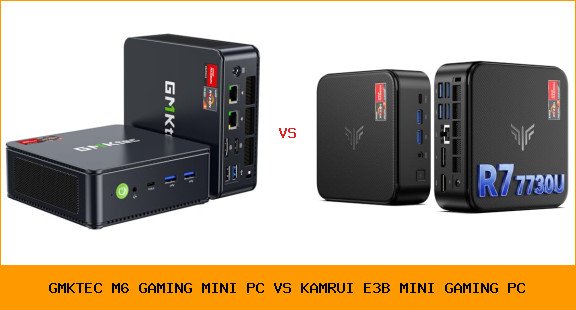
My buddy Joe and I both needed a small desktop for gaming and office work. He picked the KAMRUI E3B. I went with the GMKtec M6 Ultra. We traded machines for a weekend. The differences surprised us.
| Our Pick | |

|

|
| GMKtec GMKtec M6 Ultra Gaming Mini PC Ryzen… | KAMRUI KAMRUI E3B Mini Gaming PC 2026, AMD… |
| See on Amazon | See on Amazon |
This decision matters if you want a mini PC that can actually play games at decent settings, or if you just need a quiet office machine with a bit of horsepower. The GMKtec M6 Gaming Mini PC vs KAMRUI E3B Mini Gaming PC isn’t a fair fight on paper, but real life usage tells a fuller story.
Spoiler: one of these is clearly the better gaming machine. But the other has its own reasons to exist.
Specs at a Glance
| Feature | GMKtec M6 Ultra | KAMRUI E3B |
|---|---|---|
| Processor | AMD Ryzen 5 7640HS (Zen 4, 6 cores/12 threads, up to 5.0 GHz) | AMD Ryzen 7 7730U (Zen 3, 8 cores/16 threads, up to 4.5 GHz) |
| Integrated GPU | Radeon 760M (8 CU, 512 shaders, up to 2600 MHz) | Radeon Graphics (Vega 8, 8 CU, up to 2026 MHz) |
| RAM | 32GB DDR5 (2x16GB, expandable to 128GB) | 16GB DDR4 (expandable to 64GB) |
| Storage | 1TB PCIe 3.0 SSD (dual slots, up to 8TB PCIe 4.0) | 1TB M.2 SSD (expandable to 4TB) |
| Networking | Dual 2.5GbE LAN | Single Gigabit LAN |
| Display Outputs | USB4 (8K@60Hz), HDMI 2.0, DP | HDMI, DP, Type-C (all 4K@60Hz) |
| TDP / Power | 45W-60W boost | 15W base, low-power design |
| WiFi | WiFi 6 | WiFi 6 |
The table shows the real battle: architecture, RAM generation, GPU class, and LAN speed. Both support triple 4K displays and WiFi 6, but the GMKtec puts more heat into its GPU and memory bandwidth.
GMKtec M6 Ultra – What I Found
The first thing you notice with the M6 is its build. It feels solid, weighs a bit more than the KAMRUI. Under the hood, the Ryzen 5 7640HS is a Zen 4 monster. It runs at 4.3 GHz base and boosts to 5.0 GHz. That 45W to 60W TDP means it gets warm under load, but the included cooler keeps it from throttling.
Gaming is where this thing shines. The Radeon 760M, with 512 shaders clocked at 2600 MHz, handles Fortnite at 1080p medium settings at 60 fps. Civilization VI runs smooth. I even tried Elden Ring at low settings – it hovered around 30 fps. Not a dedicated GPU, but impressive for a box the size of a paperback.
I ran two 4K monitors for work: one via HDMI, one via USB4. The USB4 port also supports 8K output, but I don’t have an 8K screen. The dual 2.5GbE LAN ports are overkill for most home users, but if you run a Plex server or a pfSense firewall, they’re a godsend. Setup took maybe 20 minutes including Windows updates.
One caveat: the fan is audible under load. Not annoying, but you notice it in a quiet room. Also, the 32GB DDR5 RAM is fast – I noticed quicker load times in big spreadsheets compared to Joe’s machine.
KAMRUI E3B – What Joe Found
Joe’s KAMRUI E3B arrived in a smaller box. It’s lighter, almost toy-like. The Ryzen 7 7730U is an 8-core, 16-thread CPU based on Zen 3. That’s more cores than the GMKtec, but older architecture. In pure CPU tasks like compiling code or running multiple Chrome tabs, the extra cores help. But the 15W TDP means it rarely gets hot, and the fan is silent. Joe runs it 24/7 as a home server and web browser.
Gaming is the letdown. The Vega 8 GPU (Radeon Graphics) has 8 compute units but only reaches 2026 MHz peak. It plays older titles like League of Legends and Minecraft at 1080p low settings fine, but anything recent struggles. Fortnite at lowest settings drops below 30 fps during fights. Joe stuck to indie games.
The 16GB DDR4 RAM is enough for most office work, but I noticed it during multitasking with heavy Outlook PST files. Expanding to 64GB is possible, but the memory bandwidth is lower than DDR5. The single Gigabit LAN is fine for typical internet, but if you transfer large files between NAS, it’s a bottleneck.
One thing Joe loves: it runs cool and quiet. He uses it as an HTPC too, streaming 4K video without stutter. The triple display support works via HDMI, DP, and Type-C – all at 4K 60Hz. That’s handy for his trading setup.
The Differences That Matter
Gaming Performance: The GMKtec destroys the KAMRUI here. The Radeon 760M is roughly 50-60% faster than the Vega 8, based on real-world benchmarks. If you plan to play any modern 3D games on a mini PC, the GMKtec is the only choice. The KAMRUI is strictly for casual or retro gaming.
RAM and Speed: DDR5 vs DDR4. The GMKtec’s 32GB DDR5 is both faster and larger. For heavy multitasking, video editing, or running virtual machines, the M6 wins. The KAMRUI’s 16GB DDR4 feels tight for power users.
Networking: Dual 2.5GbE vs single Gigabit. The GMKtec is for enthusiasts who need fast local file transfers, while the KAMRUI’s single Gigabit is fine for standard internet. If you’re building a home lab or running a server, the GMKtec is mandatory.
Power and Heat: The KAMRUI runs cooler and quieter. If your desk is in a bedroom or you hate fan noise, the E3B is better. The GMKtec needs airflow and makes some fan sound.
Price: The KAMRUI is noticeably cheaper, but I can’t give specific numbers. Check current prices on Amazon. You pay more for the GMKtec, but you get more raw performance.
Who Should Buy Which?
Budget-minded buyers who need a basic office PC or home media center: get the KAMRUI E3B. It’s quiet, cool, and handles web apps, streaming, and light productivity without breaking the bank. Look at our best budget mini PC guide for more options.
Gamers or power users who want to play AAA titles at 1080p medium settings, run multiple VMs, or edit 4K video: the GMKtec M6 Ultra is your machine. Its CPU and GPU punch above its size. For deeper reading on what makes a great gaming rig, see our best mini PC roundup.
Space-conscious users: either fits, but the KAMRUI is smaller. Both can be mounted behind a monitor.
Experience level: The GMKtec requires a bit more setup if you want to tweak TDP or undervolt. The KAMRUI is plug-and-play.
Verdict
The GMKtec M6 Ultra is the better machine for more people. It games, it works, it networks like a champ. The KAMRUI E3B isn’t bad – it just has a different purpose. If you want a silent, low-power companion for office work and media, it’s fine. But if you want a mini PC that can genuinely replace a gaming desktop, the GMKtec wins without much debate.
I kept the GMKtec. Joe is thinking of upgrading after our weekend test. That tells you everything.
Frequently Asked Questions
Can the KAMRUI E3B play games like Fortnite or GTA V?
It can run them at very low settings and resolution, but expect stutter. Fortnite at 720p low might hit 30-40 fps. For anything modern, the GMKtec is a much smoother experience. The Vega 8 GPU is just too weak for today’s titles.
Is the GMKtec M6 Ultra worth the extra money?
If you game or do CPU-heavy work, yes. The DDR5 RAM, faster GPU, and dual 2.5GbE are worth the premium for performance users. If you only browse and stream, save your money and get the KAMRUI.
Can I upgrade the RAM or storage on either?
Both support upgrades. The GMKtec accepts up to 128GB DDR5 and two M.2 SSDs up to 8TB total. The KAMRUI goes to 64GB DDR4 and 4TB M.2. The GMKtec offers more headroom.
Which one is quieter?
The KAMRUI is nearly silent. Its 15W CPU barely needs cooling. The GMKtec can get audible under load, especially if you push the CPU to 60W. In idle both are quiet.