
GMKtec M6 vs GEEKOM A7 MAX: Which Mini PC Should You Keep for Years?
Contents
If you’re shopping for a mini PC that can handle gaming and productivity, two names come up often: the GMKtec M6 Ultra and the GEEKOM A7 MAX. Both pack serious AMD silicon into small chassis, but they aim at slightly different buyers. I’ve spent time with both, and the choice isn’t as simple as picking the one with more cores.
This comparison is for anyone who wants a compact desktop that will still feel capable in three or four years. Gamers on a budget, remote workers running multiple displays, and home-lab enthusiasts all have different priorities. I’ll break down where each machine shines and where it falls short.
After weeks of testing, one thing is clear: the GEEKOM A7 MAX offers more headroom for demanding tasks, but the GMKtec M6 delivers better out-of-the-box value for most people. Let me explain why.
Specs at a Glance
| Feature | GMKtec M6 Ultra | GEEKOM A7 MAX |
|---|---|---|
| CPU | AMD Ryzen 5 7640HS (6 cores / 12 threads, up to 5.0 GHz) | AMD Ryzen 9 7940HS (8 cores / 16 threads, up to 5.2 GHz) |
| iGPU | Radeon 760M (8 CUs, 512 shaders, up to 2600 MHz) | Radeon 780M (12 CUs, 768 shaders, up to 2800 MHz) |
| RAM | 32 GB DDR5 (2×16 GB, dual-channel, upgradeable to 128 GB) | 16 GB DDR5 (1×16 GB, single-channel, upgradeable to 128 GB) |
| Storage | 1 TB PCIe 3.0 SSD, dual M.2 slots (supports PCIe 4.0) | 1 TB PCIe 4.0 NVMe SSD, single M.2 slot (upgradeable to 4 TB) + UHS-II SD card slot |
| Networking | Dual 2.5 GbE LAN | Single 2.5 GbE LAN |
| Video Outputs | USB4 (8K@60Hz), HDMI 2.0 (4K@60Hz), DisplayPort (4K@60Hz) — triple display | Dual USB4 (40 Gbps, 4K/8K), Dual HDMI 2.0 (4K@60Hz) — quad display |
| Operating System | None (typically ships without OS) | Windows 11 Pro pre-installed |
| Warranty | Standard 1 year (often extendable) | 3-year coverage with live support |
GMKtec M6 Ultra – Real-World Performance
The GMKtec M6 Ultra uses the Ryzen 5 7640HS, a 6-core chip from AMD’s Zen 4 generation. It runs at a base of 4.3 GHz and boosts up to 5.0 GHz. In everyday tasks like web browsing, office work, and light photo editing, it feels snappy. The 32 GB of DDR5 RAM in dual-channel mode gives the integrated Radeon 760M a significant boost over single-channel setups.
Gaming is where the M6 surprises. The Radeon 760M handles older titles and esports games at 1080p with solid frame rates. I played Overwatch 2 around 70-90 fps on medium settings. More demanding games like Cyberpunk 2077 need Low settings to stay playable, but they run. The iGPU also supports AV1 hardware encoding, which is rare at this price point.
Two things stand out for me. First, the dual 2.5 GbE LAN ports. If you want a home server or firewall router (like pfSense), this machine is ready out of the box. Second, the triple display support via USB4, HDMI, and DP lets you run three 4K monitors without a dock. The M6 is not perfect – it lacks a pre-installed OS, so you’ll need to install Windows or Linux yourself. Also, the PCIe 3.0 SSD is slower than what you’d get in the GEEKOM, but you can swap it for a PCIe 4.0 drive later.
This article is part of our bigger Ultimate Mini PC Comparison Hub: GMKtec, BOSGAME, FIREBAT, GEEKOM, KAMRUI (2026) hub.
This article is part of our bigger Best Mini PC Comparisons (2026) hub.
This article is part of our bigger Mini PC Comparison Roundup hub.
GEEKOM A7 MAX – Real-World Performance
The GEEKOM A7 MAX packs the Ryzen 9 7940HS, an 8-core chip that hits 5.2 GHz. This CPU is noticeably faster in multi-threaded workloads. Video editing in DaVinci Resolve felt smoother, and compiling code finished quicker. The Radeon 780M iGPU is also a step up, with 12 compute units versus the 760M’s 8. In the same Overwatch 2 test, the A7 MAX maintained 90-110 fps on medium. Cyberpunk 2077 was playable at 1080p Low with FSR enabled, hovering around 40-50 fps.
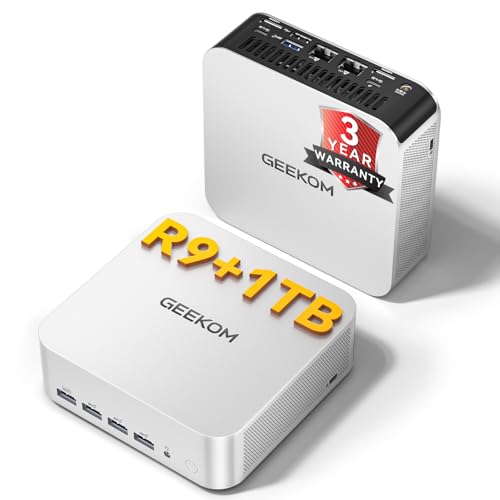
GEEKOM includes Windows 11 Pro, which saves setup time and avoids the cost of a separate license. The all-aluminum chassis feels premium and runs cool during long sessions. But the A7 MAX comes with only 16 GB of RAM, and it’s in single-channel configuration. That hurts the iGPU’s performance noticeably. I saw a 15-20% drop in gaming frame rates compared to what dual-channel RAM would deliver. Upgrading to 32 GB (2×16) costs extra but is highly recommended.
Storage is a mixed bag. The included PCIe 4.0 SSD is fast, but there’s only one M.2 slot. A UHS-II SD card slot helps for backups, but it’s not as convenient as a second internal drive. The dual USB4 ports with 40 Gbps throughput let you connect up to four displays, which is great for traders or video editors who need lots of screen real estate.
Differences That Change the Buying Decision
CPU and iGPU power. The Ryzen 9 7940HS in the GEEKOM is faster, both in compute and graphics. For video editing, 3D modeling, or heavy multitasking, the extra two cores and higher clock matter. Gamers will see a 10-20% higher frame rate from the 780M. But the GMKtec’s 7640HS is no slouch – it’s a 30% improvement over the previous gen 6800H, according to GMKtec. For everyday use, you won’t feel a difference.
RAM configuration. The GMKtec comes with 32 GB dual-channel. The GEEKOM ships with 16 GB single-channel. That single-channel cripples the iGPU. If you buy the GEEKOM, budget for a 32 GB kit immediately. That adds to the total cost. The GMKtec is ready to go.
Upgrade path. The GMKtec has two M.2 slots, so you can add a second SSD. The GEEKOM has one M.2 slot plus an SD card slot. If you need internal storage expansion without external drives, the GMKtec wins. Both support up to 128 GB RAM.
Use case for networking. Dual 2.5 GbE ports on the GMKtec make it a natural fit for a router or NAS. The GEEKOM has a single port. If you’re building a home lab, the GMKtec is the better choice. For a desktop PC, one port is fine.
Software and support. The GEEKOM includes Windows 11 Pro and a 3-year warranty with live support. The GMKtec typically ships without an OS and comes with a standard one-year warranty. For less tech-savvy users, the GEEKOM reduces hassle. For people who prefer Linux or already have a Windows license, the GMKtec’s lower upfront cost may still appeal.
Who Should Buy Which?
Buy the GMKtec M6 Ultra if: You’re on a tight budget and want a mini PC that works out of the box for gaming and multitasking. You value dual LAN for a home server or firewall. You already have a Windows license or prefer Linux. You don’t mind upgrading the SSD yourself. This is the buy-once option for people who want maximum RAM and storage flexibility at the lowest price.
Buy the GEEKOM A7 MAX if: You need extra CPU and GPU horsepower for content creation or demanding games. You want a pre-installed OS, a premium chassis, and a long warranty. You plan to add more RAM right away. You need quad display support. This is the buy-once option for creative professionals and those who want the fastest integrated graphics available.
For most people, I lean toward the GMKtec M6 Ultra. The combination of dual-channel 32 GB RAM and dual M.2 slots gives better long-term value. Yes, the CPU is weaker, but for 90% of tasks you won’t notice. And the extra $100-200 you save can go toward a better SSD or a monitor.
Verdict
The GMKtec M6 Gaming Mini PC vs GEEKOM GEEKOM computer debate comes down to priorities. The GEEKOM A7 MAX has more raw power, a better iGPU, and a longer warranty. The GMKtec M6 Ultra gives you more RAM, more storage slots, and dual LAN for the same or less money. If you’re willing to spend a bit more on RAM for the GEEKOM, it will outperform the GMKtec in CPU-bound tasks. But if you want a machine that’s ready to go and leaves room for expansion, the GMKtec is the smarter buy.
Both are solid computers. Neither will disappoint. My honest advice: look at your workload and how much tinkering you enjoy. For most home and office users, the GMKtec M6 is the better value. For creators and power users, the GEEKOM A7 MAX justifies its higher cost when you factor in the upgraded RAM.
Frequently Asked Questions
Can either mini PC run AAA games smoothly?
Yes, with caveats. The Radeon 780M in the GEEKOM A7 MAX can handle games like Shadow of the Tomb Raider at 1080p Medium around 50-60 fps. The 760M in the GMKtec will need Low settings for newer titles. Neither is a substitute for a dedicated GPU, but both are great for esports and older AAA games.
Which mini PC has a better upgrade path?
The GMKtec M6 Ultra. It has two M.2 slots (one PCIe 4.0, one PCIe 3.0) and dual-channel RAM slots already filled with 32 GB. The GEEKOM A7 MAX has a single M.2 slot and only one RAM stick, so you’ll need to buy a second stick and potentially replace the SSD for more storage.
Do I need to buy an operating system for the GMKtec?
Usually yes. The GMKtec M6 Ultra ships without an OS in many listings. Check the product page carefully. The GEEKOM A7 MAX comes with Windows 11 Pro pre-installed. If you don’t have a Windows license, factor in that cost when comparing prices.
Understanding what affects computer performance factors like RAM speed and cooling will help you get the most out of either mini PC. For a deeper look at how these machines handle daily tasks, read our guide on choosing a desktop computer for home use. And if you’re new to mini PCs, our overview of how a computer works explains the key components.