
You are staring at two tiny desktops that look almost the same on paper, but one is clearly better for gaming. This guide breaks down the real differences in speed, memory, and noise so you can pick the right one without guessing.
In short: The GMKtec M6 wins for most buyers because its newer processor and upgradeable RAM handle games better and last longer. The FIREBAT A6 is the better pick only if you need the quietest machine for office work and never plan to upgrade the memory. Check the specific section below to see which factor matters most to you.
Quick picks
Our shortlist for this job · tap one to see today's price
Protects your mini PC from drops and dust during travel.
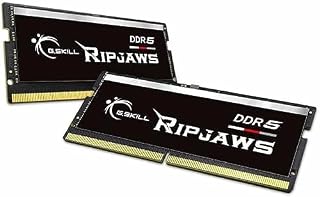
Allows you to expand GMKtec M6 memory beyond the default 16GB.
The differences at a glance
The spec sheet hides the real story. The GMKtec M6 uses a newer Zen 4 chip with faster integrated graphics. The FIREBAT A6 sticks with older Zen 3+ cores but includes more total CPU threads. Loaders in this spot often ask about performance benchmarks as well.
Most important difference: memory. GMKtec uses socketed RAM you can change. FIREBAT uses soldered RAM you cannot touch. This single fact changes who should buy which machine.
| Feature | GMKtec M6 | FIREBAT A6 |
|---|---|---|
| CPU | Ryzen 5 7640HS (Zen 4) | Ryzen 7 7735HS (Zen 3+) |
| GPU | Radeon 760M (Faster) | Radeon 680M (Slower) |
| RAM | SO-DIMM (Upgradeable) | Soldered (Fixed) |
| Network | Dual 2.5 GbE LAN | Single 2.5 GbE LAN |
Look at the GPU row first. GMKtec wins for gaming. Look at the RAM row second. GMKtec wins for long-term use. FIREBAT only wins if you value quietness over capability.
Pro tip: Always check the retailer’s current spec sheet for maximum RAM support, as mini PC models update frequently.
Gaming speed: Why the GMKtec M6 plays better
Modern games run better on the GMKtec M6. Its Ryzen 5 7640HS chip has a newer graphics unit called Radeon 760M. This GPU runs at a higher clock speed than the FIREBAT’s chip.
In practical terms, you get smoother frame rates. Tests show the GMKtec maintains playable speeds in titles like Cyberpunk 2077. The FIREBAT struggles to hold the same frame rates in those same games.
The FIREBAT A6 has more CPU cores, which helps with multitasking. But for gaming, the graphics power matters more than core count. The GMKtec’s newer architecture handles 3D graphics more efficiently. We go through kAMRUI Pinova P2 vs FIREBAT A6 step by step in its own article.
Winner: GMKtec M6. It delivers the best gaming performance in this price range. If you play any modern games, this machine will run them smoother and at higher settings.
Protects your gaming mini PC when you carry it to LAN parties or friends' houses.
- Hard EVA shell case is shockproof dustproof and water resistant, protecting Mini PC
- This product is equipped with a comfortable handle and adjustable shoulder strap for
Memory and upgrades: Your long-term investment
This is the biggest real-world difference. The GMKtec M6 has two RAM slots. You can open the case and add more memory later. The FIREBAT A6 has the memory glued to the board forever.
If you start with 16GB, that feels fine today. In two years, you may need 32GB or more for your work. The GMKtec lets you buy new RAM sticks and install them yourself. The FIREBAT locks you into the amount you bought at checkout.
The GMKtec also supports more total memory. You can expand it to 128GB. The FIREBAT tops out at 16GB. For video editing or running virtual machines, this matters a lot.
Winner: GMKtec M6. It grows with your needs. The FIREBAT is only for users who are certain they will never need more than 16GB.
This is the specific part you need to expand the GMKtec M6’s memory capacity.
- * Requires overclocking/BIOS adjustments. Maximum speed and performance depends on
- G.SKILL Ripjaws DDR5 SO-DIMM Series DDR5 SO-DIMM Memory Kit, Model
Noise and heat: Which runs quieter?
The FIREBAT A6 is the quiet machine. It runs cooler and the fan spins up less often during light tasks. If you keep the PC under your desk while working, you likely won’t hear it at all. We cover choosing between two mini PCs in a guide of its own.
The GMKtec M6 is a bit louder under heavy load. The fan is audible when gaming or rendering video. However, it is not so loud it prevents conversation. The chassis stays warm to the touch, not hot.
For a home office or living room media box, the FIREBAT’s silence is a big plus. For a dedicated gaming setup, you may not notice the fan because you are focused on the screen. Both are much quieter than a full-size desktop tower.
Winner: FIREBAT A6. It is the better choice if noise annoyance is your top priority. Gamers usually accept the GMKtec’s slightly louder fan for the better performance.
Pro tip: Place the mini PC on a hard surface, not a carpet or blanket, to keep it running cool and quiet.
Connectivity: Ports and network speed
The GMKtec M6 includes two 2.5 GbE LAN ports. This is rare for a mini PC. It is excellent for building a home server, running a network firewall, or connecting multiple devices directly.
The FIREBAT A6 has only one LAN port. It also includes a DisplayPort that supports 4K at 120Hz. This is great for high-refresh-rate monitors used for general work or light media consumption.
Both units have Wi-Fi 6 and Bluetooth 5.2. For most users, the single port on the FIREBAT is enough. But if you plan to tinker with networking or need redundant connections, the GMKtec is the clear choice.
Winner: GMKtec M6. It offers more network flexibility. Choose the FIREBAT only if you need the specific 120Hz DisplayPort output for your monitor setup.
Which one should you buy?
Match the machine to your actual use case. Do not just buy the one with the higher model number. Consider what you will do with the PC every day.
- For gaming: Buy the GMKtec M6. It has the faster graphics and better frame rates.
- For silent office work: Buy the FIREBAT A6. It runs cooler and quieter.
- For home servers: Buy the GMKtec M6. The dual network ports are a huge advantage.
- For future-proofing: Buy the GMKtec M6. You can upgrade the RAM later.
If you are unsure, the GMKtec M6 is the safer bet for most people. It does everything the FIREBAT does, but adds upgradeability and better gaming power. The only reason to pick the FIREBAT is if absolute silence is your number one requirement.
The bottom line
The GMKtec M6 is the better machine for most buyers because it games better and allows memory upgrades. The FIREBAT A6 is the right choice only if you need a quiet, fixed-spec office machine. If you want the most flexibility and performance, buy the GMKtec M6.
- Hard EVA shell case is shockproof dustproof and water resistant, protecting Mini PC
- This product is equipped with a comfortable handle and adjustable shoulder strap for
Frequently asked questions
Can I upgrade the RAM in the FIREBAT A6?
No, the FIREBAT A6 uses soldered LPDDR5 memory. This is permanently attached to the motherboard and cannot be removed or replaced. You are locked into the amount of RAM you buy at the start. The GMKtec M6 uses standard sockets that you can open and change.
Which mini PC has better battery life if I use a UPS?
Neither has a battery, but the FIREBAT A6 draws less power at idle. It runs cooler and the fan spins up less. If you use a battery backup system, the FIREBAT may last slightly longer on standby or light office tasks due to lower energy consumption.
Is the GMKtec M6 too loud for a bedroom?
For light tasks, it is quite quiet. Under heavy gaming load, the fan becomes audible. If you sleep in the same room while playing, you might notice it. For office work, it is manageable. The FIREBAT is significantly quieter overall if noise sensitivity is a major concern for you.
Do both support three displays?
Yes, both support three displays. The GMKtec uses USB4, HDMI, and DisplayPort. The FIREBAT uses USB-C, HDMI, and DisplayPort. You will need the correct cables or adapters for your monitors. The GMKtec’s USB4 port supports higher bandwidth for 8K output.