
You are staring at a broken laptop screen, a swollen battery, or a dead keyboard, and you want to know if buying the right parts yourself will save you money. This page breaks down the exact materials and characteristics professional technicians look for so you can stop guessing.
In short: Professional laptop repair relies on specific, model-compatible parts with precise material characteristics, such as tempered glass screens, lithium-ion battery chemistry, and conductive keyboard membranes. Using main components that match these specs prevents damage, ensures safety, and extends the life of your device. Most owners fail because they buy generic parts that do not match their specific laptop model.
Quick picks
Our shortlist for this job · tap one to see today's price
Includes tools for DIY installation, reducing the risk of cracking the fragile glass panel during replacement.
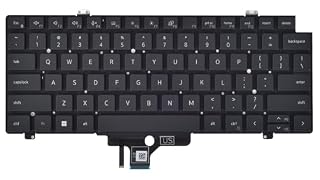
Uses conductive membranes matched to Dell Latitude specs, restoring function without short-circuiting the board.
The main materials in a laptop and their physical properties
Professional repair starts with understanding what the device is actually made of. Laptops are not monoliths; they are layered systems of plastics, metals, glass, and polymers. Each layer has specific material characteristics that dictate how it holds up to stress, heat, and moisture. For the detail, see our notes on backlight failure test.
- Polycarbonate and ABS plastics: Most chassis frames are made from ABS or polycarbonate. These materials are durable but can crack if prysed with metal tools. Professionals use plastic spudgers to avoid these micro-fractures.
- Tempered glass and film: Modern laptop screens use tempered glass for the outer layer and liquid crystal layers underneath. The glass is brittle; if it chips, the whole panel fails. This is why professional shops use suction cups and heat guns to separate the glass from the LCD without shattering it.
- Lithium-ion cells: Batteries are not just power sources; they are chemical units. The material inside (cobalt, lithium, and graphite) reacts to heat. Swollen batteries indicate material degradation. This is a safety hazard, not just a convenience issue.
When you look at a laptop, you are looking at a composite of these materials. Knowing this helps you understand why a generic fix often fails.
Screen replacement: why the material matters more than the size
Many owners think any screen of the same size will fit. It will not. The material characteristics of the panel determine its weight, thickness, and connector type. A thicker panel might block the lid hinge. A different connector will not plug in.
Professional repair shops stock panels that match the specific module code of your laptop. For example, an HP Pavilion screen has a specific ribbon cable width and mounting hole pattern. If you buy a panel with a matte finish instead of glossy, the material may be slightly thicker, causing the bezel to gap or not close properly.
This is where a specific part makes the difference. A panel designed for your exact model includes the correct mounting screws and cable layout.
Safety first: Always power off and disconnect the battery before touching the screen cables. Static discharge can kill the backlight inverter or the screen controller.
Designed for your specific HP model, it ensures the mounting holes and ribbon cable match the chassis perfectly, avoiding fit issues.
- 2-Year warranty.
- Designed for DIY installation with included tools.
Keyboards and trackpads: the conductive material challenge
Keyboards are not just plastic keys. They are a complex of conductive rubber sheets, plastic domes, and ribbon cables. The material characteristics here are about electrical resistance and tactile feedback. Professional replacements use specific conductive membranes that fit the keyboard frame perfectly. Loaders in this spot often ask about how to repair a laptop step by step as well.
If you buy a keyboard with a different layout, for example missing a function key or a different size spacebar, the material will not align with the chassis. The keys will feel loose or not click. This is a common DIY mistake that leads to buying the part twice.
For professional laptops, the keyboard material is often designed to handle high typing loads. The domes are made of silicone or a specific polymer that retains its shape after thousands of presses. A cheap part may use a different polymer that flattens over time, making keys feel dead.
Matched to Dell Latitude and Precision models, this keyboard uses the correct membrane material and layout for reliable key travel.
- Dell Latitude 5420 5421 5430 5431 5440 5450 7420 7430 7520 7530 Series Laptop
- Dell Precision 3470 3480 3490 Series Laptop
Batteries: the chemical material that degrades and why it matters
A battery is a chemical container. The material inside the cells, the electrolyte and electrode, degrades over time due to heat and charge cycles. When you see a battery swelling, the material inside is breaking down and releasing gas. This is a fire risk. Professional repair involves removing this material safely.
The main characteristic you are looking for in a new battery is its cell chemistry and capacity. A professional main laptop battery uses high-quality cells that maintain their charge capacity for longer. A cheap battery may use lower-grade material that degrades in 6 months.
Never puncture or heat a swollen battery. This is a dangerous material reaction that can cause a thermal event. Always have the battery replaced by a professional or a very careful DIYer who knows how to handle the terminals.
Thermal paste and heatsinks: the material that controls heat
Overheating is a material failure. The thermal paste between the CPU and the heatsink is a specific polymer compound designed to transfer heat. Over time, this material dries out and loses its conductivity. Professional shops replace this paste with a high-characteristic compound that maintains its properties for years. There is more on our notes on won’t power on in a separate guide.
The heatsink itself is usually made of copper or aluminum. These materials are chosen for their high thermal conductivity. If the fan is clogged with dust, the material of the heatsink cannot do its job. The heat builds up and cooks the CPU. This is why a simple cleaning job is actually a material maintenance task.
When you buy a thermal paste kit, look for the material specification. Professional-grade paste has a high thermal conductivity rating. This is a key characteristic that makes a difference in long-term performance.
When to choose a professional repair shop over DIY parts
Knowing the materials is one thing; knowing when to stop is another. You should call a professional when the issue involves soldering, liquid damage, or motherboard-level failures. These are material-level problems that require specialized tools and expertise.
- Liquid damage: The liquid leaves corrosive material on the board. This spreads over time and kills components. Only a pro can clean this with ultrasonic cleaning and corrosion inhibitors.
- Charging port failure: The port is soldered to the motherboard. Replacing it requires a soldering station and steady hands. A wrong move here can crack the board material.
- Screen backlight: If the screen is black but you can see a faint image when shining a light on it, the LED strip material has failed. This is a delicate soldering job on a small component.
For these issues, the material characteristics of the repair itself are too complex for a home toolkit. A professional shop has the right material, tools, compounds, and parts to fix the root cause.
The bottom line
Professional repair is about using the right material for the job. If your issue is a screen, keyboard, or battery, buy the exact compatible part that matches your model. If it involves the motherboard or liquid damage, let a professional handle the material-level fix. Your next step is to identify your laptop's model number and check a part for that specific chassis.
- 2-Year warranty.
- Designed for DIY installation with included tools.
Frequently asked questions
What is the main material in a laptop battery?
Laptop batteries use lithium-ion cells. The main material characteristic is the electrolyte and electrode inside, which stores chemical energy. This material degrades over time, which is why batteries lose their charge capacity.
Why do professional shops use specific screens?
Professional shops use screens that match the module code of the laptop. This ensures the material characteristics, glass type, thickness, and connector fit the chassis perfectly. A generic screen will not align.
Can I use any keyboard for my laptop?
No. Keyboards use conductive membranes and specific plastic domes. The material must match the frame. If the layout or material thickness is wrong, the keys will not click properly or will not fit.
What material does thermal paste use?
Thermal paste is a polymer compound with high thermal conductivity. It fills the microscopic gaps between the CPU and the heatsink material, usually copper or aluminum, to transfer heat effectively.