
You need a laptop that can handle a heavy course load without dying before your last lecture. This guide cuts through the specs to find the right processor for study, coding, and life.
In short: For most students, an Intel Core i5 or AMD Ryzen 5 with at least 4 cores is the sweet spot. These processors handle multitasking, video calls, and research with cool, quiet operation and all-day battery life.
Quick picks
Our shortlist for this job · tap one to see today's price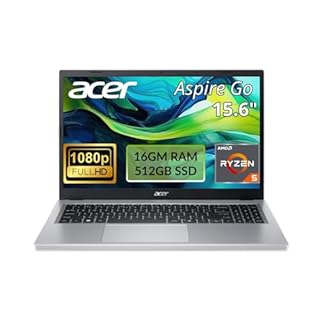
Runs many tabs and apps smoothly without high heat or battery drain.

Opens applications instantly and feels responsive during quick edits.

Runs fanless and quiet, perfect for quiet library study sessions.

Boosts performance for 30+ browser tabs and heavy document editing.

Keeps your processor cool during long study sessions to save battery.
Best for multitasking on a budget: AMD Ryzen 5 laptops
AMD Ryzen 5 processors are the best value for students who juggle many tasks. They pack more cores than rivals at a lower price. This means your laptop stays smooth while you have Chrome, notes, and a podcast open. We cover best laptop processors for multitasking in 2026 in a guide of its own.
Modern Ryzen chips are also very efficient. They run cooler and quieter than older Intel models. This is a big plus for long library sessions where fan noise is a distraction.
One drawback: some older Ryzen models have slightly slower single-core speeds. If you run heavy single-threaded programs, you might notice a tiny lag compared to Intel. For general study, it is negligible.
- Pros: Great multi-core performance for the price.
- Pros: Efficient, leading to longer battery life.
- Cons: Integrated graphics are weaker for heavy video editing.
A solid mid-range laptop with this chip handles a standard course load easily.
- Efficient Multitasking Power: Driven by the AMD Ryzen 5 7520U processor and 16GB of
- Vibrant FHD Touch Display: The 15.6-inch Full HD (1920 x 1080) LED-backlit touchscreen
Best for snappy single-task speed: Intel Core i5 laptops
Intel Core i5 chips are famous for their snappy feel. When you open a word processor, it appears instantly. This single-core speed makes simple tasks feel faster and more responsive.
Intel laptops also have a huge selection of models. You will find them in almost every store, which makes repairs and support easy. The ecosystem is mature and well-known.
The trade-off is heat. Older i5 laptops can get warm under sustained load. If you run long simulations, the fans might spin up. For standard office and study work, it is quiet enough.
- Pros: Excellent single-core speed for quick app launches.
- Pros: Wide availability and compatibility.
- Cons: Can run warmer under heavy, sustained loads.
Best for silent, all-day battery life: Apple MacBook Air M2
If you use macOS, the M2 chip is in a league of its own. It runs fanless, meaning zero noise. This is perfect for quiet library corners or group study spaces. We go through performance needs for coursework step by step in its own article.
Battery life is exceptional. You can get through a full day of lectures and notes without a charger. The efficiency per watt is unmatched by any x86 laptop.
The main drawback is the price. MacBooks are more expensive upfront. Also, you are locked into the Apple ecosystem. If your school requires Windows-specific software, this is not for you.
- Pros: Fanless, silent operation.
- Pros: Unmatched battery life.
- Cons: Higher initial cost and platform lock-in.
Best upgrade for older or weaker laptops: Add RAM
If your current laptop feels slow, the processor might not be the issue. Often, it is the memory. Adding a 16GB RAM kit makes a huge difference for multitasking.
A laptop with 8GB of RAM struggles when you open 30 tabs and a word processor. A 16GB kit gives the system room to breathe. You can attach this upgrade to most open-slab laptops.
Tip: Check your laptop’s maximum supported RAM before buying. Use a tool like CPU-Z to see what you have now. Do not mix different RAM speeds if you can avoid it.
- Action: Buy a matching pair of 8GB sticks.
- Result: Smoother switching between apps and fewer freezes.
This 16GB kit is a quick, affordable way to make an older laptop feel fast again.
- Actual memory speed may vary depending on the system, CPU, motherboard, BIOS settings
- Adherence to JEDEC and compliance to RoHS with respect to environmental protection
Best for preventing overheating in dorms: Use a cooling pad
Heat is the enemy of battery life and performance. If your laptop gets warm on a desk, airflow is restricted. A cooling pad improves airflow under the chassis. There is more on interpreting spec sheet numbers in a separate guide.
For students in small dorms, a cooling pad helps keep the processor cool. A cooler CPU runs more efficiently, saving battery power. It also reduces the chance of thermal throttling during long coding sessions.
Safety: Never block the laptop’s air vents with blankets or pillows. This causes rapid overheating and can damage the battery.
- Why: Better airflow lowers CPU temperatures.
- Result: Quieter fans and longer battery life.
This pad raises the laptop and directs cool air to the bottom vents.
- Ultra-Portable: Slim, portable, and light weight allowing you to protect your
- Ergonomic Comfort: Doubles as an ergonomic stand with two adjustable height settings
How to choose the right processor for your major
Your major determines what you need. Not every student needs the same CPU. Match the processor to your workflow, not just the price.
Use this checklist to narrow down your choice:
- Business/Econ: Intel Core i5 or Ryzen 5. Handles spreadsheets and models.
- Engineering/CS: Intel Core i7 or Ryzen 7. More cores help with compiling and virtual machines.
- Arts/Design: Apple M2 or high-end AMD. Better integrated graphics for rendering.
- Nursing/Health: Any modern i5/Ryzen 5. Focus on battery life for long shifts.
| Processor | Best For | Key Strength | Main Drawback |
|---|---|---|---|
| AMD Ryzen 5 | General Study | Multi-core value | Slower single-core |
| Intel Core i5 | Office Work | App responsiveness | Runs warm |
| Apple M2 | Creative/CS | Silent & Battery | Price |
| AMD Ryzen 7 | Engineering | Heavy Multitasking | Heat |
Pro tip: Check if your school requires specific software. Some programs run best on Windows, while others are macOS-only. This dictates your processor choice.
What specs to check before you buy
Do not just look at the processor model. These other specs determine if the laptop is actually good for you.
Here is what to check:
- RAM: 16GB is the new minimum for smooth multitasking. 8GB is okay for basic tasks but will feel slow over time.
- Storage: 512GB SSD is standard. 256GB fills up fast with assignments and apps.
- Display: A 1080p screen is clear enough for reading. Avoid low-resolution 1366×768 panels if your eyes are sensitive.
- Ports: Ensure it has the ports you need (HDMI, USB-C) so you do not always carry a dongle.
If you can upgrade the RAM yourself later, buy the base model. If the RAM is soldered (not upgradable), buy 16GB from the start.
Pro tip: Use the manufacturer's spec sheet to see if RAM is soldered. If it is, do not skimp on memory.
FAQ
Is a dedicated graphics card necessary for post-secondary work? For 90% of students, no. Modern integrated graphics handle video calls, photos, and multiple monitors. Only buy a dedicated GPU if you are studying 3D animation or heavy game development.
How much RAM do I need for a college laptop? 16GB is the safe recommendation. It allows you to run browser tabs, word processors, and video meetings simultaneously without swapping to the SSD.
Is Intel or AMD better for a student? It depends. AMD offers better multi-core performance for the price. Intel is faster for single-task responsiveness. Both are excellent choices for general study.
Can I upgrade my laptop’s processor later? No. On almost all modern laptops, the processor is soldered to the motherboard. You cannot swap it. Choose the right CPU when you buy the laptop.
The bottom line
For most students, an AMD Ryzen 5 or Intel Core i5 laptop with 16GB of RAM is the best balance of speed, battery, and price. If you need silent operation for libraries, choose a MacBook M2. Your next step is to check your school's software requirements before locking in a brand.
- Actual memory speed may vary depending on the system, CPU, motherboard, BIOS settings
- Adherence to JEDEC and compliance to RoHS with respect to environmental protection
Frequently asked questions
Is a dedicated graphics card necessary for post-secondary work?
For most majors, no. Integrated graphics in modern CPUs handle video, documents, and multiple monitors. You only need a dedicated GPU for heavy 3D rendering or game development. Otherwise, it just hurts battery life.
How much RAM do I need for a college laptop?
16GB is the current standard for a smooth experience. 8GB is acceptable for basic word processing but will feel slow when running multiple apps. If your laptop allows upgrades, start with 8GB and add more later.
Is Intel or AMD better for a student?
AMD is better for multitasking and value. Intel is better for snappy single-task speed. For general study, either is fine. Choose AMD if you run many tabs, Intel if you prefer quick app launches.
Can I upgrade my laptop's processor later?
No. Modern laptop CPUs are soldered directly to the motherboard. You cannot swap them for a faster model. This means you must choose the right processor when you first buy the laptop.