
Cheap laptops lag in power—but the HP 14 and Acer Chromebook 315 deliver solid student performance.
Finding the best budget laptop for students means balancing speed, portability, and value. The HP 14 impresses with its crisp 14-inch HD display and smooth Windows 11 experience, while the Acer Chromebook 315 stands out for its vibrant 15.6″ Full HD screen and efficient Intel Wi-Fi 6 connectivity.
For students needing all-day battery life and lightweight design, the Acer Chromebook 315 offers a niche advantage that’s perfect for classes and campus life.
Below, we analyze budget, lifespan, and real-user feedback.


Finding the best fit for student needs
Compare the key features and specifications of our top picks to find the perfect match for your needs.

HP 14 Laptop Intel Celeron 4GB
The HP 14 Laptop, featuring the Intel Celeron N4020 processor, 4 GB RAM, and 64 GB storage, stands out as the best budget laptop for students. Its 14-inch Micro-edge HD display offers an immersive viewing experience with a 79% screen-to-body ratio and a sleek 6.5 mm micro-edge bezel. This lightweight, thin design makes it perfect for students constantly on the move, providing portability without sacrificing essential performance. Equipped with Windows 11 Home and a one-year subscription to Microsoft 365, it ensures productivity right out of the box. The Intel UHD Graphics 600 supports 4K streaming and casual gaming, enhancing entertainment options for students during downtime.
Pros
- Thin and light design with a 6.5 mm micro-edge bezel for enhanced portability and screen space.
- 14-inch HD display with a 79% screen-to-body ratio delivers vibrant visuals and a more immersive experience.
- Efficient Intel Celeron N4020 dual-core processor balances performance and power consumption effectively.
- 4 GB RAM ensures smooth multitasking for typical student workloads.
- 64 GB embedded multimedia flash storage offers reliable and fast data access.
- 4K streaming capability thanks to Intel UHD Graphics 600 for enhanced media consumption.
- Includes Windows 11 Home and a one-year Microsoft 365 subscription for productivity tools.
Cons
- Limited 64 GB storage may require additional external storage for extensive files or media.
- HD (1366 x 768) resolution is modest compared to Full HD displays.
- Intel Celeron N4020 is adequate for basic tasks, but may struggle with intensive applications.
- 4 GB RAM might limit heavy multitasking or advanced software usage.
Overall, the HP 14 Laptop offers excellent value as the best budget laptop for students who need portability, essential performance, and reliable multimedia capabilities in a sleek package.
Acer Chromebook 315 15.6″ Laptop
The Acer Chromebook 315 Laptop is an excellent choice for anyone seeking the best budget laptop for students. Powered by the Intel Celeron N4500 processor and equipped with 4GB LPDDR4X memory, this Chromebook delivers smooth performance for everyday tasks. Its 15.6″ Full HD IPS display provides vibrant visuals and wide viewing angles, ideal for studying, streaming, and video calls. The inclusion of Intel UHD Graphics supports casual gaming and multimedia smoothly, while Chrome OS ensures fast boot times and automatic updates to keep the system optimized. With 64GB of eMMC storage complemented by 100GB of Google Drive space, students can easily store and back up important files. The laptop also benefits from Intel Wi-Fi 6 connectivity, allowing faster and more reliable internet access, essential for online learning environments.
Pros
- Fast and responsive Chrome OS with automatic updates and quick boot times.
- 15.6″ Full HD IPS display offers clear, vibrant visuals with wide viewing angles.
- Intel Wi-Fi 6 ensures high-speed, stable internet connectivity for seamless online activities.
- Long battery life of up to 10 hours supports a full day of classes and study sessions.
- Multiple USB Type-C and USB 3.2 ports for versatile connectivity options.
- Access to over 2 million Android apps via Google Play enhances productivity and entertainment.
Cons
- Limited 64GB eMMC storage may require reliance on cloud storage for larger files.
- 4GB RAM might restrict heavy multitasking or demanding applications.
- Processor is suitable for basic tasks but may struggle with intensive software.
Overall, the Acer Chromebook 315 balances performance, portability, and affordability, making it a top contender for students needing a reliable and budget-friendly laptop.
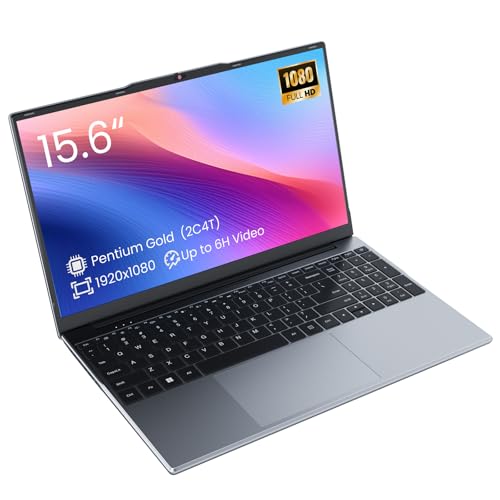
Phantom 15.6″ FHD Laptop Pentium
The Phatom 15.6″ FHD Laptop Computers stands out as the best budget laptop for students seeking reliable performance and portability. Equipped with an efficient Pentium Gold processor, this laptop delivers smooth multitasking and everyday computing tasks such as web browsing, document editing, and video streaming without lag. The crisp 15.6-inch Full HD IPS display ensures vibrant colors and wide viewing angles, enhancing visual comfort during long study sessions or online classes. With 4GB DDR3L RAM and a fast 128GB M.2 SATA SSD, the laptop boots quickly and offers responsive operation. Additionally, the memory is expandable up to 16GB, allowing users to upgrade for improved multitasking capabilities. Its lightweight design at just 3.8 lbs makes it highly portable for students on the go. Modern connectivity options including USB 3.0, USB-C, HDMI supporting 4K output, microSD slot, Bluetooth 5.0, and dual-band WiFi ensure seamless integration with peripherals and networks. The long-lasting 38.5Wh battery supports up to 6 hours of local video playback, ideal for extended usage without frequent recharging. Preinstalled with Windows 11, this laptop is ready for immediate use, making it a practical choice for both school and business environments.
Pros
- Efficient Pentium Gold processor for smooth everyday performance
- 15.6-inch Full HD IPS display with sharp visuals and wide viewing angles
- Fast 128GB SSD with expandable RAM up to 16GB for better multitasking
- Lightweight design at 3.8 lbs, ideal for portability
- Comprehensive connectivity including USB 3.0, USB-C, HDMI, microSD, Bluetooth 5.0, and dual-band WiFi
- Long-lasting battery offering up to 6 hours of video playback
- Preinstalled with Windows 11 for immediate use
Cons
- Base 4GB RAM may require upgrading for intensive multitasking
- Processor speed (1.6GHz) is adequate but not suitable for heavy computing tasks
- USB-C port operates at USB 2.0 speed, limiting transfer rates
Overall, the Phatom 15.6″ FHD Laptop provides excellent value as the best budget laptop for students needing dependable performance, portability, and essential features for academic success.
acer Aspire Go 15 AI Laptop 8GB 128GB
The acer Aspire Go 15 AI Ready Laptop stands out as the best budget laptop for students, combining powerful performance with user-friendly features. Equipped with an 8-Core Intel Core 3 processor N355 and 8GB DDR5 memory, this laptop ensures smooth multitasking and fast responsiveness. Its 15.6″ FHD IPS display delivers crisp, vibrant visuals ideal for both study sessions and streaming, while Acer BluelightShield technology protects your eyes from strain during long hours of use. With 128GB UFS storage, ample connectivity options, and Windows 11 Home in S mode, this laptop is tailored to meet the demanding needs of students without breaking the bank.
Pros
- Powerful 8-Core Intel Core 3 Processor N355 for seamless multitasking and productivity
- 8GB DDR5 memory ensures smooth and responsive performance
- 15.6″ Full HD IPS display with narrow bezels and Acer BluelightShield for eye comfort
- Fast 128GB UFS storage provides quick data access and ample space for essentials
- Wi-Fi 6 and HDMI 2.1 connectivity for faster, reliable wireless and external display options
- Copilot AI assistant integrated in Windows for enhanced productivity
- Eco-friendly design with recyclable materials and Energy Star certification
- 720p HD camera with Acer TNR and PurifiedVoice for clear video calls
Cons
- 128GB storage may be limiting for users with large media libraries
- Windows 11 Home in S mode restricts software installation to Microsoft Store only
- No dedicated graphics card, limiting advanced gaming or graphic-intensive tasks
- Battery life, though decent, may vary with heavy AI Copilot usage
Overall, the acer Aspire Go 15 AI Ready Laptop offers excellent value and performance, making it a top choice for students seeking a reliable and affordable device.
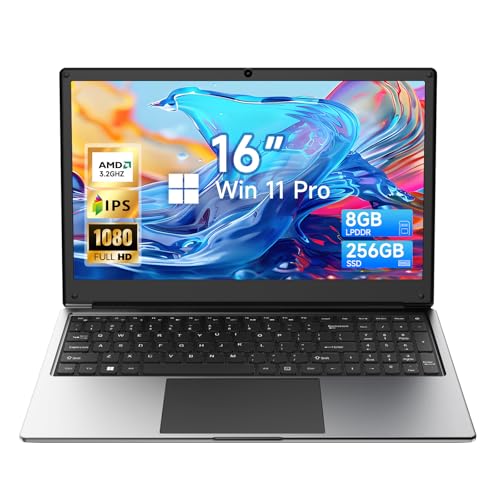
Exilapsire 16 Inch Laptop AMD A9
The Exilapsire 16 inch Laptop Computer is an excellent choice for anyone searching for the best budget laptop for students. Featuring an AMD A9 Processor with speeds up to 3.2GHz paired with 8GB of RAM and a 256GB SSD, this laptop handles everyday tasks like web browsing, document editing, and multimedia consumption with ease. Its 16-inch Full HD IPS display offers a crisp 1920 x 1080 resolution and anti-glare coating, ensuring comfortable viewing during long study or work sessions. Pre-installed with Windows 11 Pro, it delivers a smooth and updated user experience. Additionally, the laptop is equipped with comprehensive connectivity options including dual-band Wi-Fi5, Bluetooth 5.0, multiple USB ports, and HDMI, making it versatile for various needs.
Pros
- Powerful AMD A9-9400 processor ensures reliable and fast performance.
- 8GB RAM and 256GB SSD provide ample speed and storage for student tasks.
- 16-inch Full HD IPS display with anti-glare coating offers excellent visual clarity and eye comfort.
- Long-lasting 9000mAh battery supports extended use without frequent charging.
- Multiple connectivity options including USB 3.0, Type-C, HDMI, and dual-band Wi-Fi.
- Pre-installed Windows 11 Pro for the latest software compatibility.
- Compact and lightweight design, ideal for portability.
- One-year limited warranty provides peace of mind.
Cons
- Processor may struggle with heavy multitasking or demanding software.
- Integrated graphics limit performance for advanced gaming or graphic design.
- Screen brightness could be higher for use in bright environments.
Overall, the Exilapsire 16 inch Laptop offers excellent value as the best budget laptop for students, delivering solid performance and essential features in a portable package.
Faq about Best Budget Laptop for Students:
1: What is the best budget laptop for students?
The best budget laptop for students combines performance, battery life, and affordability. Popular options include Acer Aspire 5, Lenovo IdeaPad 3, and HP Pavilion x360.
2: How much should I spend on a student laptop?
Generally, a budget of $300 to $600 is ideal for a reliable student laptop that meets basic needs like browsing, assignments, and light multitasking.
3: What features should a student laptop have?
A student laptop should have at least an Intel i3 or Ryzen 3 processor, 8GB RAM, 256GB SSD, good battery life, and a comfortable keyboard for typing.
4: Are Chromebooks good for students?
Yes, Chromebooks are excellent for students who primarily use web-based applications. They are affordable, lightweight, and offer long battery life.
5: Can I play games on a budget laptop?
While budget laptops are not designed for gaming, some models can handle light gaming. Look for laptops with dedicated graphics cards for better performance.
6: Is refurbished a good option for student laptops?
Refurbished laptops can be a cost-effective option for students. Ensure they come with a warranty and are from reputable sellers for reliability.
Conclusion
The HP 14 Laptop offers a sleek design paired with Windows 11, delivering a seamless user experience ideal for productivity and moderate multitasking. Its inclusion of Microsoft 365 enhances its value for academic tasks requiring familiar software suites. Meanwhile, the Acer Chromebook 315 impresses with a larger Full HD IPS display and optimized Chrome OS environment, providing smooth performance and superior connectivity features like Wi-Fi 6, which benefits users prioritizing web-based applications and extended battery life. Both models present compelling options, balancing performance and portability effectively.
Ultimately, the choice hinges on user preference for operating systems and specific needs: opt for the HP 14 for a traditional Windows setup with bundled software, or select the Acer Chromebook 315 for a vibrant display and streamlined web-centric functionality. Each stands out as a prudent investment for students seeking reliable, budget-conscious computing solutions.