
Struggling with slow, unreliable laptops that hinder your office productivity? Find efficient solutions here.
The best laptop for office work combines speed, reliability, and convenience. Models like the HP 15.6″ Business Laptop with Microsoft Office 365 and Copilot AI offer seamless integration and ample storage, ensuring you stay productive. Its powerful quad-core Intel processor and 16GB RAM deliver smooth multitasking, while 1TB OneDrive provides secure cloud backup.
Comparing standout features, the HP 14″ Business Laptop excels with 32GB RAM for heavy workloads, while the HP 14 Laptop offers portability and 4K graphics for crisp visuals. These laptops simplify office tasks through efficient performance and smart AI tools.
We break down performance, durability, and more to help you choose the ideal office companion.


Finding the perfect fit for your desk setup
Compare the key features and specifications of our top picks to find the perfect match for your needs.


HP 15.6 Business Laptop 16GB RAM
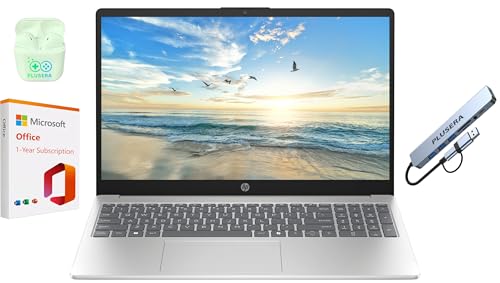
The HP 15.6″ Business Laptop with Microsoft Office 365 and Copilot AI emerges as a strong contender for the best laptop for office work. Powered by an Intel N200 quad-core processor with a max boost clock of 3.7GHz, this device promises snappy performance for everyday tasks and multitasking. The 16GB RAM paired with a 128GB SSD ensures smooth operation and quick boot times, while the 1TB OneDrive integration offers ample cloud storage for your documents and projects. The 15.6-inch LED display with HD resolution delivers decent visuals, though it’s more functional than flashy, ideal for spreadsheets and video calls rather than binge-watching your favorite series. The inclusion of Microsoft Office 365 with Copilot AI adds a productivity boost, streamlining document creation and management directly out of the box. Connectivity options like USB-C, USB-A, HDMI, and a headphone/microphone combo jack cover all bases, complemented by WiFi and Bluetooth support. Bonus points for the privacy shutter on the camera—a thoughtful touch for security-conscious users. Plus, the package includes PLUSERA earphones and an 8-in-1 hub, making this a well-rounded kit for the mobile professional.
Pros
With its quad-core Intel processor and 16GB RAM, this laptop handles multitasking and office software with ease, making it a reliable workhorse. The 1TB OneDrive storage integrated with Microsoft Office 365 and Copilot AI enhances productivity, while the natural silver finish gives it a sleek, professional look. The privacy shutter adds peace of mind during video meetings, and the included PLUSERA earphones and 8-in-1 hub make connecting peripherals a breeze.
Cons
The 1366 x 768 resolution on a 15.6-inch screen feels a bit dated, especially if you’re used to crisp Full HD displays—perfectly fine for spreadsheets, but don’t expect stunning visuals. Storage-wise, the 128GB SSD might fill up quickly if you handle large files locally, so relying on OneDrive is almost a necessity. Also, switching out of S mode to install non-Microsoft Store apps can be a minor hassle for less tech-savvy users.
HP 14 Laptop Intel Celeron 4GB
The HP 14 Laptop, featuring the Intel Celeron N4020 processor, 4 GB RAM, and 64 GB storage, stands out as a strong contender for the Best Laptop for Office Work. This snowflake white, thin, and portable device boasts a 14-inch Micro-edge HD display with a 79% screen-to-body ratio, making it perfect for those who need clarity and space without the bulk. Its 6.5 mm micro-edge bezel design means you get more screen real estate to tackle spreadsheets, emails, and presentations without feeling cramped. Running Windows 11 Home and including one year of Microsoft 365, it’s ready to keep you productive right out of the box. The dual-core Intel Celeron N4020 balances performance and power consumption so you can work through your busiest days without constantly hunting for an outlet. Plus, the Intel UHD Graphics 600 supports smooth 4K streaming, which is a nice bonus for office breaks or quick video calls.
Pros
This laptop’s portability and sleek design make it ideal for on-the-go office warriors. The 14-inch HD display with minimal bezels offers an immersive viewing experience that’s surprisingly enjoyable for a budget-friendly machine. The all-day performance powered by the Intel Celeron N4020 and 4 GB RAM handles everyday office tasks like a champ, while the included Microsoft 365 subscription adds tremendous value. Storage might seem modest at 64 GB, but the embedded multimedia card ensures reliable flash-based storage that boots quickly and feels snappy during multitasking. And who doesn’t appreciate the subtle 4K graphics support for those moments when you need a little entertainment?
Cons
While the HP 14 is great for typical office work, the 64 GB storage can fill up faster than you’d like if you deal with large files or lots of applications. The 4 GB RAM is adequate but not ideal for heavy multitasking or running memory-intensive programs, so power users might feel the pinch. The HD display resolution (1366 x 768) is decent but might not satisfy those craving full HD crispness. Also, the Intel Celeron N4020, although efficient, is on the entry-level side, so don’t expect lightning-fast processing speeds for demanding tasks. Lastly, the thin design might sacrifice some port variety, which could be inconvenient if you need multiple connections without dongles.
HP 14 Laptop 32GB RAM 64GB SSD
The HP 14″ Business Laptop with Microsoft Office 365 with Copilot AI & 1TB OneDrive is a strong contender for the title of Best Laptop for Office Work. Powered by an Intel Celeron N4500 dual-core processor with a max boost clock of 2.80 GHz, this laptop balances performance and efficiency perfectly for everyday office tasks. The 14-inch anti-glare LED display with a resolution of 1366 x 768 offers a crisp and clear viewing experience, reducing eye strain during those marathon spreadsheet sessions. What truly sets this device apart is the combination of 32GB RAM and a 64GB eMMC SSD, allowing seamless multitasking and fast data transfers without hiccups. Windows 11 ensures smooth navigation and compatibility with modern applications, while the inclusion of Microsoft Office 365 with Copilot AI and 1TB OneDrive adds significant value for productivity and cloud storage. Additionally, the laptop boasts a robust set of ports including USB-C, USB-A, HDMI, and an SD card reader, catering to a variety of peripherals. The HP Fast Charge feature coupled with up to 12 hours of battery life means less time tethered to an outlet and more on-the-go productivity. The bundled PLUSERA earphones and HP True Vision HD camera complement remote meetings and calls beautifully, making this laptop a well-rounded package for any office professional.
Pros
This laptop impresses with its ample 32GB RAM that handles multiple applications and browser tabs effortlessly, paired with a fast 64GB SSD for quick boot and load times. The anti-glare 14-inch screen increases comfort for long hours, and the 12-hour battery life alongside HP Fast Charge makes it truly portable. The inclusion of Microsoft Office 365 with Copilot AI enhances productivity, and the generous 1TB OneDrive storage offers excellent cloud backup. Wide port options and HD audio add to its versatility, while the bundled earphones and HD camera cater nicely to the remote work lifestyle.
Cons
While the Intel Celeron N4500 processor is sufficient for office tasks, it might feel a bit sluggish with more demanding software or heavy multitasking beyond typical work use. The display resolution of 1366 x 768, although clear, may disappoint users accustomed to Full HD screens, especially for detailed graphic work. Storage at 64GB, although fast, could be limiting for users with large local files, requiring reliance on external drives or cloud services. Lastly, the laptop’s lightweight build means it may not feel as premium or sturdy as some higher-end business laptops.
HP 15.6 Business Laptop i3 16GB
The HP 15.6″ Business Laptop stands out as a strong contender for the best laptop for office work, combining productivity and practicality in one sleek package. Featuring a 12th Gen Intel Core i3-1215U processor with 6 cores and speeds up to 4.4 GHz, this machine handles multitasking effortlessly, whether you’re juggling spreadsheets or video calls. The 16GB DDR4 RAM and a spacious 1TB PCIe NVMe SSD ensure fast performance and ample storage for all your important files. Its HD touchscreen display with micro-edge design adds a responsive and vibrant interface that’s great for presentations or quick edits. What truly elevates this laptop is the pre-installed Lifetime Microsoft Office 2024 suite, saving you from subscription headaches and license worries. Plus, the innovative Copilot AI chat assistant adds a tech-savvy twist, helping you stay productive and creative throughout your workday. Running on Windows 11 Pro, it offers robust security and business-focused features that keep your data safe and your workflow smooth.
Pros
With its powerful 6-core processor and generous 16GB RAM, this laptop handles demanding office tasks without breaking a sweat. The pre-installed Microsoft Office 2024 lifetime license is a game-changer, eliminating subscription fees and setup hassles. The 1TB SSD provides lightning-fast boot times and plenty of room for documents, presentations, and media. I also appreciate the touchscreen display, which adds versatility whether you’re scrolling through reports or sketching ideas. The Copilot AI assistant is a clever addition, making multitasking and information retrieval feel less like work and more like having a helpful coworker on call. Battery life offers up to 5 hours of mixed use, and HP Fast Charge gets you back to 50% power in just 45 minutes—perfect for coffee breaks.
Cons
The HD resolution at 1366 x 768 feels a bit dated in an era of Full HD and beyond, especially on a 15.6″ screen, which may not satisfy those who prefer crisp visuals. The brightness at 250 nits and 45% NTSC color gamut is adequate but not ideal for color-critical work or bright environments. Port selection is somewhat limited, with only one USB Type-C port that doesn’t support charging or video output, which might frustrate users relying on a single-cable setup or multiple peripherals. Also, the keyboard lacks backlighting, so working late nights might require an external light source. Lastly, the integrated 720p webcam is serviceable but not stellar for those frequent video conferences demanding sharp image quality.
HP 14 Laptop Intel Quad-Core 8GB RAM
If you’re hunting for the best laptop for office work that balances performance, portability, and value, the HP 14″ Business & Student Laptop is a solid contender. Powered by an Intel Celeron N4120 quad-core processor with a max boost clock of 2.60GHz and 8GB DDR4 RAM, this machine handles everyday office tasks and multitasking without breaking a sweat. The inclusion of Windows 11 S and a 1-year Microsoft Office 365 subscription means you’re ready to tackle documents, spreadsheets, and presentations straight out of the box. The 320GB storage cleverly combines a 64GB SSD with a 256GB SD card, delivering both speed and ample space—a neat twist for those who love flexibility.
Pros
The HP laptop shines with its impressive battery life, lasting up to 11 hours and 30 minutes, which means fewer frantic searches for power outlets during long meetings or study sessions. Its 14-inch HD display offers decent clarity for the price, and the multi-touch HP Imagepad adds a nice touch for smoother navigation. Connectivity options are generous, including USB-C 3.0, USB-A ports, HDMI, and an SD card reader, covering all your peripheral needs. Plus, the bundled PLUSERA earphones are a pleasant surprise, perfect for conference calls or tuning out distractions. The lightweight design and Windows 11 S streamline your workflow without unnecessary bloat.
Cons
The HD resolution at 1366 x 768 feels a bit outdated, especially if you’re used to sharper screens, and Intel UHD Graphics 600 limits gaming or graphic-intensive tasks—so don’t expect to edit videos like a pro here. Storage speed is decent but not lightning fast, thanks to the eMMC SSD rather than a full NVMe drive, which might slow down heavier workloads. Also, Windows 11 S restricts app installation to the Microsoft Store unless you switch out of S mode, which could frustrate those needing specialized software.
FAQ about Best Laptop for Office Work:
1: What features should I look for in the best laptop for office work?
Look for a laptop with a fast processor, at least 8GB of RAM, a comfortable keyboard, and a full HD display for productivity.
2: Are touchscreen laptops better for office work?
Touchscreen laptops can enhance productivity for tasks like presentations and note-taking, but they are not essential for everyone.
3: How important is battery life in an office laptop?
Battery life is crucial; aim for at least 8 hours to ensure you can work through the day without needing to recharge.
4: Should I prioritize weight and portability?
Yes, lightweight and portable laptops are ideal for commuting and working in different locations.
5: What operating system is best for office work?
Windows is widely used in office environments, but macOS and Linux can also be suitable depending on your software needs.
6: Is a solid-state drive (SSD) necessary?
An SSD is recommended for faster boot times and improved overall performance compared to traditional hard drives.
Conclusion
The HP 15.6″ Business Laptop stands out with its robust quad-core Intel processor, generous 16GB RAM, and ample 1TB OneDrive storage, complemented by Microsoft Office 365 with Copilot AI, making it ideal for demanding multitasking and seamless productivity. Its inclusion of PLUSERA earphones and an 8-in-1 hub enhances connectivity and user experience for professional environments.
On the other hand, the HP 14 Laptop offers a lightweight, portable design with a 14-inch micro-edge HD display, suitable for users prioritizing mobility. While its Intel Celeron processor and 4GB RAM suffice for basic office tasks, the limited 64GB storage and entry-level specs make it better suited for lighter workloads. Selecting between these depends on whether performance or portability takes precedence in your workflow.